Liquidity Maxing [JOAT]Liquidity Maxing - Institutional Liquidity Matrix
Introduction
Liquidity Maxing is an open-source strategy for TradingView built around institutional market structure concepts. It identifies structural shifts, evaluates trades through multi-factor confluence, and implements layered risk controls.
The strategy is designed for swing trading on 4-hour timeframes, focusing on how institutional order flow manifests in price action through structure breaks, inducements, and liquidity sweeps.
Core Functionality
Liquidity Maxing performs three primary functions:
Tracks market structure to identify when control shifts between buyers and sellers
Scores potential trades using an eight-factor confluence system
Manages position sizing and risk exposure dynamically based on volatility and user-defined limits
The goal is selective trading when multiple conditions align, rather than frequent entries.
Market Structure Engine
The structure engine tracks three key events:
Break of Structure (BOS): Price pushes beyond a prior pivot in the direction of trend
Change of Character (CHoCH): Control flips from bullish to bearish or vice versa
Inducement Sweeps (IDM): Market briefly runs stops against trend before moving in the real direction
The structure module continuously updates strong highs and lows, labeling structural shifts visually. IDM markers are optional and disabled by default to maintain chart clarity.
The trade engine requires valid structure alignment before considering entries. No structure, no trade.
Eight-Factor Confluence System
Instead of relying on a single indicator, Liquidity Maxing uses an eight-factor scoring system:
Structure alignment with current trend
RSI within healthy bands (different ranges for up and down trends)
MACD momentum agreement with direction
Volume above adaptive baseline
Price relative to main trend EMA
Session and weekend filter (configurable)
Volatility expansion/contraction via ATR shifts
Higher-timeframe EMA confirmation
Each factor contributes one point to the confluence score. The default minimum confluence threshold is 6 out of 8, but you can adjust this from 1-8 based on your preference for trade frequency versus selectivity.
Only when structure and confluence agree does the strategy proceed to risk evaluation.
Dynamic Risk Management
Risk controls are implemented in multiple layers:
ATR-based stops and targets with configurable risk-to-reward ratio (default 2:1)
Volatility-adjusted position sizing to maintain consistent risk per trade as ranges expand or compress
Daily and weekly risk budgets that halt new entries once thresholds are reached
Correlation cooldown to prevent clustered trades in the same direction
Global circuit breaker with maximum drawdown limit and emergency kill switch
If any guardrail is breached, the strategy will not open new positions. The dashboard clearly displays risk state for transparency.
Market Presets
The strategy includes configuration presets optimized for different market types:
Crypto (BTC/ETH): RSI bands 70/30, volume multiplier 1.2, enhanced ATR scaling
Forex Majors: RSI bands 75/25, volume multiplier 1.5
Indices (SPY/QQQ): RSI bands 70/30, volume multiplier 1.3
Custom: Default values for user customization
For crypto assets, the strategy automatically applies ATR volatility scaling to account for higher volatility characteristics.
Monitoring and Dashboards
The strategy includes optional monitoring layers:
Risk Operations Dashboard (top-right):
Trend state
Confluence score
ATR value
Current position size percentage
Global drawdown
Daily and weekly risk consumption
Correlation guard state
Alert mode status
Performance Console (top-left):
Net profit
Current equity
Win rate percentage
Average trade value
Sharpe-style ratio (rolling 50-bar window)
Profit factor
Open trade count
Optional risk tint on chart background provides visual indication of "safe to trade" versus "halted" state.
All visualization elements can be toggled on/off from the inputs for clean chart viewing or full telemetry during parameter tuning.
Alerts and Automation
The strategy supports alert integration with two formats:
Standard alerts: Human-readable messages for long, short, and risk-halt conditions
Webhook format: JSON-formatted payloads ready for external execution systems (optional)
Alert messages are predictable and unambiguous, suitable for manual review or automated forwarding to execution engines.
Built-in Validation Suite
The strategy includes an optional validation layer that can be enabled from inputs. It checks:
Internal consistency of structure and confluence metrics
Sanity and ordering of risk parameters
Position sizing compliance with user-defined floors and caps
This validation is optional and not required for trading, but provides transparency into system operation during development or troubleshooting.
Strategy Parameters
Market Presets:
Configuration Preset: Choose between Crypto (BTC/ETH), Forex Majors, Indices (SPY/QQQ), or Custom
Market Structure Architecture:
Pivot Length: Default 5 bars
Filter by Inducement (IDM): Default enabled
Visualize Structure: Default enabled
Structure Lookback: Default 50 bars
Risk & Capital Preservation:
Risk:Reward Ratio: Default 2.0
ATR Period: Default 14
ATR Multiplier (Stop): Default 2.0
Max Drawdown Circuit Breaker: Default 10%
Risk per Trade (% Equity): Default 1.5%
Daily Risk Limit: Default 6%
Weekly Risk Limit: Default 12%
Min Position Size (% Equity): Default 0.25%
Max Position Size (% Equity): Default 5%
Correlation Cooldown (bars): Default 3
Emergency Kill Switch: Default disabled
Signal Confluence:
RSI Length: Default 14
Trend EMA: Default 200
HTF Confirmation TF: Default Daily
Allow Weekend Trading: Default enabled
Minimum Confluence Score (0-8): Default 6
Backtesting Considerations
When backtesting this strategy, consider the following:
Commission: Default 0.05% (adjustable in strategy settings)
Initial Capital: Default $100,000 (adjustable)
Position Sizing: Uses percentage of equity (default 2% per trade)
Timeframe: Optimized for 4-hour charts, though can be tested on other timeframes
Results will vary significantly based on:
Market conditions and volatility regimes
Parameter settings, especially confluence threshold
Risk limit configuration
Symbol characteristics (crypto vs forex vs equities)
Past performance does not guarantee future results. Win rate, profit factor, and other metrics should be evaluated in context of drawdown periods, trade frequency, and market conditions.
How to Use This Strategy
This is a framework that requires understanding and parameter tuning, not a one-size-fits-all solution.
Recommended workflow:
Start on 4-hour timeframe with default parameters and appropriate market preset
Run backtests and study performance console metrics: focus on drawdown behavior, win rate, profit factor, and trade frequency
Adjust confluence threshold to match your risk appetite—higher thresholds mean fewer but more selective trades
Set realistic daily and weekly risk budgets appropriate for your account size and risk tolerance
Consider ATR multiplier adjustments based on market volatility characteristics
Only connect alerts or automation after thorough testing and parameter validation
Treat this as a risk framework with an integrated entry engine, not merely an entry signal generator. The risk controls are as important as the trade signals.
Strategy Limitations
Designed for swing trading timeframes; may not perform optimally on very short timeframes
Requires sufficient market structure to identify pivots; may struggle in choppy or low-volatility environments
Crypto markets require different parameter tuning than traditional markets
Risk limits may prevent entries during favorable setups if daily/weekly budgets are exhausted
Correlation cooldown may delay entries that would otherwise be valid
Backtesting results depend on data quality and may not reflect live trading with slippage
Design Philosophy
Many indicators tell you when price crossed a moving average or RSI left oversold. This strategy addresses questions institutional traders ask:
Who is in control of the market right now?
Is this move structurally significant or just noise?
Do I want to add more risk given what I've already done today/week?
If I'm wrong, exactly how painful can this be?
The strategy provides disciplined, repeatable answers to these questions through systematic structure analysis, confluence filtering, and multi-layer risk management.
Technical Implementation
The strategy uses Pine Script v6 with:
Custom types for structure, confluence, and risk state management
Functional programming approach for reusable calculations
State management through persistent variables
Optional visual elements that can be toggled independently
The code is open-source and can be modified to suit individual needs. All important logic is visible in the source code.
Disclaimer
This script is provided for educational and informational purposes only. It is not intended as financial, investment, trading, or any other type of advice or recommendation. Trading involves substantial risk of loss and is not suitable for all investors. Past performance, whether real or indicated by historical tests of strategies, is not indicative of future results.
No representation is being made that any account will or is likely to achieve profits or losses similar to those shown. In fact, there are frequently sharp differences between backtested results and actual results subsequently achieved by any particular trading strategy.
The user should be aware of the risks involved in trading and should trade only with risk capital. The authors and publishers of this script are not responsible for any losses or damages, including without limitation, any loss of profit, which may arise directly or indirectly from use of or reliance on this script.
This strategy uses technical analysis methods and indicators that are not guaranteed to be accurate or profitable. Market conditions change, and strategies that worked in the past may not work in the future. Users should thoroughly test any strategy in a paper trading environment before risking real capital.
Commission and slippage settings in backtests may not accurately reflect live trading conditions. Real trading results will vary based on execution quality, market liquidity, and other factors not captured in backtesting.
The user assumes full responsibility for all trading decisions made using this script. Always consult with a qualified financial advisor before making investment decisions.
Enjoy - officialjackofalltrades
Multitimeframe

Daytrading Suite: Neon TPO + FVG v6.1Here is the summary of the code and the trading guide in English.
---
### 1. Code Summary: What does the chart show?
The script combines three dimensions of trading into a single chart:
* **The Context (TPO / Market Profile - Yesterday):**
* **Gold Zone (Center):** Yesterday's **POC (Point of Control)**. This was the "fairest price". It often acts as a magnet.
* **White Dashed Lines:** The **VAH (Value Area High)** and **VAL (Value Area Low)**. Yesterday, 70% of all trading volume happened between these lines. This is the area of "Balance".
* **The Structure (HTF - 1 Hour+):**
* **Red/Green Boxes (Right Edge):** Automatic **Supply & Demand Zones** based on the 1-hour chart (or your setting). They indicate major resistance and support levels.
* **The Timing (Entries):**
* **Neon FVG Boxes (Small):** "Fair Value Gaps". These represent imbalances in price. If price revisits these, it is often your **entry signal**.
* **Lines (VWAP, EMA, PDH/PDL):** Act as dynamic support and trend indicators.
---
### 2. Trading Strategy: How to use it
Do not just trade every colored spot. You must combine **Location (TPO)** with **Signal (FVG)**.
#### Step A: The Open (Where are we?)
In the morning (or at the US Open), check where the price is relative to the **white TPO lines**.
1. **Inside the White Lines (In Balance):**
* The market is undecided. Expect ranging/choppy behavior.
* **Strategy:** Buy at the bottom edge (VAL), Sell at the top edge (VAH). The target is often the Gold Zone (POC) in the middle.
2. **Outside the White Lines (Imbalance):**
* The market is seeking new prices. Danger of a Trend!
* **Strategy:** If price breaks above VAH and tests it from above -> **Long**. If it breaks below VAL -> **Short**.
#### Step B: The Setup (The High Probability Scenario)
Here is the "Rejection" Setup (Long Example):
1. Price drops to the lower white line (**VAL**) or into a green **Demand Zone**.
2. It bounces (shows a wick).
3. In the process, a small **green Neon FVG** is formed.
4. **Entry:** Limit Order at the top of the Neon FVG.
5. **Target:** The Gold Zone (POC) or the upper white line (VAH).
6. **Stop Loss:** Below the recent swing low.
#### Step C: Warning Signals (When NOT to trade)
* **In "No Man's Land":** If the price is sitting right in the middle between Gold (POC) and White (VAH/VAL), do nothing. The risk is 50/50. Wait until price hits an edge.
* **Against the Flow:** If EMA 9 and 21 are pointing steeply downwards, do not buy blindly at the VAL just because the line is there. Wait for confirmation (FVG).
### Pre-Trade Checklist:
1. **Level:** Am I at a white line (VAH/VAL) or the Gold Zone (POC)?
2. **Structure:** Do I have an HTF Demand/Supply Zone backing me up?
3. **Trigger:** Do I see a Neon FVG pointing in my direction?

Replay CountdownDisplays countdown for current bar in Replay mode.
Optionally also displays the current replay time in the exchange timezone.

Liquidity Hunter [VectorYield]Liquidity Hunter is a technical analysis tool designed to visualize market structure by identifying key liquidity pools—areas where stop-loss and pending orders are typically clustered. This indicator highlights these levels to help traders analyze potential price reaction zones.
What is Liquidity?
In technical analysis, liquidity refers to price levels where significant trading activity has historically occurred or is expected to occur, such as:
Above old Swing Highs (Buy-side liquidity)
Below old Swing Lows (Sell-side liquidity)
Core Features
1. Multi-Type Liquidity Detection
Plots various categories of market structure:
Structural : Swing Highs/Lows (S-H, S-L) and Equal Highs/Lows (EQH, EQL).
Time-Based : Previous Day, Week, and Month Highs/Lows.
Session-Based : High/Low of Asia, London, and New York sessions.
2. Volume-Based Strength
The indicator analyses volume at the pivot point of a swing. Levels marked as High-Strength (⭐) indicate that the pivot was formed with above-average volume relative to the lookback period.
3. Sweep vs. Break Classification
Distinguishes between price interaction types:
Liquidity Sweep (💰): Price wicks through a level but closes within the range.
Structural Break (▶): Price closes firmly beyond the level.
4. Session & Killzone Visuals
Optionally overlays the Asian, London, and New York trading sessions and specific "Killzone" time windows on the chart.
5. Dashboard
An on-screen dashboard displays the nearest bullish and bearish targets, their distance from current price, and their calculated strength status.
Settings & Customization
Pivot Lookback : Adjust the sensitivity of swing detection.
Session Times : Configure custom start/end times and timezones for session overlays.
Visuals : All colors, line styles, and symbols can be toggled or customized in the settings menu.

Moving Avg on all timeframes w/ full controlThis indicator is a multi-moving-average overlay built for intraday traders who want daily context + intraday timing on the same chart. It’s designed to work cleanly on common intraday timeframes like 5-minute, 10-minute, and 65-minute, while still letting you reference your key daily trend levels.
Key ideas
Daily trend context on intraday charts: You can plot moving averages that represent your daily structure (ex: 10/20/50/200) while trading intraday.
Intraday “day-equivalent” moving averages: If you like the Brian Shannon style approach, you can use intraday period equivalents (ex: on 5-min, 5D ≈ 390, 10D ≈ 780, 20D ≈ 1560) so you can “feel” multi-day trend/slope directly on lower timeframes.
Sessions awareness (Premarket + RTH)
Includes session inputs so you can define Premarket (1) and RTH (M) windows.
This helps keep your chart behavior consistent with how you trade (especially if you care about RTH structure vs extended hours).
Each MA slot typically includes:
On/Off toggle (so you can declutter instantly)
Length (any period you want: daily-style or intraday equivalents)
MA type selection (ex: SMA/EMA style options)
Visual controls like line width / style (so your key MA stands out)
Why this is useful
On higher intraday frames (like 65-min) you can track the “intermediate trend” cleanly.
On lower intraday frames (5-min / 10-min) you can time entries/exits while still respecting the bigger MA bias.

Infinity Algo Dashboard█ OVERVIEW
Infinity Algo Dashboard combines 4 powerful modules into one clean overlay: Multi-Timeframe Analysis, Order Blocks, Market Structure (BOS/CHoCH), and Adaptive Cloud Bands.
Monitor 8 timeframes simultaneously, spot supply/demand zones with volume metrics, track structure shifts in real-time, and assess volatility — all without cluttering your chart.
Includes 16+ built-in alert conditions and 17 color themes.
█ KEY FEATURES
✅ Multi-Timeframe Dashboard (8 TFs) — trend + volatility at a glance
✅ Algorithmic Order Blocks / Supply & Demand Zones with volume analysis
✅ Market Structure Labels (BOS / CHoCH) for regime detection
✅ Adaptive Cloud Bands for dynamic support/resistance
✅ 16+ Built-in Alert Conditions for automation
✅ 17 Color Themes including colorblind-friendly options
✅ Designed for crypto, forex, stocks, indices, and commodities
█ WHAT MAKES THIS INDICATOR DIFFERENT
📊 Multi-Timeframe Analysis
Most MTF dashboards just show moving average direction. This one shows trend state + volatility regime + volatility trend across 8 timeframes simultaneously. Spot alignment instantly.
🧱 Smart Order Blocks
Not just rectangles on a chart. These zones include volume metrics (Buy/Sell split), midlines, break detection, and automatic pruning of invalid zones.
📐 Market Structure That Makes Sense
BOS (Break of Structure) and CHoCH (Change of Character) labels derived from actual swing highs/lows — not arbitrary price levels.
☁️ Adaptive Cloud Bands
Volatility-aware envelope that auto-adjusts its period based on your timeframe. Expands in trending markets, contracts in consolidation.
█ MODULES EXPLAINED
1) Multi-Timeframe Dashboard
Monitors up to 8 user-selected timeframes simultaneously
Trend State: Bullish / Bearish / Overbought / Oversold
Volatility State: High / Low / Normal
Volatility Trend: Rising / Falling / Stable
Two visual styles: Pro Neutral (clean) or Semantic Heatmap (color-coded)
AVG row shows overall market bias across all timeframes
2) Order Blocks / Buy-Sell Zones
Algorithmic detection of swing-based supply/demand zones
Volume Metrics: Total volume + Buy/Sell % split inside each zone
Midline: Key level within the zone for precision entries
Break Labels: "Break Up" / "Break Down" when zones are invalidated
Exit Markers: Signals when price leaves a zone (Close or Wick trigger)
Smart Filtering: Show nearest only, hide overlaps, limit history
3) Market Structure (BOS/CHoCH)
BOS (Break of Structure): Trend continuation signal — confirms momentum
CHoCH (Change of Character): Early reversal warning — first sign of regime shift
Derived from pivot highs/lows using configurable sensitivity
Optional candle coloring based on structure bias
4) Cloud Bands (Adaptive Envelope)
Smoothed, volatility-aware channel (Keltner-style with enhancements)
Auto Mode: Period adjusts automatically based on your chart timeframe
Manual Mode: Set your own period for full control
Dynamic midline for trend bias assessment
Edge dots highlight when price touches band boundaries
Great for identifying breakouts vs. mean-reversion setups
█ USE CASES
📈 Trend Confirmation
Check the MTF Dashboard for alignment. When 6+ timeframes agree (Strong Bullish/Bearish), you have confluence. Use Order Blocks as entry zones in the direction of the trend.
📉 Reversal Hunting
Watch for CHoCH labels — they signal potential regime change before the crowd sees it. Combine with Order Blocks for well-defined reversal entries.
🎯 Precision Entries
Use Order Block midlines as entry targets. When price retraces to the midline of an unbroken zone aligned with higher-TF bias, you have a more selective setup.
⚡ Volatility Assessment
Cloud Bands show you the current volatility regime. Price outside bands = trending (ride it). Price inside bands = consolidation (fade the edges or wait).
🤖 Alert Automation
Set alerts for zone breaks, BOS/CHoCH events, MTF alignment shifts, or cloud breakouts. React to opportunities even when away from the screen.
█ HOW TO USE
Apply to your chart (any timeframe, any market)
Configure your 8 dashboard timeframes (e.g., 1m/5m/15m/1h/4h/1D/1W/1M)
Watch for MTF alignment — strong alignment = cleaner directional bias
Use Order Blocks as "areas of interest" — prefer zones aligned with HTF bias
Monitor BOS/CHoCH for structure shifts — CHoCH = warning, BOS = confirmation
Use Cloud Bands to assess volatility — outside = trending, inside = ranging
Set alerts for the events that matter to your strategy
█ ALERTS
16+ built-in alert conditions:
Order Blocks: Zone breaks, zone entries, zone exits
Market Structure: Bullish/Bearish BOS, Bullish/Bearish CHoCH
MTF Alignment: Strong bullish/bearish (6+), Full alignment (8/8)
MTF Bias Flip: When average bias crosses bullish/bearish threshold
Cloud Events: Breakout up/down, Midband cross up/down
█ WORKS ON
Crypto
Forex
Stocks
Indices
Commodities
█ REALISTIC EXPECTATIONS
Order Blocks are algorithmic approximations — not true order flow data
BOS/CHoCH labels update on confirmed swings — some lag is expected
MTF alignment doesn't guarantee direction — it shows current state
Always combine dashboard insights with your own analysis and risk management
█ LIMITATIONS
Order Blocks are derived from swing behavior + volume — not actual institutional order flow
Zones/labels can update on the realtime candle until the swing is confirmed
Performance may slow with max history on low timeframes — reduce settings if needed
MTF data updates on higher-TF bar closes — slight delay is normal
█ DISCLAIMER
This indicator is provided for educational and informational purposes only and does not constitute financial advice. Trading involves substantial risk of loss, and you are solely responsible for your own trading decisions.

MTF Momentum Confluence [Free]The MTF Momentum Confluence Strategy identifies high-probability trade setups by analyzing momentum alignment across multiple timeframes. When momentum agrees across 4 different timeframes, the probability of a successful trade increases significantly.
The core principle is simple: trade in the direction where all timeframes agree.
📈 Trading Styles
Choose your style — the indicator handles the rest:
Scalping: Optimized for fast-paced trading
Day Trading: Balanced for intraday moves
Swing Trading: Tuned for larger market swings
📊 Dashboard
Real-time confluence at a glance:
4 timeframes with bullish/bearish/neutral status
Confluence score (-100% to +100%)
Position state (Long / Short / Flat)
Background color shows active bias
🎯 How To Read
Score above +65% → Strong bullish confluence
Score below -65% → Strong bearish confluence
Green background → Bullish momentum active
Red background → Bearish momentum active
💡 Tips
Best setups occur when all 4 timeframes align
Higher score = stronger confluence
Avoid low scores (mixed signals)
Combine with key levels for entries
⚡ Pro Version
Entry & exit signals
Price alerts
Custom thresholds
Full customization

Swing Elite Supply & Demand [Free]This indicator automatically identifies and draws institutional supply and demand zones based on the Rally-Base-Rally (RBR), Drop-Base-Rally (DBR), Drop-Base-Drop (DBD), and Rally-Base-Drop (RBD) patterns.
🔍 What It Does
The indicator scans for explosive candles preceded by consolidation (base) candles to identify areas where institutions have placed large orders. These zones act as potential support and resistance levels where price is likely to react.
Zone Types Detected:
RBR (Rally-Base-Rally): Demand zone formed when price rallies, consolidates, then rallies again
DBR (Drop-Base-Rally): Demand zone formed when price drops, consolidates, then rallies
DBD (Drop-Base-Drop): Supply zone formed when price drops, consolidates, then drops again
RBD (Rally-Base-Drop): Supply zone formed when price rallies, consolidates, then drops
📈 How To Use
Finding Entries:
In an uptrend, wait for price to pull back into a demand zone (RBR/DBR) for long entries
In a downtrend, wait for price to rally into a supply zone (DBD/RBD) for short entries
Fresh (untested) zones typically offer the best reaction
Zone Quality:
Zones with strong explosive candles breaking out of the base indicate higher institutional interest
Smaller base candles (tight consolidation) often produce more precise zones
Zones that align with higher timeframe structure increase probability
Zone Mitigation:
When price penetrates a zone, it becomes "mitigated" and is automatically removed
This keeps your chart clean with only active, tradeable zones
⚙️ Settings
Show Demand/Supply Zones: Toggle each zone type on/off
Zone Colors: Customize demand and supply zone colors
Zone Width Type: "Preferred" uses candle bodies, "Wider" uses full wicks
Show Zone Labels: Display RBR/DBR/DBD/RBD labels on zones
Label Size: Tiny, Small, Normal, or Large
Extend Zones: How far zones extend to the right (bars)
Remove Mitigated Zones: Auto-remove zones when price penetrates them
Max Zones: Limit displayed zones to keep chart clean
💡 Tips
Use on Daily and Weekly timeframes for the strongest institutional zones
Combine with trend direction — trade demand zones in uptrends, supply zones in downtrends
Look for zones that align with key support/resistance levels
Wait for confirmation candles when price enters a zone before entering trades
Fresher zones (recently formed, not yet tested) typically produce better reactions
⚡ Pro Version Available
The Pro version includes additional features:
All timeframes (not just Daily/Weekly)
Multi-Timeframe zone detection
Big Brother (HTF) zone coverage detection
Level on Level (LOL) zone merging for stronger zones
FLIP levels (broken structure zones)
Gap Finder
Stop Loss lines with customizable padding
Advanced candle detection thresholds
Zone expiry after price moves too far
Info dashboard
Price alerts

Swing Elite Trend Direction [Free]Swing Elite Trend Direction
This indicator automatically identifies and labels market structure by detecting swing highs and swing lows, then classifying them as Higher Highs (HH), Higher Lows (HL), Lower Highs (LH), and Lower Lows (LL).
🔍 What It Does
The indicator uses a depth-based pivot detection algorithm to find significant swing points in price action. Each swing is then compared to the previous swing of the same type to determine the market structure:
HH (Higher High): Current swing high is above the previous swing high → bullish structure
HL (Higher Low): Current swing low is above the previous swing low → bullish structure
LH (Lower High): Current swing high is below the previous swing high → bearish structure
LL (Lower Low): Current swing low is below the previous swing low → bearish structure
📈 How To Use
Trend Identification:
Bullish trend is confirmed when you see HH followed by HL (or HL followed by HH)
Bearish trend is confirmed when you see LL followed by LH (or LH followed by LL)
The zigzag line color changes based on confirmed trend direction
Trade Setups:
In a bullish trend, look for pullbacks to HL areas for long entries
In a bearish trend, look for rallies to LH areas for short entries
Trend changes are signaled when structure breaks (e.g., bullish trend making a LL)
Depth Setting:
Higher depth values (e.g., 34-55) capture major swings for higher timeframe analysis
Lower depth values (e.g., 8-21) capture minor swings for shorter-term trading
Adjust based on your trading style and timeframe

MACD Multi-Timeframe[nakano]# MACD Multi-Timeframe Dashboard & Oscillator
## English Description
### Overview
This comprehensive indicator combines a standard MACD oscillator with a powerful **Multi-Timeframe (MTF) Dashboard**. It allows traders to monitor MACD trends, momentum, and signal crossovers across up to **11 different timeframes** simultaneously, displayed in a customizable table directly on the chart.
### Key Features
* **Massive MTF Support:** Configure up to 11 individual timeframe slots (TF0 to TF10), ranging from 1-minute to monthly charts.
* **Advanced Trend Detection:** The dashboard uses strict logic to identify "Strong Bullish" or "Strong Bearish" conditions, indicated by colored headers and symbols (▲/▼).
* **Momentum Arrows:** Real-time visual cues (↑↑, ↑, ↗, etc.) indicate the strength and direction of the MACD and Signal lines.
* **Repaint Prevention:** Includes a "Wait for Bar Confirmation" feature for both the table and the oscillator to ensure analysis is based only on closed candles.
* **Customizable Design:** Adjust the table position, font size, transparency, and choose which data rows (MACD, Signal, Hist) to display.
* **Flexible Calculation:** Supports both SMA and EMA for MACD lines and Signal line smoothing.
### Visual Guide & Logic
**1. Dashboard Header (Timeframe Label)**
The header background changes color only when a **Strong Trend** is detected.
* **Bullish (Green / ▲):** Golden Cross + Both lines rising + All values (MACD, Signal, Hist) > 0 + Histogram rising.
* **Bearish (Red / ▼):** Dead Cross + Both lines falling + All values (MACD, Signal, Hist) < 0 + Histogram falling.
**2. Histogram Arrows**
Arrows indicate the momentum of the MACD and Signal lines during a crossover.
* **↑↑ / ↓↓ :** **Strongest Trend.** Crossover active, both lines moving in trend direction, AND values are in the correct zone (above/below 0).
* **↑ / ↓ :** **Strong Trend.** Crossover active and both lines moving in trend direction.
* **↗ / ↘ :** **Weak/Developing Trend.** Crossover active but momentum is mixed or lines are not fully aligned.
**3. Text Colors (Momentum)**
* **Colored Numbers (Green/Red):** Indicates momentum is **accelerating** in the trend direction (e.g., Histogram is positive and larger than the previous bar).
* **Black Numbers:** Indicates momentum is **fading** or the histogram has just crossed the zero line.
### Settings
* **MACD Calculation:** Fast/Slow lengths, Source, MA Type (SMA/EMA), and Signal Smoothing.
* **Table Layout:** Position (Top/Middle/Bottom, Left/Center/Right), Size, Transparency, and Row Visibility.
* **Confirmation:** Toggle "Wait for Bar Confirmation" (for Chart or Table) to stop repainting by using only closed bar data.
---
## 日本語 (Japanese Description)
### 概要
このインジケーターは、標準的なMACDオシレーターと、強力な**マルチタイムフレーム(MTF)ダッシュボード**を組み合わせたツールです。最大**11種類の異なる時間足**におけるMACDのトレンド、勢い(モメンタム)、クロスの状況を、チャート上のカスタマイズ可能なテーブルで同時に監視できます。
### 主な機能
* **多機能なMTFサポート:** 1分足から月足まで、最大11個の時間足スロット(TF0~TF10)を個別に設定可能です。
* **高度なトレンド判定:** 厳格なロジックを用いて「強い強気(Strong Bullish)」や「強い弱気(Strong Bearish)」を判定し、ヘッダーの色や記号(▲/▼)で知らせます。
* **モメンタム矢印:** MACDラインとシグナルラインの強さと方向を、矢印(↑↑, ↑, ↗ など)でリアルタイムに可視化します。
* **リペイント(再描画)防止:** テーブルとオシレーターのそれぞれに「確定足のみを使用(Wait for Bar Confirmation)」するオプションがあり、閉じたローソク足のみに基づいた分析が可能です。
* **デザインのカスタマイズ:** テーブルの位置、フォントサイズ、透明度、表示するデータ行(MACD, Signal, Hist)を自由に調整できます。
* **柔軟な計算設定:** MACD線やシグナル線の計算において、SMA(単純移動平均)とEMA(指数平滑移動平均)を選択可能です。
### 表示ロジックの解説
**1. ダッシュボードヘッダー(時間足ラベル)**
**強いトレンド**が検出された場合のみ、ヘッダーの背景色が変化します。
* **強気 (緑 / ▲):** ゴールデンクロス中 + 両線が上昇 + 全値(MACD, Signal, Hist)が0以上 + ヒストグラムが上昇中。
* **弱気 (赤 / ▼):** デッドクロス中 + 両線が下降 + 全値(MACD, Signal, Hist)が0以下 + ヒストグラムが下降中。
**2. ヒストグラムの矢印**
クロス中のモメンタムの強さを矢印で示します。
* **↑↑ / ↓↓ :** **最強のトレンド。** クロス発生中で、両線がトレンド方向に動き、かつ正しいゾーン(0より上/下)にある状態。
* **↑ / ↓ :** **強いトレンド。** クロス発生中で、両線がトレンド方向に動いている状態。
* **↗ / ↘ :** **弱い/発生中のトレンド。** クロス発生中だが、勢いがまちまちか、方向が揃っていない状態。
**3. テキストの色(勢い)**
* **色付きの数値 (緑/赤):** トレンド方向への**勢いが加速している**ことを示します(例:ヒストグラムがプラス圏で、かつ前回より上昇している)。
* **黒色の数値:** **勢いが減衰している**、またはゼロラインをまたいだ直後であることを示します。
### 設定項目
* **MACD Calculation:** 短期/長期の期間、ソース、MAタイプ(SMA/EMA)、シグナル平滑化の設定。
* **Table Layout:** テーブルの位置(9箇所)、サイズ、透明度、表示データ行(MACD/Signal/Hist)の選択。
* **Confirmation:** "Wait for Bar Confirmation" を有効にすると、現在足ではなく「1本前の確定足」を使用するため、リペイント(再描画)を防止できます。


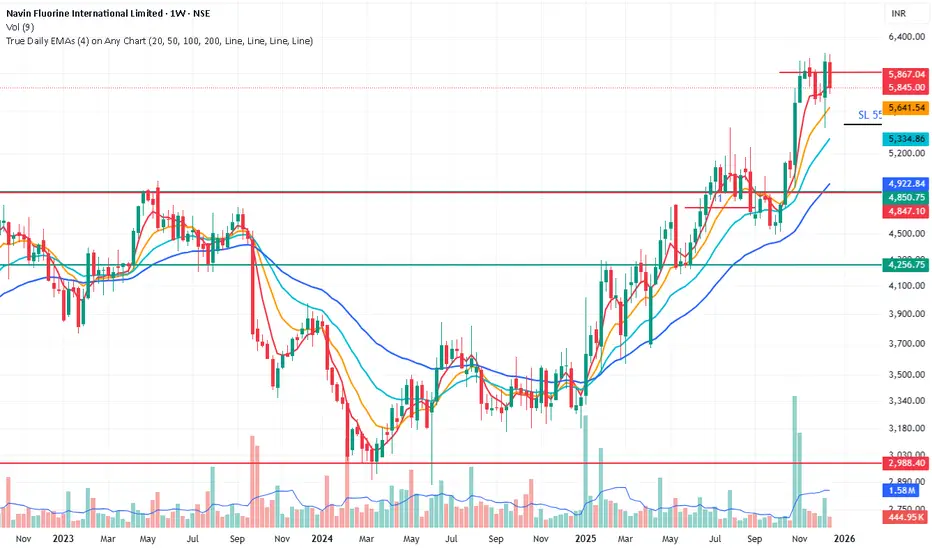
True Daily EMAs (4) on Any ChartIt calculated the 4 EMAs based on days as input. Even on a weekly or monthly chart it shows 20/50/100/200 Day EMAs. Changing the time frame of chart does not effect the EMAs
Multi-TF Fibonacci Pivot Points V4.5.3📊 MULTI-TIMEFRAME FIBONACCI PIVOT POINTS
Display Fibonacci-based pivot points from multiple timeframes simultaneously on any chart. Perfect for identifying key support/resistance levels, confluences, and high-probability trade zones.
═══════════════════════════════════════════════════════
✨ KEY FEATURES
🎯 MULTI-TIMEFRAME DISPLAY
• View pivots from up to 6 different timeframes at once
• 4HR, Daily, Weekly, Monthly, Quarterly, and Yearly support
• Automatic timeframe validation prevents invalid combinations
• Smart label placement reduces chart clutter
📈 FIBONACCI LEVELS
• S3: -0.618 (Deep support)
• S2: -0.382 (Intermediate support)
• S1: -0.236 (Shallow support)
• Pivot Point: 0.000 (Central pivot)
• R1: +0.236 (Shallow resistance)
• R2: +0.382 (Intermediate resistance)
• R3: +0.618 (Deep resistance)
• Optional additional Fibonacci levels available in settings
🎨 HIGHLY CUSTOMIZABLE
• Individual color control for each timeframe
• Show/hide specific levels (S3, S2, S1, P, R1, R2, R3)
• Adjustable line width and transparency
• Optional price labels
• Compact or detailed label formats
🔔 ALERT SYSTEM
• Long Signal: Price crosses above pivot point
• Short Signal: Price crosses below pivot point
• Customizable alert messages
• Works with webhooks for automated trading
═══════════════════════════════════════════════════════
💡 HOW TO USE
**CONFLUENCE TRADING:**
When multiple timeframe pivots align at the same price level, it creates a strong confluence zone. These areas often act as significant support/resistance.
Example:
• Daily R1, Weekly P, and Monthly S1 all near $90,000
• This creates a high-probability resistance zone
• Consider taking profits or shorting at this confluence
**TREND IDENTIFICATION:**
• Price above all pivots = Strong uptrend
• Price below all pivots = Strong downtrend
• Price between pivots = Range-bound or transitional
**SUPPORT/RESISTANCE:**
• Fibonacci levels act as dynamic support/resistance
• S1/R1: First line of support/resistance (shallow retracements)
• S2/R2: Intermediate zones (common reversal points)
• S3/R3: Deep retracements (high-probability bounce areas)
**ENTRY/EXIT STRATEGIES:**
• Buy at support levels (S1, S2, S3) in uptrends
• Sell at resistance levels (R1, R2, R3) in downtrends
• Use pivot point as dynamic stop loss or take profit target
• Combine with your preferred indicators for confirmation
═══════════════════════════════════════════════════════
🎓 PRACTICAL EXAMPLE: Confluence Zone Reversal
**Setup:**
• BTC in downtrend, approaching $84,000
• Daily S2, Weekly S1, and Monthly Pivot all converge at $84,000
• Strong 3-timeframe confluence = high-probability support zone
**Entry Signal:**
• Wait for price to test the $84,000 confluence level
• Look for reversal confirmation (reversal pattern, bullish engulfing, RSI divergence, volume spike etc)
• Enter long position above confluence at $84,100
**Risk Management:**
• Stop loss: $83,500 (below S2 support level – generally recommended to use same TF although for better R:R you could consider using a different TF support level)
• Initial target: $86,000 (Daily R1 resistance)
• Risk/Reward: ~$500 risk for $1,900 profit potential = 1:3.8 ratio
**Why It Works:**
When multiple timeframes agree on a support level, it creates strong buyer interest at that price zone. Professional traders and algorithms often place orders at these confluence areas. When the support holds, the reversal moves are typically swift and powerful as trapped short sellers cover positions and new buyers enter.
This same principle works in reverse for resistance confluences (shorting opportunities) and can be applied across any timeframe or asset class.
═══════════════════════════════════════════════════════
⚙️ SETTINGS GUIDE
**TIMEFRAME CONFIGURATION:**
• Enable/disable each timeframe independently
• Set 4HR, Daily, Weekly, Monthly, Quarterly, Yearly periods
• Warning system prevents invalid timeframe combinations
**LEVEL VISIBILITY:**
• Toggle individual Fibonacci levels on/off
• Hide levels you don't trade to reduce clutter
• Keep only the levels relevant to your strategy
• Enable optional additional Fibonacci levels if needed
**VISUAL CUSTOMIZATION:**
• Choose colours that match your charting style
• Adjust line width for visibility (1-3 recommended)
• Set transparency for background levels (20-40% typical)
• Enable/disable price labels based on preference
**ALERTS:**
• Set up alerts for pivot point crosses
• Receive notifications when price tests key levels
• Use webhook URLs for automated trade execution
• Customize alert messages for different scenarios
═══════════════════════════════════════════════════════
📚 UNDERSTANDING FIBONACCI PIVOTS
**What are Fibonacci Pivot Points?**
Traditional pivot points use simple averages (High + Low + Close) / 3. Fibonacci pivot points enhance this by applying Fibonacci ratios (0.236, 0.382, 0.618) to calculate support and resistance levels.
**Why Fibonacci Ratios?**
These ratios appear frequently in nature and financial markets:
• 0.236 (23.6%) - Shallow retracement
• 0.382 (38.2%) - Common retracement zone
• 0.618 (61.8%) - Golden ratio, deep retracement
Markets often respect these levels due to trader psychology and self-fulfilling prophecy.
**Multi-Timeframe Advantage:**
Higher timeframe pivots carry more weight:
• Yearly/Quarterly pivots: Major support/resistance (long-term positioning)
• Monthly pivots: Significant levels (swing trades)
• Weekly pivots: Intermediate zones (position trades)
• Daily pivots: Short-term levels (day trades)
• 4HR/Lower timeframes: Intraday precision (scalping)
When pivots from multiple timeframes align, the confluence creates stronger support/resistance that professional traders watch closely.
═══════════════════════════════════════════════════════
⚡ INTEGRATION WITH STRATEGY BUILDING
This indicator works seamlessly with strategy builders and backtesting tools. The alert system provides clean signals that can be used as entry/exit conditions.
These signals can be incorporated into automated strategies or used as confluence filters with your existing trading system.
**Compatible with:**
• TradingView's Strategy Tester
• Most strategy building tools
• Webhook-based automation platforms
• Custom Pine Script strategies
Simply reference the indicator's signals in your strategy logic or use the visual levels for manual discretionary trading.
⚠️ IMPORTANT NOTES
**Timeframe Rules:**
• Current chart timeframe must be LOWER than indicator timeframes
• Example: Can't display Daily pivots on Weekly chart
• Invalid combinations will show warning in label
• Solution: Switch to lower chart timeframe or adjust indicator settings
**Performance Considerations:**
• Displaying 6 timeframes with all levels = 42 lines on chart
• Disable unused timeframes to reduce visual clutter
• Hide levels you don't actively trade (e.g., keep only S1, P, R1)
• Use transparency to make background levels less prominent
**Alert Best Practices:**
• Test alerts on paper trading account first
• Understand alert fires when bar CLOSES (not on wick)
• Pivot point crosses generate signals, not individual S/R levels
• Combine with other confluence factors (don't trade alerts blindly)
═══════════════════════════════════════════════════════
📖 PRACTICE SUGGESTIONS
1. Observe how price respects pivot levels (especially HTF ones)
2. If available, use the Replay feature to identify how price reacts to different pivot levels (try to check in bullish, bearish and flat markets)
3. Use additional confluence for trades (previous S/R, momentum indicators etc)
4. Backtest your strategy before live trading
5. Keep a trading journal of pivot-based trades
6. Gradually add more timeframes as you gain experience
═══════════════════════════════════════════════════════
📈 BUILDING COMPLETE TRADING SYSTEMS
Multi-Timeframe Fibonacci Pivots excels at identifying high-probability price levels and confluence zones. For traders looking to develop complete trading strategies around these signals, the natural progression involves:
**1. Signal Identification** (This Indicator)
Identify key support/resistance levels and confluence zones across multiple timeframes
**2. Strategy Development**
Test and validate trading rules around these pivot levels using backtesting tools
**3. Trade Management**
Implement proper entry execution, exit management, position sizing, and risk controls
This indicator integrates seamlessly with strategy testing and trade management systems. For traders serious about building robust, professional-grade trading approaches, explore the additional indicators/strategies I will be publishing soon.
The goal is always the same: transform good trading ideas into consistently executable strategies with proper risk management.
═══════════════════════════════════════════════════════
🎯 QUICK START CHECKLIST
Getting started with MTF Fibonacci Pivots:
Add indicator to chart (lower timeframe than pivots you want to see)
Enable 1-2 timeframes initially (e.g., Daily + Weekly)
Customize colours to match your chart theme
Hide levels you don't trade (optional: keep only S1, P, R1)
Identify current confluence zones
Mark key levels you'll watch for the session/day/week
Set up alerts for pivot crosses (optional)
Practice identifying setups before taking real trades
═══════════════════════════════════════════════════════
🌟 ENJOY TRADING WITH MTF FIBONACCI PIVOTS!
Whether you're a day trader looking for intraday levels, a swing trader seeking major support/resistance zones, or a long-term investor identifying key price areas, Multi-Timeframe Fibonacci Pivots provides the levels you need at a glance.
Happy trading! 📈
═══════════════════════════════════════════════════════
🔐 RISK DISCLAIMER
This indicator is for educational
and informational purposes only. It does not constitute financial advice.
**Remember:**
• No indicator is 100% accurate
• Always use proper risk management (stop losses, position sizing)
• Past performance does not guarantee future results
• Combine with your own analysis and trading plan
• Never risk more than you can afford to lose
• Test thoroughly on paper trading before using real capital
Trading carries significant risk. Ensure you understand these risks before trading.
═══════════════════════════════════════════════════════
💬 FEEDBACK & SUPPORT
**Found a bug?** Please report via comments with:
• Chart timeframe, asset, and indicator settings
• Description of issue and expected behavior
**Feature requests?** I'm always looking to improve! Let me know:
• What additional functionality would help your trading?
• Which features do you use most/least?
• How can the indicator be more user-friendly?
**Success story?** Share how you're using MTF Fibonacci Pivots! Community feedback helps guide future development.
═══════════════════════════════════════════════════════
🙏 CREDITS & ACKNOWLEDGMENTS
**Original Concept:**
This indicator is based on the excellent "Fibonacci Extension / Retracement / Pivot Points" script by dgtrd. The original script provided a solid foundation for calculating Fibonacci-based pivot levels.
**Changes in This Version:**
• Multi-timeframe capability (display up to 6 timeframes simultaneously)
• Optional additional Fibonacci levels
• Enhanced customization (colors, widths, transparency per timeframe)
• Improved label system (compact/detailed formats, smart placement)
• Timeframe validation and warnings
• Optimized performance for multiple timeframes
**Attribution:**
Original script by dgtrd:
Enhancements and multi-timeframe implementation with the support of Al
If you find value in this indicator, please also check out dgtrd's original work and other excellent pivot point indicators in the TradingView community.

Statistical Deviation per AssetINDICATOR: STATISTICAL DEVIATION PER ASSET (SDPA)
1. Overview
The Statistical Deviation per Asset (SDPA) is a quantitative analysis tool designed to measure the strength and exhaustion of price movements. Unlike standard oscillators (like RSI ), the SDPA calculates the actual percentage deviation from the most recent pivot point (High or Low) and compares it against historical performance averages specific to each asset.
---
2. Core Logic & Calculation
The script operates on a Mean Reversion principle. It assumes that every asset (Gold, Bitcoin, Ethereum, etc.) has a unique "volatility signature" depending on the timeframe.
* Dynamic Pivot Detection : The indicator identifies recent Swing Highs and Swing Lows using an adaptive lookback period.
* Real-Time Return Calculation : Once a pivot is confirmed, the script calculates the real-time percentage gain (from a Low) or loss (from a High).
* Zero-Indexed Histogram : This return is plotted as an oscillator centered around a Zero Line , representing the current trend's progress since the last reversal.
---
3. Adaptive Intelligence (Multi-Asset & Multi-TF)
The SDPA is pre-loaded with a statistical database. It automatically adjusts its sensitivity and thresholds based on:
1. The Selected Asset : Whether trading XAUUSD , Bitcoin , or Solana , the deviation thresholds adapt to the specific volatility of that instrument.
2. The Timeframe (TF) : The calculation period ( period ) and performance targets ( hausse_perf / baisse_perf ) change dynamically. For example, a 1-minute scalping setup uses a longer lookback (200) compared to a Daily swing setup (10).
---
4. Visual Anatomy
The interface is designed for instant "at-a-glance" interpretation:
* The Histogram :
* Green : Price is trending up since the last Swing Low .
* Red : Price is trending down since the last Swing High .
* Threshold Lines (The Statistical Averages) :
* Thick Line (60% Opacity) : Represents the Average Historical Deviation . When the histogram hits this line, the move is considered "statistically mature."
* Thin Line (70% Opacity) : Represents the Strong Deviation Zone (1.5x the average), indicating extreme momentum or potential exhaustion.
* Background Highlighting : The chart background colors automatically when the price exceeds historical averages, signaling a High-Probability Reversal Zone .
---
5. How to Trade with SDPA
* Trend Maturity : If the histogram exceeds the Bullish Average (Green line), the current move has reached its typical historical limit. Traders should look for take-profit opportunities or wait for a reversal.
* Impulse Strength : A rapid move from the Zero Line toward the thresholds confirms strong institutional interest.
* Mean Reversion : When the histogram reaches the Strong Zone (1.5x), the price is "overextended" statistically, offering a high reward-to-risk ratio for counter-trend setups.
---
6. Technical Parameters
* Asset Choice : Dropdown menu to select the specific asset.
* Colors : Customizable Bullish and Bearish colors to match any UI theme.
* Precision : Set to 4 decimal places to ensure accuracy across all asset types.

Fair Value Gap [Tradeuminati]Fair Value Gap
Fair Value Gap is a clean and rule-based Fair Value Gap indicator for TradingView, designed to display only valid and confirmed Fair Value Gaps (FVGs) and Inverted Fair Value Gaps (iFVGs).
The indicator is built on a strict 3-candle FVG definition and operates exclusively on candle close, ensuring no repainting and no premature signals.
🔹 Key Features
Valid Fair Value Gaps (FVG)
- Detects bullish and bearish Fair Value Gaps using a precise 3-candle structure
- FVGs are only plotted after the confirming candle has closed
- A Fair Value Gap remains visible only as long as it is valid
- Once price closes beyond the FVG, it is removed or converted
Inverted Fair Value Gaps (iFVG)
- When a valid FVG is invalidated by a candle close, it can be converted into an iFVG
- iFVGs retain the original price range and structure
- Only valid iFVGs are displayed
- As soon as price closes through an iFVG, it is automatically removed
Clean & Controlled Visualization
- Only the last N active FVGs are displayed (bullish + bearish combined)
- Only the last N valid iFVGs are shown
- Boxes automatically extend to the current price + configurable bars
- Labels are dynamically positioned at the right edge of each zone
🔹 Technical Notes
- No repainting
- No intrabar signals
- Close-based validation only
- Works on all markets and timeframes
- Lightweight and performance-friendly
⚠️ Disclaimer
This indicator is for technical analysis purposes only and does not constitute trading or investment advice.

Look Back Calculator Custom Lookbacks with Individual Colors (Accurate on All Timeframes)
A clean, monochrome-grey indicator that displays historical closing price levels from user-defined lookback periods.
Key Features:
• 4 Custom Hourly Levels (e.g., 1.5h, 3h, 6h, 9h or any value you choose) – fully accurate on 15-minute and lower timeframes
• 4 Custom Daily Levels (e.g., 20d, 40d, 60d, 90d or any number of days)
• Independent toggle for each level
• Individual color selection for every vertical line
• Table column backgrounds match the selected vertical line colors
• Optional candle highlighting (background/border/both) at lookback bars
• Dashed vertical lines at lookback points (toggleable)
• Current price row with automatic spanning
• Time row shown only for daily levels (cleaner layout for intraday)
• Alerts on price crossing any enabled level (with dynamic messages)
• Compact mode for shorter labels
Perfect for support/resistance analysis, order flow, or ICT/SMC concepts. Works seamlessly on any timeframe, including 15min charts.

Market Return Analyzerمؤشر محلل عوائد السوق يعرض أداء الأصل المالي عبر عدة فترات زمنية (يومي، أسبوعي، شهري، سنوي، وطويل الأجل) في جدول واضح وقابل للتخصيص مباشرة على الشارت، لمساعدة المتداول على اتخاذ قرارات أسرع وأكثر دقة
Market Return Analyzer displays multi-timeframe performance (Daily, Weekly, Monthly, YTD, and Long-Term returns) in a clean, customizable table directly on your chart.
Designed for traders and investors who want quick performance insights without clutter

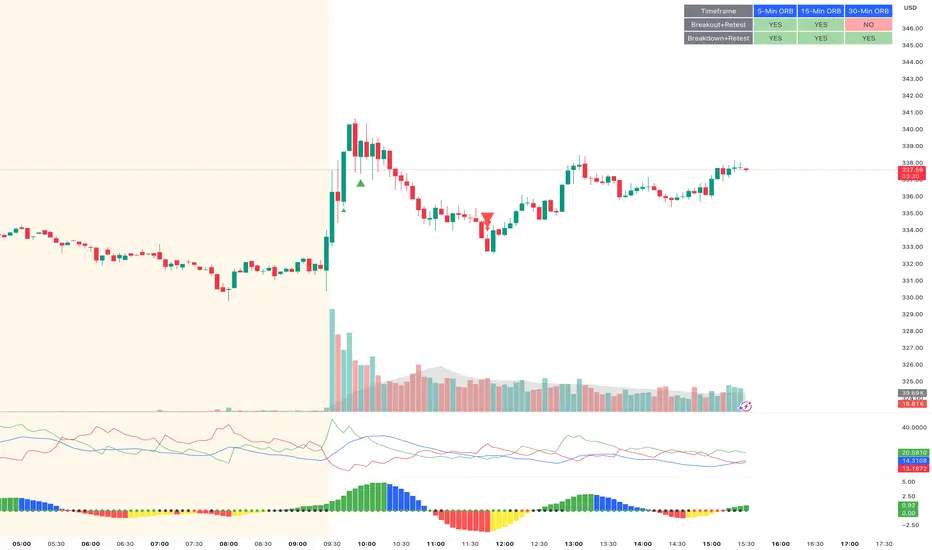
ORB Breakout & RetestORB Breakout & Breakdown Indicator - Complete Opening Range Strategy
Description :
The ORB (Opening Range Breakout) Breakout & Retest Indicator is a simple tool designed to identify opening range breakouts and breakdowns with retest confirmation. This indicator works on ANY timeframe while automatically analyzing 1-minute price action to detect precise entry signals.
What makes this indicator unique:
- ✅ Multi-Timeframe ORB Analysis - Simultaneously tracks 5-min, 15-min, and 30-min opening ranges
- ✅ Smart Retest Logic - Filters false breakouts by requiring price to retest and confirm the level
- ✅ Works on Any Chart Timeframe - View on 5-min, 15-min, 1-hour, or daily charts while getting 1-minute precision
- ✅ Both Long & Short Signals - Detects bullish breakouts AND bearish breakdowns
- ✅ Customizable Alerts - Get notified when confirmed setups occur
- ✅ Clean Visual Display - Compact table showing all ORB levels and signal status
How it Works:
Opening Range Detection :
- 5-Min ORB: Captures high/low from 9:30-9:35 AM
- 15-Min ORB: Captures high/low from 9:30-9:45 AM
- 30-Min ORB: Captures high/low from 9:30-10:00 AM
Breakout Confirmation (3-Step Process) :
1. Initial Break - Price closes above ORB High (or below ORB Low for shorts)
2. Retest - Price pulls back to retest the broken level
3. Confirmation - Price breaks through again, confirming the trend
This retest requirement dramatically reduces false signals and helps you enter trades with better risk/reward.
Perfect For :
- Day traders looking for opening range strategies
- Scalpers who need precise entry signals
- Swing traders identifying strong intraday momentum
- Anyone trading stocks, futures, forex, or crypto during market hours
---
⚙️ Settings & Customization :
Display Options :
- ☑️ Show ORB High (Default: OFF) - Display the high of each opening range in the table
- ☑️ Show ORB Low (Default: OFF) - Display the low of each opening range in the table
- ☑️ Show Breakout+Retest (Default: ON) - Show bullish breakout confirmation status
- ☑️ Show Breakdown+Retest (Default: ON) - Show bearish breakdown confirmation status
Alert Options :
- ☑️ Enable 5-Min Alerts (Default: OFF) - Get alerts for 5-minute ORB confirmations
- ☑️ Enable 15-Min Alerts (Default: OFF) - Get alerts for 15-minute ORB confirmations
- ☑️ Enable 30-Min Alerts (Default: OFF) - Get alerts for 30-minute ORB confirmations
Visual Indicators :
- Green triangles (▲) below bars = Breakout confirmed (bullish)
- Red triangles (▼) above bars = Breakdown confirmed (bearish)
- Triangle sizes: Tiny (5-min), Small (15-min), Normal (30-min)
---
Table Legend:
Timeframe Row: Shows the three ORB periods being tracked
ORB High Row: (Optional) The highest price during each opening range period
ORB Low Row: (Optional) The lowest price during each opening range period
Breakout+Retest Row:
- 🟢 YES = Bullish setup confirmed (price broke high, retested, and confirmed)
- 🔴 NO = No confirmed bullish setup yet
- ⚪ N/A = Opening range not yet established
Breakdown+Retest Row:
- 🟢 YES = Bearish setup confirmed (price broke low, retested, and confirmed)
- 🔴 NO = No confirmed bearish setup yet
- ⚪ N/A = Opening range not yet established
How to Use :
1. Add to Chart - Works best on stocks, futures, and indices with regular market hours (9:30 AM EST open)
2. Choose Your Timeframe - View on any timeframe; indicator automatically analyzes 1-minute data
3. Monitor the Table - Watch for "YES" signals in Breakout or Breakdown rows
4. Set Alerts - Enable alerts for your preferred ORB timeframes
5. Plan Your Trade - Use ORB levels as entry points and initial stop-loss levels
Tips :
- Combine multiple timeframe confirmations for higher probability setups
- Use ORB High/Low levels as natural support/resistance zones
- The 5-min ORB gives faster signals; 30-min ORB gives stronger trends
- Best results typically occur in the first 1-2 hours after market open
- Works on all markets but optimized for regular trading hours (9:30 AM EST)
Key Features Summary :
✓ Multi-timeframe opening range tracking (5, 15, 30-minute)
✓ Retest confirmation logic to filter false breakouts
✓ Works on any chart timeframe with 1-minute precision
✓ Bullish and bearish signal detection
✓ Customizable visual display with toggle options
✓ Individual alerts for each timeframe and direction
✓ Clean, professional table interface
✓ No repainting - signals are final once confirmed
✓ Suitable for all experience levels
Batik Lite BATIK INDICATOR LITE — the Syndicate’s silent signal for clean, high-probability zones. No noise. No drama. Just zones.
What is BATIK?
BATIK stands for:
Balance • Accuracy • Timing • Intelligent • Konsistent
It’s a proprietary zone concept designed to highlight areas where price is most likely to react, reverse, or continue after confirmation — so you can wait for the retest and move like a professional, not a chaser.
What this Lite version does
Marks BATIK B (Buy Zone) & BATIK S (Sell Zone) after confirmation
Draws a clean zone box based on the key candle and extends it up to 55 bars
Keeps your chart clean: only 10 previous zones + 1 current zone
Built for fast reading and sniper-style planning
Performance Claim
BATIK is known in the community for a high win-rate, with a claimed up to 98% when used with proper filtering, discipline, and risk management.
Results may vary. Trading is risky — manage risk like a boss.
Recommended Timeframe
✅ M5 and above
🏆 M5 is reported as the highest win-rate timeframe for BATIK-style execution.
Market Coverage
✅ Can be used on all available charts and pairs in the market
(Forex, Gold, Crypto, Indices — wherever your chart lives.)
Pricing (Subscription / Access)
MYR 150 / month
MYR 750 / 6 months
MYR 1200 / year
Request Access / Support
Email: castcallasia@gmail.com
WhatsApp: +60179999109

The Navigator Fortress (ORB M15 + H4 Filter)To read The Navigator Fortress (v1.4), you simply follow a "top-down" sequence of filters. It moves from the macro-trend (The Compass) to the local boundary (The Harbor) and finally to your execution signal (The Beam).
1. The H4 Compass (The Strategy Filter)
Before you look at the price, look at the Dashboard in the top-right corner.
🧭 COMPASS: BULLISH (Blue): The "Big Ships" are moving up. You are only authorized to take LONG breakouts.
🧭 COMPASS: BEARISH (Orange): The "Big Ships" are moving down. You are only authorized to take SHORT breakouts.
🧭 COMPASS: IN JAWS (Gray): Price is stuck between the H4 10 and 50 EMAs. This is "The Fog." Do not trade, as the win rate drops significantly in this zone.
2. The M15 Harbor (The Field of Play)
At 8:45 AM CST, the script will finish drawing two horizontal lines:
Blue Line (Top): The high of the 8:30–8:45 AM window. This is your resistance wall.
Orange Line (Bottom): The low of that same window. This is your support floor.
The Rule: You are waiting for a candle to close completely outside these lines. A "wick" poking through is not a signal; it is a trap.
3. The Beam & State (The Execution)
When a valid breakout happens that matches your H4 Compass:
The Label: A label will appear above or below the candle saying "LONG" or "SHORT".
The Background: The entire chart background will turn faint Blue or Orange. This tells you the "Harbor is Open" in that direction until the 10:00 AM CST session close.
The Moat (Stop Loss): Check your Alerts tab or phone notification. The script will give you a specific price (e.g., 1.08552). This is your 2.0x ATR "Moat"—place your stop loss here to stay safe from market noise.
🛡️ Summary of the Workflow
Check Compass: Is it Blue, Orange, or Gray?
Wait for 8:45: Let the M15 Harbor lines form.
Wait for the Beam: Did a candle close outside the line?
Drop Anchor: Execute the trade, set your stop at the "Moat" price from the alert, and aim for the next major Daily S/R level or a 2:1 reward.

pD Zones [MMT]pD Zones plots a clean set of intraday high‑of‑day (HOD) and low‑of‑day (LOD) zones that automatically extend forward, flip color on mitigation, and archive as historical levels for context. It is designed to give intraday traders a simple visual map of premium/discount zones derived from a chosen calculation timeframe.
Overview
Objective : Highlight the current day’s HOD/LOD wick zones as actionable intraday support and resistance.
Core logic runs on a user‑selectable source timeframe (default 15m), then projects those zones onto any chart you are trading.
Zones extend into the future, react to price via mitigation logic, and then optionally roll into a dimmed historical layer.
Zone logic
Each session, the script tracks the extreme high and low plus their wick limits (open/close‑based) on the source timeframe to form two intraday zones.
When a new day starts, the finalized prior‑day zones are “locked in” and the current day begins tracking a fresh HOD/LOD pair.
Only one HOD and one LOD zone are created per day, reducing clutter and keeping focus on the most relevant levels.
Mitigation & color flips
Active HOD zones behave as resistance: a decisive break above the top of the box flips it to a bullish (supportive) color profile, while a move back below can re‑flip it.
Active LOD zones behave as support: a break below the bottom of the box flips it to a bearish profile, and a sustained reclaim can re‑flip it as well.
Once mitigated and carried into a new day, zones are restyled with a softer historical color so they remain visible but unobtrusive.
Alerts
When price breaks a HOD zone to the upside, the script can trigger an alert message noting that HOD resistance has been broken and showing the exact level.
When price breaks a LOD zone to the downside, an alert notes that LOD support has been broken, again with the precise price printed.
These alerts are meant for intraday confirmation of structure shifts at key daily extremes, rather than frequent scalper signals.
Inputs & customization
- Calculation Timeframe: choose which timeframe defines the daily HOD/LOD zones (e.g., 5m, 15m, 1h), independent from the chart.
- Visual Settings: customize support/resistance fill colors and border color to integrate with existing layouts.
- Logic Settings:
Max Active Zones: cap how many live zones remain on the chart at once to control noise.
Max Historical Zones: keep only the most recent historical levels or show all past days.
Zone Extension Offset (Bars): control how aggressively boxes project into the future.
- Mitigation Settings: choose the historical zone color to distinguish active levels from archived ones at a glance.

Techno Signals Pro ⚡ QUICK SETUP
FOR BEGINNERS:
Keep all defaults
Trade only A+ signals
Use provided TP/SL levels
Wait for volume confirmation
FOR ADVANCED:
Adjust confluence threshold (higher = fewer but better signals)
Toggle divergence optional for more flexibility
Use MTF alignment for higher timeframes
Enable slippage buffer for realistic risk
🚀 GETTING STARTED
Add indicator to your chart
Check table for current signal
Verify conditions match your timeframe
Set orders at TP/SL levels
Manage trade according to grade
Remember: No indicator is perfect. Always use proper risk management and combine with price action confirmation. Start with paper trading to understand the system before real money.

Structure Lite - Automatic Major Trend LinesStructure Lite – Pivot-Based Market Structure Visualization
OVERVIEW
Structure Lite is an open-source charting tool designed to assist traders in visualizing higher-timeframe market structure. The script identifies major swing points using high-period pivot analysis and projects structural support and resistance lines directly on the chart. Its purpose is to highlight persistent market structure while minimizing visual noise.
CORE CONCEPTS & CALCULATIONS
Pivot Identification
The script uses Pine Script’s built-in ta.pivothigh() and ta.pivotlow() functions to identify confirmed swing highs and lows. A pivot is only validated after a user-defined number of bars (Major Pivot Lookback) have formed on both sides of the price extreme, ensuring that only structurally significant pivots are selected.
Structural Pairing
Each structural line is created only after two consecutive pivots of the same type are confirmed (high-to-high or low-to-low). The script stores the price and bar index of these pivots and uses them as fixed anchor points.
Line Projection
Once a valid pivot pair is formed, the script draws a line between the two points using line.new() and extends it forward using extend.right. These lines represent projected structural boundaries rather than trade signals.
Object Management
To maintain chart clarity and performance, the script manages all drawn objects through a line array. A FIFO (First-In, First-Out) method is applied so that only the three most recent structural lines remain visible. Older lines are automatically deleted as new ones are created.
DESIGN PHILOSOPHY & ORIGINALITY
While many indicators plot frequent swing points or short-term pivots, Structure Lite focuses on structural persistence. By filtering for higher-period pivots and limiting the number of displayed projections, the script emphasizes dominant market structure rather than short-term fluctuations. This approach is intended to support discretionary analysis, not replace it.
HOW TO USE
Major Pivot Lookback
Increase the value to focus on higher-timeframe structure (e.g., swing or position trading).
Decrease the value to visualize intraday structural levels.
Visual Encoding
Green lines represent projected structural support
Red lines represent projected structural resistance
Visibility Control
A boolean input allows all structure lines to be hidden instantly to restore a clean price chart.
LIMITATIONS & DISCLAIMER
This script is a visualization tool only. It does not generate trade signals, entry or exit points, alerts, or directional forecasts. All plotted levels are derived from historical price action and may change as new pivots form. The script is provided for educational and analytical purposes and should be used in conjunction with other forms of market analysis
