Double EMA WIth Pullback Buy Sell Signal - Smarter AlgoBuilt with love "Double EMA With Pullback Buy Sell Signal "
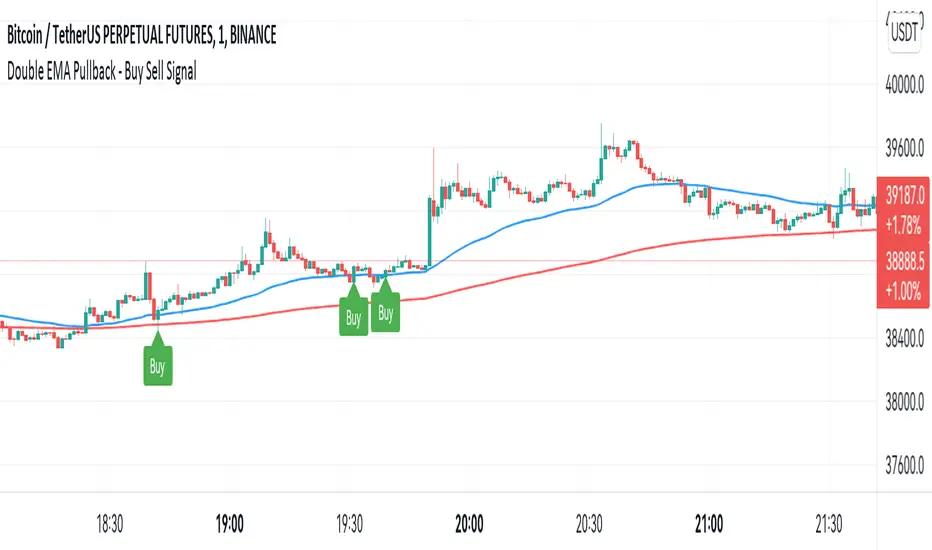
This indiator will help you to find a Double EMA Pullback Signal
You can combine with your own strategy, or use this purely
DISCLAIMER :
Measure the risk first before use it in real market
Backtest The Strategy was very important, so you know the probability
Fundamentally Logical :
Pullback (Some Previous candle is Red for Bull Pullback vice versa)
the Entry candle must be a Candlestick Pattern
Features :
1. Double EMA
2. Pullback Signal
How to use it :
1. Adjust the Pullback Backstep
2. Adjust the EMA Period
3. Adjust the Style to your preferences
Regards,
Hanabil
In den Scripts nach "smart" suchen
PSv5 Color Magic and Chart Theme SimulatorKEEP YOUR COINS FOLKS! I DON'T NEED THEM, DON'T WANT THEM. Many other talented authors on TV deserve them.
INTRODUCTION:
This is my "PSv5 Color Magic and Chart Theme Simulator" displayed using Pine Script version 5.0. The purpose of this PSv5 colorcator is to show vivid colors that are most suitable in my opinion for modifying or developing Pine scripts. Whether you are new to Pine or an experienced Pine poet, this should aid you in developing indicators with stunning color from the provided color list that is easily copied and pasted into any novel script you should possess. Whichever colors you choose, and how, is up to your imagination's capacity.
COMMENTARY:
I have a thesis. Pine essentially is a gigantor calculator with a lot of programmable bells and whistles to perform intense analytics. Zillions of numbers per day are blended up into another cornucopia of numbers to analyze. The thing is, ALL of those numbers are moot unless we can informatively portray them in various colorized forms with unique methods to point out significant numeric events. By graphically displaying them with specific modes of operation, only then do these numbers truly make any sense to us and become quantitatively beneficial.
I have to admit... I hate numbers. I never really liked them, even before I knew what an ema() was. Some days I almost can't stand them, and on occasion I feel they deserve to be flushed down the toilet at times. However, I'm a stickler for a proper gauge of measurements. Numbers are a mental burden, but they do have "purpose and meaning". That's where COLOR comes in! By applying color in specific ways in varying dynamic forms, we can generate smarter visual aids from these numerics. Numbers can be "transformed" into something colorful it wasn't before, into a tool, like a hammer. But we don't need a hammer, we need an impressive jack hammer for BIG problem solving that we could never achieve in the not to distant past.
As time goes on, we analytically measure more, and more, and more each year. It's necessary to our continual evolution. That's one significant difference between us and cave men, and the pertinent reason why we are quickly evolving as a species, while animals haven't. Humankind is gifted to enumerate very well AND blessed to see in color. We use it for innumerable things in the technological present for purpose and pleasure. Day in and day out, we take color for granted, because it's every where we can look. The fact is, color is the most important apparatus in humankind's existence EVER. We wouldn't have survived this far without it.
By utilizing color to it's grand potential, greater advancements can be attained while simultaneously being enjoyed visually. Once color is transformed from it's numeric origins into applicable tools, we can enjoy the style, elegance, and QUALITATIVE nature of the indication that can be forged. Quantities can't reveal all. Color on the other hand has a handy "quality" factor to it, often revealing things we can't ordinarily recognize. When high quality tools provide us with obtained goals, that's when we will realize how magical color truly is, always has been, and shall always be.
The future emerging economies and future financial vessels of people around the globe are going to be dependent on the secured construction of intelligent applications with a rock solid color foundation, not just math alone. I have no doubt about that. I can envision that with my eyes closed. To make an informed choice, it should be charted or graphed somehow prior to a final executive decision to trade. Going back to abysmal black and white with double decimal points placed next to cartoons within extinction doomed newspapers is not a viable option any more.
OBSERVATIONS AND UTILITY:
One thing you will notice is the code is very dense. Looks almost hideous right? Well, the variable naming is lengthy, but it's purpose is to be self explanatory, even for those who don't know how to program, YET. I'm simply not a notation enthusiast. My main intention was to provide clearly identifiable variables from their origin of assignment to their intended destination of use, clearly visible for anyone visiting. The empowerment of well versed words that are easier to understand, is a close rival to the prominent influence color has.
Secondly, I'm displaying hline() and label.new() as prime candidates to exemplify by demonstration how the "Power of Color" can be embraced with the "Power of Pine". Color in Pine has been extensively upgraded to serve novel purposes to accomplish next generation indicators that do and WILL come to exist. New functions included with PSv5 are color.rgb(), color.from_gradient(), color.r(), color.g(), color.b(), and color.t() to accompany color.new() in our mutual TV adventures. Keep in mind, the extreme agility of color also extends to line.new(), the "entirely new" linefill.new(), table.new(), bgcolor() and every other function that may utilize color.
There's a wide range of adjustability in Settings to make selections to see how they perform on different backgrounds, with their size and form. As you curiously toy with those, you're going to notice how some jump out like laser beams while others don't. Things that aren't visually appealing, still have very viable purposes, even if they don't stand out in the crowd. Often, that's preferable. The important thing is that when pertinent information relative to indication is crucial, you can program it with distinction from an assortment of a potential 1.67 million colors that can be created in Pine. "These" are my chosen favorite few, and I hope you adopt them.
PURPOSES:
For those of you who are new to Pine Script, this also may help you understand color hex/rgb and how it is utilized in Pine in a most effective manner. The most skilled of programmers can garner perks as well. There is countless examples of code diversity present here that are applicable in other scripts with adequate mutation. Any member has the freedom use any of this code in this script any way they see fit. It's specifically intended for all. There is absolutely no need for accreditation for any of this code reuse ever, in the present case. Don't worry about, I'm not.
The color_tostring() will be most valuable in troubleshooting color when using color.rgb() and becoming adept with it. I'm not going to be able to use color.rgb() without it. Chameleon indicators of the polychromatic variety are most likely going to be fine tuned with color_tostring() divulging it's results to label.new() or even table.new() maybe. One the best virtues of this script in chart, is when you hover over the generated labels, there's a hidden gift for those who truly wish to learn the intricate mechanics of diverse color in Pine. Settings has informative tooltips too.
AFTERTHOUGHTS:
Colors are most vibrant on the "Black Chart" which is the default, but it doesn't currently exist as a chart theme. With the extreme luminous intensity of LCDs in millicandela( mcd ), you may notice "Light" charts may saturate the colors making charts challenging to analyze. Because of this, I personally use "Dark Charts" and design my indicators specifically for these. I hope this provides inspiration for the future developers who are contemplating the creation of next generation indicators and how color may enhance their usefulness.
When available time provides itself, I will consider your inquiries, thoughts, and concepts presented below in the comments section, should you have any questions or comments regarding this indicator. When my indicators achieve more prevalent use by TV members , I may implement more ideas when they present themselves as worthy additions. Have a profitable future everyone!


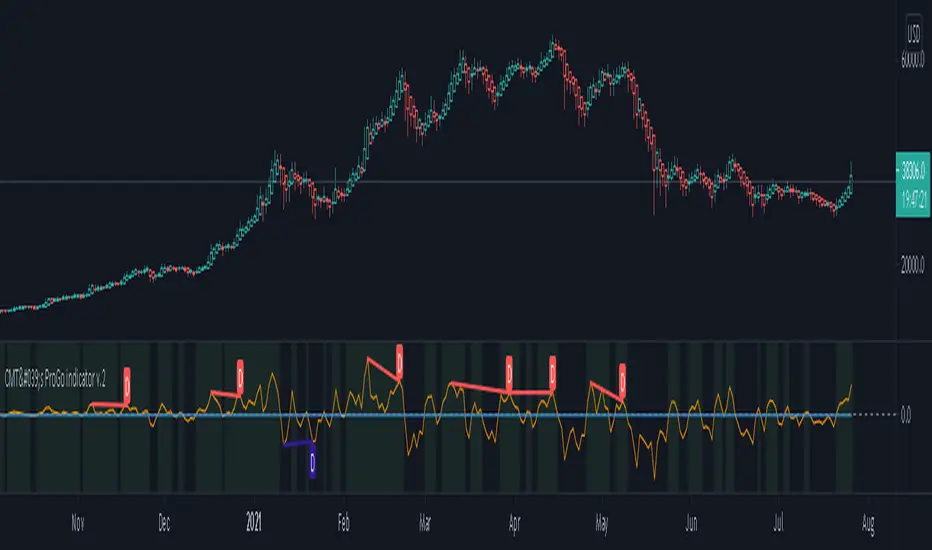
CMT's ProGo indicator v.2This was inspired by William's ProGo, which is an oscillator with a fast line based on today's open minus close compared to a slow line derived from yesterday's open minus close. These are tied to the 14 day SMA in both cases. William's hypothesis is that smart money makes its decisions based on what's happening now and dumb money makes their decisions slower. My hypothesis is that smart money reacts faster and in a more straightforward manner based on current price action while dumb money takes even longer than WIlliam's factored due to overthinking things. To reflect this, I've tied the pro line to the 1 SMA and the amateur line to the 21 SMA then changed the formula for the amateur line to open divided by close. That's a really cute story and all, but let's throw out all of the smart money/dumb money stuff and strap our boots to reality.
How to use:
1.) What we're looking at in the end is an examination of the relationship between price action and the 21 SMA. Since we're exploring rate of change and momentum, divergences should be relevant, right? And divergences are relevant in this indicator. These divergences are pretty good and tend to work in harmony with the trend, though can signal reversal points.
2.) This is not a real time oscillator. It involves three levels of derivation. Sometimes it'll provide leading signals and sometimes it'll show lagging signals because we're comparing the present against the past through a filter.
3.) I've noticed that this oscillator can be used to generate angled trend lines in some cases before they become evident through price action. This is interesting. What you'll do is slap some trend lines onto the oscillator, copy those then paste them onto the price action chart, copy them a few times to create a channel and see what's what. Horizontal support and resistance on the oscillator seems to translate into future price action S/R as well. THAT's interesting.
4.) On lower time frames, this indicator will do a pretty good job of letting you know whether you're in a bearish or bullish trend.
5.) Because of how the oscillator is formulated, it only recognizes Bitcoin as either bullish or ranging on higher time frames and will only ever register bearish on lower time frames. I don't think this will ever change, but if it does register BTC as bearish on higher time frames, I'd be real worried about Bitcoin.
6.) You'll notice that over time, volatility in the oscillator increases. Neat, huh? Yeah, it'll increase as market cap does. Take care and have fun with that.
v2.0 Improvements:
Divergences have been added.
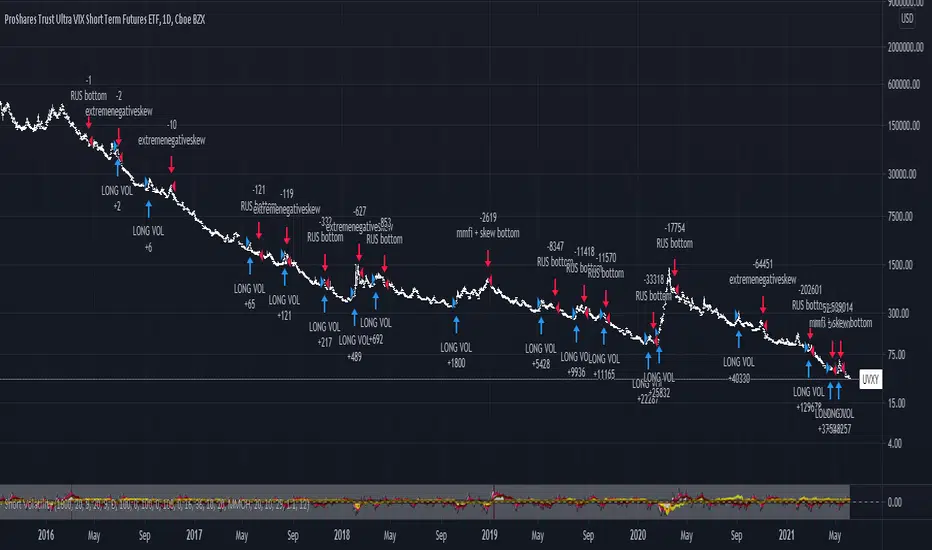
Long/Short Volatility AlgoA modification of my leveraged ETF algorithm. Giving out for free because it's a sloppy algorithm, and I personally use a much more refined algorithm developed by someone much smarter than me.
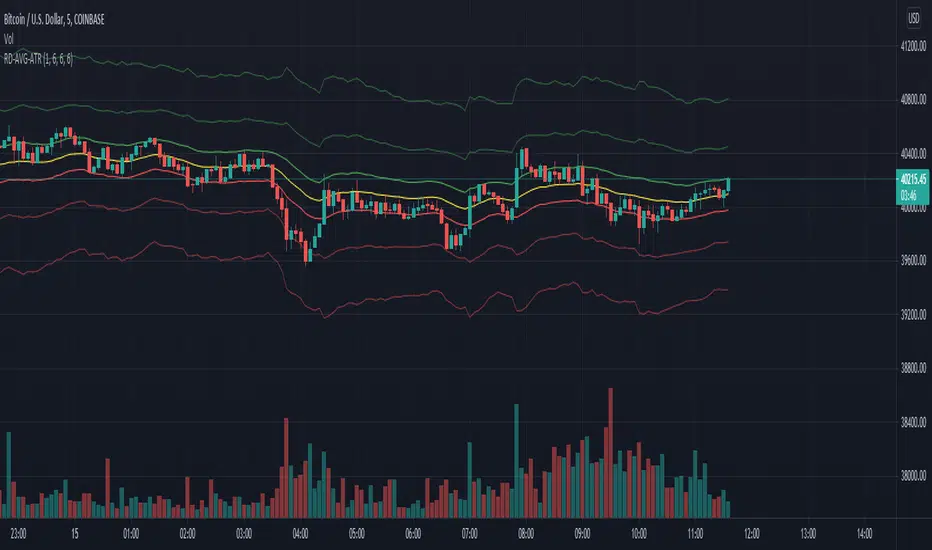
RexDog Average with ATRBam-- look what Rex did. A RexDog Average with ATR bands-- he's going insane. Simple but powerful.
This indicator includes the RexDog average but provides you with the ability to plot (and customize) both above and below ATR calculated bands.
With this indicator you can display all 3 or any combination of the bands: the RexDog Avg, Adding ATR Upper or the Subtracting ATR Below.
To remove a plot or customize color and line size go to the style options.
Before we get detailed with this version you can customize the default average factor of the RexDog Avg (default is 6). More tips on this below.
How This Works
Just as with the RexDog Average we take the 6 ATR data points (200, 100, 50, 24, 9, 5). We then create an average by dividing by 6. But wait there's more...
With this indicator you can customize independently the above and below bands via a float value for precision. 6 is the default (you can customize by increments at 0.25 or input value you like 1-20).
Now this works opposite how you might think but you'll get it once you start changing the numbers. For instance, editing the above band lowering the ATR factor will raise the band.
RexDog Avg Factor
With this release you are able to change the default average factor (6) to anything you want. You'll find though going too high or low from the default won't get the best results. The default increment change is 0.1 but you can enter any float value you like between 1-20.
The Original RexDog Average Overview
Yes, simple—the RexDog Average is a bias moving average indicator. The purpose is to provide the overall momentum bias you should have when trading an instrument. It works across all markets and all timeframes.
Usage:
Price above the RexDog AVG = long momentum bias
Price below the RexDog AVG = short momentum bias
With the ATR addition most likely your usage will be similar to Bollinger Bands. While not the same as in deviations much of the same principles might apply, especially with customization.
*Note: we have banned the word “trend” in the RexDog Trading Method.
Additional Usage Advice:
If price rips through the average your momentum bias should probably change. 80% of the time when price moves through the RexDog Average it will come back and test the area around average within 1-2 bars. 20% of the time it does not. The momentum is so strong in that direction so look for a 50-70% tests of the bar that impulse through the RexDog Average.
If you are using the RexDog Trading Method by default if the price is above the average and you are short you are in a fade trade. The momentum trade would be long. Of course reverse if price is below.
On multiple time frames. Of course, one timeframe can be long bias and a lower timeframe can be short bias. Which one do you use? Both—if your in a short trade using lower timeframe and with the bias of the average your in a momentum trade—but on the higher timeframe your aware you are essential fading the overall momentum.
Background:
Rex and I searched high and low for one simple thing. A moving average (or combination of some) that we could use to form our momentum bias that worked for all timeframes and all markets we trade.
We tried and tested them all. Even went down the path of ribbons and various other types of hybrid EMA /MA derivatives. Nothing had a high enough accuracy or mathematically was reliable that we could say with a high probability that it was on the right side of the momentum.
We almost stopped and landed on using the true and tested 200 MA—but we found through extensive tests that using the 200MA or EMA you’re often late to the party. Look you don’t need to be the first one in the trade but having a heads up sure helps.
To quote one of the best financial movies of the modern era—Margin Call:
“There are three ways to make a living in this business: be first, be smarter, or cheat… it sure is a hell of a lot easier to be first”. The RexDog Average used properly enables you to be first or damn near close.
Under the Hood:
This is so simple most reading this will discount it. You might even scoff and berate Rex for wasting your time. But you would be wrong. The RexDog Average has been tested across all markets—FOREX, Crypto, Equities, Futures (even tick charts), and even the Penguin population in Antarctica.
The RexDog Average is an average of 6 simple moving averages: 200, 100, 50, 24, 9, 5.
Yes, that’s it.
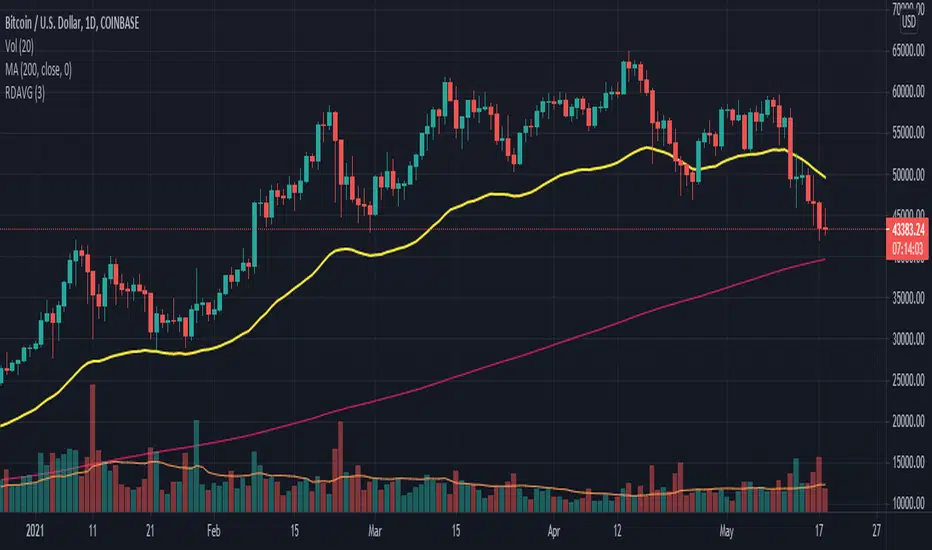
RexDog AverageYes, simple—the RexDog Average is a bias moving average indicator. The purpose is to provide the overall momentum bias you should have when trading an instrument. It works across all markets and all timeframes.
Usage:
Price above the RexDog AVG = long momentum bias
Price below the RexDog AVG = short momentum bias
*Note: we have banned the word “trend” in the RexDog Trading Method.
Additional Usage Advice:
If price rips through the average your momentum bias should probably change. 80% of the time when price moves through the RexDog Average it will come back and test the area around average within 1-2 bars. 20% of the time it does not. The momentum is so strong in that direction so look for a 50-70% tests of the bar that impulse through the RexDog Average.
If you are using the RexDog Trading Method by default if the price is above the average and you are short you are in a fade trade. The momentum trade would be long. Of course reverse if price is below.
On multiple time frames. Of course, one timeframe can be long bias and a lower timeframe can be short bias. Which one do you use? Both—if your in a short trade using lower timeframe and with the bias of the average your in a momentum trade—but on the higher timeframe your aware you are essential fading the overall momentum.
Background:
Rex and I searched high and low for one simple thing. A moving average (or combination of some) that we could use to form our momentum bias that worked for all timeframes and all markets we trade.
We tried and tested them all. Even went down the path of ribbons and various other types of hybrid EMA/MA derivatives. Nothing had a high enough accuracy or mathematically was reliable that we could say with a high probability that it was on the right side of the momentum.
We almost stopped and landed on using the true and tested 200 MA—but we found through extensive tests that using the 200MA or EMA you’re often late to the party. Look you don’t need to be the first one in the trade but having a heads up sure helps.
To quote one of the best financial movies of the modern era—Margin Call:
“There are three ways to make a living in this business: be first, be smarter, or cheat… it sure is a hell of a lot easier to be first”. The RexDog Average used properly enables you to be first or damn near close.
Under the Hood:
This is so simple most reading this will discount it. You might even scoff and berate Rex for wasting your time. But you would be wrong. The RexDog Average has been tested across all markets—FOREX, Crypto, Equities, Futures (even tick charts), and even the Penguin population in Antarctica.
The RexDog Average is an average of 6 simple moving averages: 200, 100, 50, 24, 9, 5.
Yes, that’s it.
The RexDog Average Plus will be released soon with additional parameters and most likely upper and lower bounds. In addition, we are working on a hybrid RexDog Exponential Average.
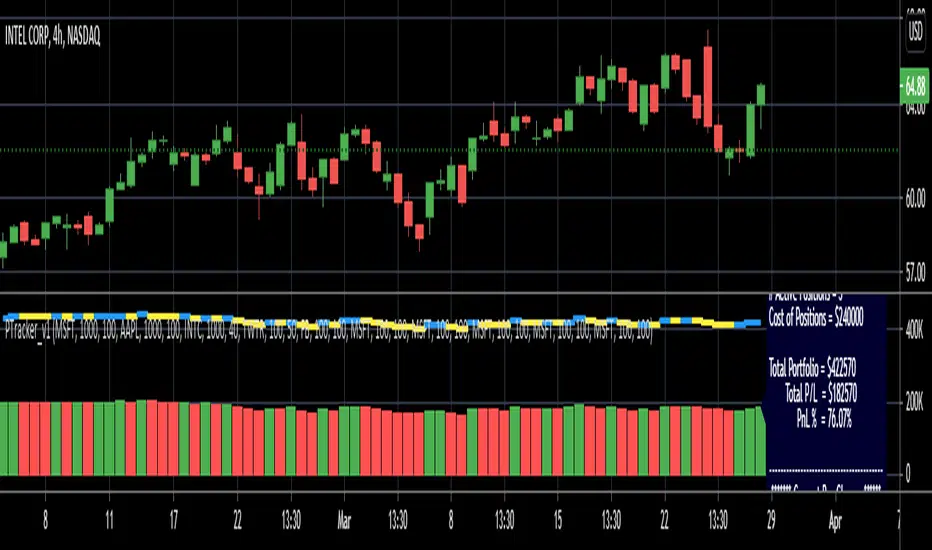
Simple Portfolio TrackerThis is just a simple portfolio tracker that i started to play around with - i'm sure there are smarter ways to do this, but i chose the simpler way :) -- please feel free to use this, or consider it as a starting point to your own indicator.
i will come back later and add some more stuff once i get time. for example, show the total value, recent change, P&L % ..etc
So the simple idea is to track a portfolio of few positions and watch how the total portfolio and the PnL changes over time as the price of the individual holdings move up and down. it can be added to any chart.
The code is currently set to track 5 positions - settings allow to enter if the positions is used or not, symbol, amount and cost price..
** note: more positions can be added by editing the code and copying and pasting the marked "position block" that contains the input statements and the calculations, then changing/replacing the position identifier (_1, _2, ..etc) in all variables with new number..
--- don't forget to add these extra positions you insert in the code to the formula lines that calculate the totals
i tried to make this as easy as possible in the code. the code includes a sample portfolio as default values just to help "demo" how this works
the input is made easy, thanks to the recent addition of the "inline" feature in the input() statement
i don't know if some traders will find this useful ?? or if more about how to use it is needed.. let me know in the comments.. as i mentioned, i was just playing with the idea over the weekend so didn't really put a lot of work into it.
Credits and thanks to @boji1 for inspiring this :)
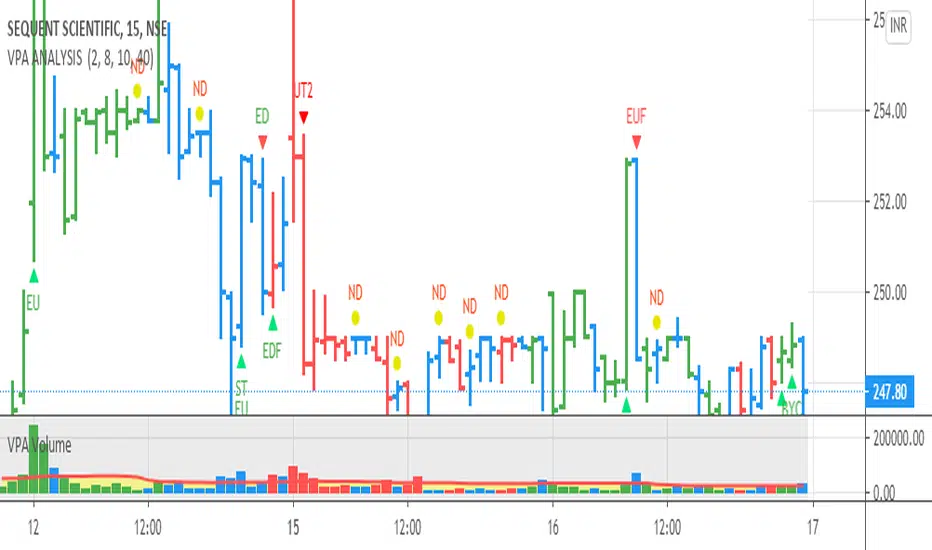
VPA ANALYSIS VPA Analysis provide the indications for various conditions as per the Volume Spread Analysis concept. The various legends are provided below
LEGEND DETAILS
UT1 - Upthrust Bar: This will be widespread Bar on high Volume closing on the low. This normally happens after an up move. Here the smart money move the price to the High and then quickly brings to the Low trapping many retail trader who rushed into in order not to miss the bullish move. This is a bearish Signal
UT2 -Upthrust Bar Confirmation: A widespread Down Bar following a Upthrust Bar. This confirms the weakness of the Upthrust Bar. Expect the stock to move down
Confirms . This is a Bearish Signal
PUT - Pseudo Upthrust: An Upthrust Bar in bar action but the volume remains average. This still indicates weakness. Indicate Possible Bearishness
PUC -Pseudo Upthrust Confirmation: widespread Bar after a pseudo–Upthrust Bar confirms the weakness of the Pseudo Upthrust Bar
Confirms Bearishness
BC - Buying Climax: A very wide Spread bar on ultra-High Volume closing at the top. Such a Bar indicates the climatic move in an uptrend. This Bar traps many retailers as the uptrend ends and reverses quickly. Confirms Bearishness
TC - Trend Change: This Indicates a possible Trend Change in an uptrend. Indicates Weakness
SEC- Sell Condition: This bar indicates confluence of some bearish signals. Possible end of Uptrend and start of Downtrend soon. Bearish Signal
UT - Upthrust Condition: When multiple bearish signals occur, the legend is printed in two lines. The Legend “UT” indicates that an upthrust condition is present. Bearish Signal
ND - No demand in uptrend: This bar indicates that there is no demand. In an uptrend this indicates weakness. Bearish Signal
ND - No Demand: This bar indicates that there is no demand. This can occur in any part of the Trend. In all place other than in an uptrend this just indicates just weakness
ED - Effort to Move Down: Widespread Bar closing down on High volume or above average volume . The smart money is pushing the prices down. Bearish Signal
EDF - Effort to Move Down Failed: Widespread / above average spread Bar closing up on High volume or above average volume appearing after ‘Effort to move down” bar.
This indicates that the Effort to move the pries down has failed. Bullish signal
SV - Stopping Volume: A high volume medium to widespread Bar closing in the upper middle part in a down trend indicates that smart money is buying. This is an indication that the down trend is likely to end soon. Indicates strength
ST1 - Strength Returning 1: Strength seen returning after a down trend. High volume adds to strength. Indicates Strength
ST2 - Strength Returning 2: Strength seen returning after a down trend. High volume adds to strength.
BYC - Buy Condition: This bar indicates confluence of some bullish signals Possible end of downtrend and start of uptrend soon. Indicates Strength
EU - Effort to Move Up: Widespread Bar closing up on High volume or above average volume . The smart money is pushing the prices up. Bullish Signal
EUF - Effort to Move Up Failed: Widespread / above average spread Bar closing down on High volume or above average volume appearing after ‘Effort to move up” bar.
This indicates that the Effort to move the pries up has failed. Bearish Signal
LVT- Low Volume Test: A low volume bar dipping into previous supply area and closing in the upper part of the Bar. A successful test is a positive sign. Indicates Strength
ST(after a LVT ) - Strength after Successful Low Volume Test: An up Bar closing near High after a Test confirms strength. Bullish Signal
RUT - Reverse Upthrust Bar: This will be a widespread Bar on high Volume closing on the high is a Down Trend. Here the buyers have become active and move the prices from the low to High. The down Move is likely to end and up trend likely to start soon. indicates Strength
NS - No supply Bar: This bar indicates that there is no supply. This is a sign of strength especially in a down trend. Indicates strength
ST - Strength Returns: When multiple bullish signals occur, the legend is printed in two lines. The Legend “ST” indicates that an condition of strength other than the condition mentioned in the second line is present. Bullish Signals
BAR COLORS
Green- Bullish / Strength
Red - Bearish / weakness
Blue / White - Sentiment Changing from bullish to Bearish and Vice Versa
Pinescript v4 - The Holy Grail (Trailing Stop)After studying several other scripts, I believe I have found the Holy Grail! (Or perhaps I've just found a bug with Tradingview's Pinescript v4 language) Anyhow, I'm publishing this script in the hope that someone smarter than myself could shed some light on the fact that adding a trailing stop to any strategy seems to make it miraculously...no that's an understatement...incredulously, stupendously, mind-bendingly profitable. I'm talking about INSANE profit factors, higher than 200x, with drawdowns of <10%. Sounds too good to be true? Maybe it is...or you could hook it up to your LIVE broker, and pray it doesn't explode. This is an upgraded version of my original Pin Bar Strategy.
Recommended Chart Settings:
Asset Class: Forex
Time Frame: H1
Long Entry Conditions:
a) Exponential Moving Average Fan up trend
b) Presence of a Bullish Pin Bar
c) Pin Bar pierces the Exponential Moving Average Fan
Short Entry Conditions:
a) Exponential Moving Average down trend
b) Presence of a Bearish Pin Bar
c) Pin Bar pierces the Exponential Moving Average Fan
Exit Conditions:
a) Trailing stop is hit
b) Moving Averages cross-back (optional)
c) It's the weekend
Default Robot Settings:
Equity Risk (%): 3 //how much account balance to risk per trade
Stop Loss (x*ATR, Float): 0.5 //stoploss = x * ATR, you can change x
Stop Loss Trail Points (Pips): 1 //the magic sauce, not sure how this works
Stop Loss Trail Offset (Pips): 1 //the magic sauce, not sure how this works
Slow SMA (Period): 50 //slow moving average period
Medium EMA (Period): 18 //medium exponential moving average period
Fast EMA (Period): 6 //fast exponential moving average period
ATR (Period): 14 // average true range period
Cancel Entry After X Bars (Period): 3 //cancel the order after x bars not triggered, you can change x
Backtest Results (2019 to 2020, H1, Default Settings):
AUDUSD - 1604% profit, 239.6 profit factor, 4.9% drawdown (INSANE)
NZDUSD - 1688.7% profit, 100.3 profit factor, 2.5% drawdown
GBPUSD - 1168.8% profit, 98.7 profit factor, 0% drawdown
USDJPY - 900.7% profit, 93.7 profit factor, 4.9% drawdown
USDCAD - 819% profit, 31.7 profit factor, 8.1% drawdown
EURUSD - 685.6% profit, 26.8 profit factor, 5.9% drawdown
USDCHF - 1008% profit, 18.7 profit factor, 8.6% drawdown
GBPJPY - 1173.4% profit, 16.1 profit factor, 7.9% drawdown
EURAUD - 613.3% profit, 14.4 profit factor, 9.8% drawdown
AUDJPY - 1619% profit, 11.26 profit factor, 9.1% drawdown
EURJPY - 897.2% profit, 6 profit factor, 13.8% drawdown
EURGBP - 608.9% profit, 5.3 profit factor, 9.8% drawdown (NOT TOO SHABBY)
As you can clearly see above, this forex robot is projected by the Tradingview backtester to be INSANELY profitable for all common forex pairs. So what was the difference between this strategy and my previous strategies? Check my code and look for "trail_points" and "trail_offset"; you can even look them up in the PineScript v4 documentation. They specify a trailing stop as the exit condition, which automatically closes the trade if price reverses against you.
I however suspect that the backtester is not properly calculating intra-bar price movement, and is using a simplified model. With this simplfied approach, the trailing stop code becomes some sort of "holy grail" generator, making every trade entered profitable.
Risk Warning:
This is a forex trading strategy that involves high risk of equity loss, and backtest performance will not equal future results. You agree to use this script at your own risk.
Hint:
To get more realistic results, and *maybe* overcome the intrabar simulation error, change the settings to: "Stop Loss Trail Points (pips)": 100
I am not sure if this eradicates the bug, but the entries and exits look more proper, and the profit factors are more believable.

Trend M ver1this simple tool a helper for trader in order to put your target at the correct places:)
so script based on Trend M (open script in my page)
the script based on non security MTF that allow us to detect the M = mean average of resistance and support by MTF
best setting is either monthly or weekly
when you go on lower chart just put in the min the exact TF that you on. 60 min =60
2 hour 120
5 min =5
etc
when ever the trend is above the mean or M then it bullish =lime color. bellow the M is bearish =red color
the R1 and S level are % from the mean . so it can act for us either target or as stop loss
you can set the R1 or S1 as you like by % ratio . so 0.01 is 1%
0.1 is 10 % etc
all you need to find is the weekly or monthly range of the asset then put the % ratio that you wish up or down
you can use it with trend lines or other method .it just another tool to make you trade smarter

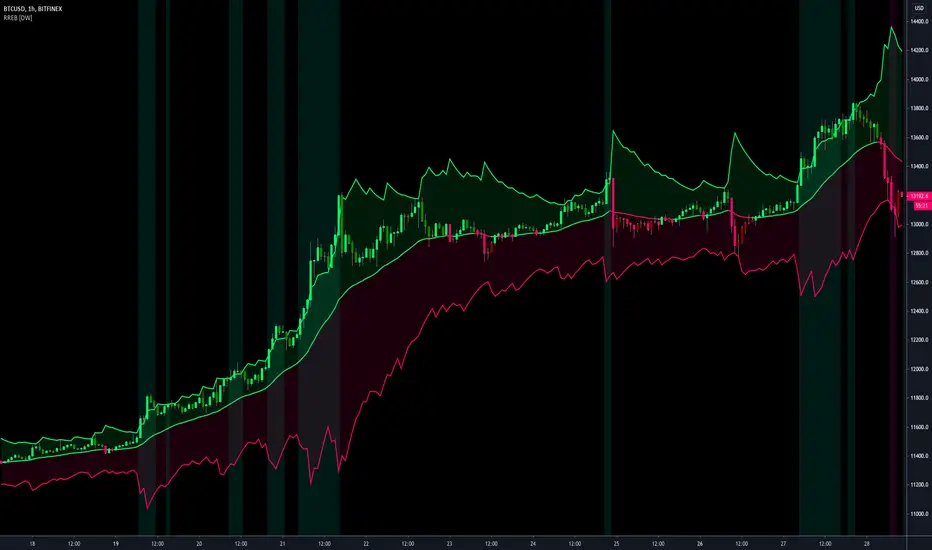
Resampling Reverse Engineering Bands [DW]This is an experimental study designed to reverse engineer price levels from centered oscillators at user defined sample rates.
This study aims to educate users on the process of oscillator reverse engineering, and to give users an alternative perspective on some of the most commonly used oscillators in the trading game.
Reverse engineering price levels from an oscillator is actually a rather simple, straightforward process.
Rather than plugging price values into a function to solve for oscillator values, we rearrange the function using some basic algebraic operations and plug in a specified oscillator value to solve for price values instead.
This process tells us what price value is needed in order for the oscillator to equal a certain value.
For example, if you wanted to know what price value would be considered “overbought” or “oversold” according to your oscillator, you can do that using this process.
In this study, the reverse engineering functions are used to calculate the price values of user defined high and low oscillator thresholds, and the price values for the oscillator center.
This allows you to visualize what prices will trigger thresholds as a sort of confidence interval, which is information that isn't inherently available when simply analyzing the oscillator directly.
This script is equipped with three reverse engineering functions to choose from for calculating the band values:
-> Reverse Relative Strength Index (RRSI)
-> Reverse Stochastic Oscillator (RStoch)
-> Reverse Commodity Channel Index (RCCI)
You can easily select the function you want to utilize from the "Band Calculation Type" dropdown tab.
These functions are specially designed to calculate at any sample rate (up to 1 bar per sample) utilizing the process of downsampling that I introduced in my Resampling Filter Pack.
The sample rate can be determined with any of these three methods:
-> BPS - Resamples based on the number of bars.
-> Interval - Resamples based on time in multiples of current charting timeframe.
-> PA - Resamples based on changes in price action by a specified size. The PA algorithm in this script is derived from my Range Filter algorithm.
The range for PA method can be sized in points, pips, ticks, % of price, ATR, average change, and absolute quantity.
Utilizing downsampled rates allows you to visualize the reverse engineered values of an oscillator calculated at larger sample scales.
This can be rather beneficial for trend analysis since lower sample rates completely remove certain levels of noise.
By default, the sample rate is set to 1 BPS, which is the same as bar-to-bar calculation. Feel free to experiment with the sample rate parameters and configure them how you like.
Custom bar colors are included as well. The color scheme is based on disparity between sources and the reverse engineered center level.
In addition, background highlights are included to indicate when price is outside the bands, thus indicating "overbought" and "oversold" conditions according to the thresholds you set.
I also included four external output variables for easy integration of signals with other scripts:
-> Trend Signals (Current Resolution Prices) - Outputs 1 for bullish and -1 for bearish based on disparity between current resolution source and the central level output.
-> Trend Signals (Resampled Prices) - Outputs 1 for bullish and -1 for bearish based on disparity between resampled source and the central level output.
-> Outside Band Signal (Current Resolution Prices) - Outputs 1 for overbought and -1 for oversold based on current resolution source being outside the bands. Returns 0 otherwise.
-> Outside Band Signal (Resampled Prices) - Outputs 1 for overbought and -1 for oversold based on resampled source being outside the bands. Returns 0 otherwise.
To use these signals with another script, simply select the corresponding external output you want to use from your script's source input dropdown tab.
Reverse engineering oscillators is a simple, yet powerful approach to incorporate into your momentum or trend analysis setup.
By incorporating projected price levels from oscillators into our analysis setups, we are able to gain valuable insights, make (potentially) smarter trading decisions, and visualize the oscillators we know and love in a totally different way.
I hope you all find this script useful and enjoyable!
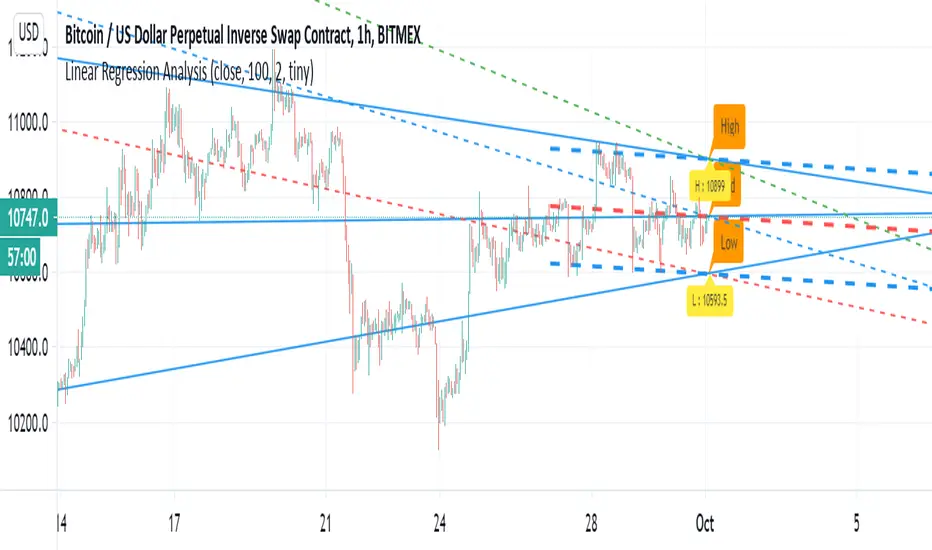
Linear Regression AnalysisJust another linear regression tool to play with :)
I have to say that linear regression is one of my favorite indictor so i just try to play to show
how its we can make it smarter:)
the dashed lines are represent linear regression clone with high low and mid level shown.
the blue thin line show longer trend projection
the trend is option that can use for shorter trend
Hyper Frame Fibo MA RibbonsIntroduction
Moving averages are an integral part of the TA world. There are different types of moving averages and each person uses them depending on their strategy and market conditions.
Meanwhile, the main variable in calculating the averages is their LENGTH. This value is optional, but not every value is applicable.
After much experience in the world of financial markets, I came to the conclusion that although the most popular length values are 20, 50, 100, and 200, the Fibonacci number come with surprising results .
Description
The following script calculates seven averages with the length of Fibonacci numbers (34, 55, 89, 144, 233, 377 and 610) with the formula of your choice (SMA, EMA, WMA, HMA) and shows that we named it FiboMa .
You can also have Bollinger Bands with the desired frame at the same time.
This is not the whole story...
You can see the same values from smaller or larger frames at the same time!
We named this feature Hyper Frame Vision .
It is possible to display values for FiboMa up to three hyper frames (with the main frame a total of 4 levels) and in the Bollinger Bands one hyper frame (with the main frame a total of 2 levels).
By default, the display of FiboMa hyper frame values is limited to the last 10 bars, which you can change to an arbitrary value by changing the source code.
The display of hyper frame values is not limited for Bollinger Band.
What is its use? What is it good for?
Support and Resistance
Using dynamic support / resistance is much smarter than static! This protects you from the risk of many fake breaks, and your profit and loss limits will be more flexible and more efficient.
The intersection of FiboMa ribbons are potential points of support / resistance.
We use colors to easily identify supports / resistances.
Any average lower than the price is assumed as support and displayed in green, and any average above the price is assumed as resistance so displayed in red.
So the color of the averages is dynamic.
The color of FiboMa is a range from red to green. Whatever colors get saturated , the lenght is longer and the more power it has as support / resistance.
Volatility
With this script, you also have the ability to monitor the amount of market volatility ! The combination of Bollinger Bands and FiboMa provides a clear view of the market volatility.
The decrease and compression of the FiboMa width is a sign of a decrease in volatility and vice versa.
Trend
I don't see the need for additional explanation, only whenever the price is higher than the middle band , the BB cloud is green , and whenever it is lower , is red .
The wider FiboMa means the stronger trend.
How to use
In the script settings you have the ability to enable or disable anything except.
---------------------------------------------
Similar scripts have been published before and we were inspired by them and tried to improve idea and code uniqe one.
I hope it will be useful .. Support us with your likes and comments .. We have anothers great script .. Just started.

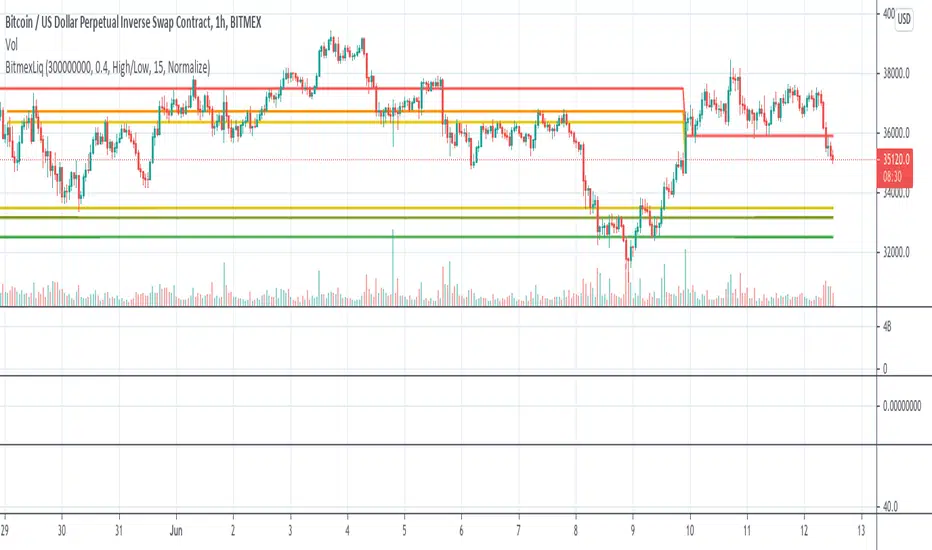
BitMEX Liquidation LevelsThis indicator plots BitMEX liquidation levels:
- 25x
- 50x
- 100x
The indicator works as following:
The underlying assumption (as with all liquidation calculations) obviously is that traders used fixed margin or go "all in" on their cross-margin account.
You then can configure a minimum trade volume and a minimum price change in percent for a candle to start computing liquidation levels from that candle
Additionally: configure the price base for the liqudation level: Candle high or low (default) works well, but you can also set "candle close" or "median high/low"
The indicator will then plot horizontal lines on the main chart showing price levels where many positions opened at the configured "start candle" will likely get liquidated.
It works for all BitMEX contracts and while it has been optimized for BitMEX, it will work on other exchanges with the same leverage levels (25x, 50x, 100x) and maintenance margin requirements too.
This indicator uses the Smart Volume indicator to compute the volume at the "start volume candle" setting where the liquidation level starts. This indicator can be found here: Smart Volume:
Price-Line Channel - A Friendly Support And Resistance IndicatorIntroduction
Lines are the most widely used figures in technical analysis, this is due to the linear trends that some securities posses (daily log SP500 for example), support and resistances are also responsible for the uses of lines, basically linear support and resistances are made with the assumption that the line connecting two local maximas or minimas will help the user detect a new local maxima or minima when the price will cross the line.
Technical indicators attempting to output lines have always been a concern in technical analysis, the mostly know certainly being the linear regression, however any linear models would fit in this category. In general those indicators always reevaluate their outputs values (repainting), others non repainting indicators returning lines are sometimes to impractical to set-up. This is what has encouraged me to make a simpler indicator based on the framework used in the recursive bands indicator that i published.
The proposed indicator aim to be extremely flexible and easy to use while returning linear support and resistances, an option that allow readjustment is also introduced, thus allowing for a "smarter" indicator.
The Indicator
The indicator return two extremities, the upper one aim to detect resistance points while the lower one aim to detect support points. The length setting control the steepness of the line, with higher values of length involving a lower slope, this make the indicator less reactive and interact with the price less often.
The name "price-line" comes from the fact that the channel is dependent on its own interaction with the price, therefore a breakout methodology can also be used, where price is up-trending when crossing with the upper extremity and down trending when crossing with the lower one.
Readjusted Option
The line steepness can be readjusted based on the market volatility, it make more sense for the line to be more steep when the market is more volatile, thus making it converge faster toward the price, this of course is done at the cost of some linearity. This is achieved by checking the "readjustment" option. The effects can be shown on BTCUSD, below the indicator without the readjusted option :
when the "readjustment" option is checked we have the following results :
The volatile down movement on BTCUSd make the upper extremity converge faster toward the price, this option can be great for volatile markets.
Conclusion
The recursive bands indicator prove to be an excellent framework that allow for the creation of lots of indicators, the proposed indicator is extremely efficient and provide an easy solution for returning linear support and resistances without much drawbacks, the readjusted option allow the indicator to adapt to the market volatility at the cost of linearity.
The performance of the indicator is relative to the motion of the price, however the indicator show signs of returning accurate support and resistances points. I hope the indicator find its use in the community.
Thanks for reading !
Note
Respect the house rules, always request permission before publishing open source code. This is an original work, requesting permission is the least you can do.

T-Step LSMAIntroduction
The trend step indicator family has produced much interest in the community, those indicators showed in certain cases robustness and reactivity. Their ease of use/interpretation is also a major advantage. Although those indicators have a relatively good fit with the input price, they can still be improved by introducing least-squares fitting on their calculations. This is why i propose a new indicator (T-Step LSMA) which aim to gather all the components of the trend-step indicator family (including the auto-line family).
The indicator will use as a threshold the mean absolute error between the input and the output (T-Channel) scaled with the efficiency ratio (Efficient Trend Step) while using least squares in order to provide a better fit with the price (Auto-Filter).
The Indicator
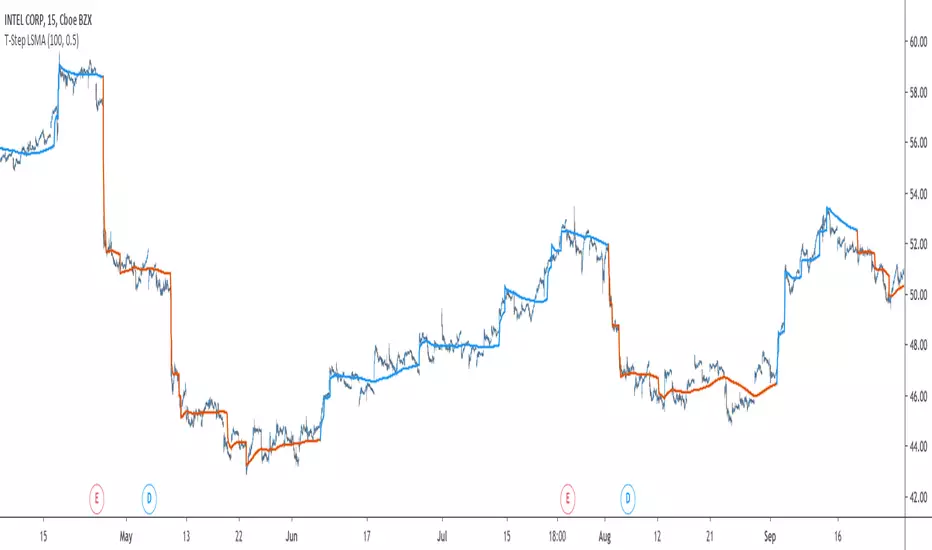
The interpretation of the indicator is easy, the indicator estimate an up-trending market when in blue, down-trending when in orange, the signal only depend on the trend-step part ( b in the code).
length control the period of the efficiency ratio as well as any components in the lsma calculation. The efficiency ratio allow to provide adaptivity, therefore the threshold will be lower when market is trending and higher when market is ranging.
Sc control the amount of feedback of the indicator, a value of 1 will use only the closing price as input, a value of 0.5 will use 50% of the closing price/indicator output as input, this allow to get smoother results.
It is possible to get the non-smooth version of the indicator by checking "No Smoothing".
This allow the indicator to filter more information.
Least Squares Smoothing - Benefits
One could ask why introducing least squares smoothing, there are several reasons to this choice, we have seen that trend-step indicators are boxy, they filter most of the variational information in the price, introducing least squares smoothing allow to gain back some of this variational information while providing a better fit with the price, the indicator is more noisy but also more practical in certain situations.
For example the indicator in its boxy form can't really be useful as input for other indicators, which is not the case with this version.
Relative strength index of period 14 using the proposed indicator as input.
Down-Sides
The indicator is dependent on the time frame used, larger time frames resulting in an indicator overfitting, sticking with lower time frames might be ideal. The indicator behavior might also change depending on the market in which it is applied.
Setting Up Alerts For The Indicator
Alerts conditions are already set, in order to create an alert based on the indicator follow these steps :
Go to the alert section (the alarm clock) -> create new alert -> select T-Step LSMA in condition -> Below select Up or Dn (Up for a up-trending alert and Dn for a down-trending alert)
In option select "once per bar close", change the message if you want a personalized message.
Conclusion
I don't think i'll post other indicators related to the trend-step framework for the time to comes, nonetheless the ones posted proven to have interesting results as well as many upsides. Although i don't think they would generate positive long-terms returns they could still be of use when using smarter volatility metrics as threshold. The proposed indicator conserve more information than its relatives and might find some use as input for other indicators.
Recommended Use Of The Code
Although i don't put restrictions on the code usage, i still recommend creative and pertinent changes to be made, graphical changes or any minor changes are not necessary, remember that such practice is disrespectful toward the author, you don't want to load up the tradingview servers for nothing right ?
Support Me
Making indicators sure is hard, it takes time and it can be quite lonely to, so i would love talking with you guys while making them :) There isn't better support than the one provided by your friends so drop me a message.
Kaufman Adaptive Least Squares Moving AverageIntroduction
It is possible to use a wide variety of filters for the estimation of a least squares moving average, one of the them being the Kaufman adaptive moving average (KAMA) which adapt to the market trend strength, by using KAMA in an lsma we therefore allow for an adaptive low lag filter which might provide a smarter way to remove noise while preserving reactivity.
The Indicator
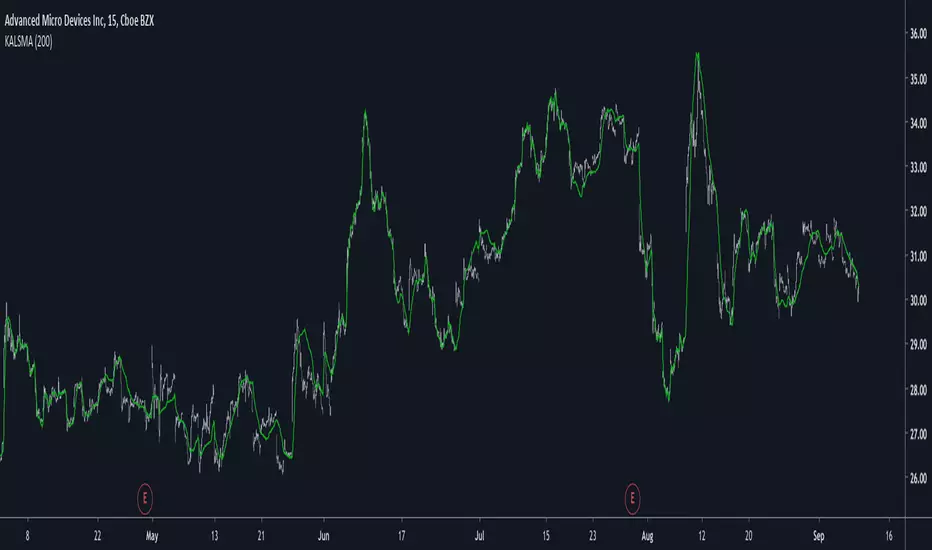
The lsma aim to minimize the sum of the squared residuals, paired with KAMA we obtain a great adaptive solution for smoothing while conserving reactivity. Length control the period of the efficiency ratio used in KAMA, higher values of length allow for overall smoother results. The pre-filtering option allow for even smoother results by using KAMA as input instead of the raw price.
The proposed indicator without pre-filtering in green, a simple moving average in orange, and a lsma with all of them length = 200. The proposed filter allow for fast and precise crosses with the moving average while eliminating major whipsaws.
Same setup with the pre-filtering option, the result are overall smoother.
Conclusion
The provided code allow for the implementation of any filter instead of KAMA, try using your own filters. Thanks for reading :)
Kaufman Adaptive Moving AverageKaufman Adaptive Moving Average script.
This indicator was originally developed by Perry J. Kaufman (`Smarter Trading: Improving Performance in Changing Markets`, 1995).

Candle CountingI was talking with one of the biggest hedge fund traders in the world the other day. He goes to me, "Brian, why don't you come and work for us, since you're a better trader than anyone at our firm?" Well I said I would, but there's no one there with an iq as high as mine, so I'd have no one to talk to when I'm eatin my sammiches. Man I'm a savant mate, I'm a f***ing CANDLE COUNTER. I tell people all the time, know your market. And that's your tip of the day really, I mean nobody out there knows Yen better than me. I mean the other day I was 70,000 in the hole, but I didn't get out, I was balls deep making a cheese sammich on the George Forman. Now I mean you can try and do what I'm doing, but understand something, I am 100% smarter than you, and your machines. In the industry, they call me Mr. Yen, I touch the sun, and my d*ck, regularly.

HADYAN NEW SCALPING V 2.9//@version=5
indicator(title='HADYAN NEW SCALPING V 2.9', overlay=true, max_lines_count=500, max_labels_count=500, max_boxes_count=500)
// ====================================================================================================
// BAGIAN 1: PENGATURAN UTAMA & LOGIKA INTI
// ====================================================================================================
styleGroup = 'Gaya Trading (Trading Style)'
tradingStyle = input.string('Mencuri Profit', title='Pilih Gaya Trading', options= , group=styleGroup)
// --- FITUR ANTI-KEDIP ---
useConfirmedBar = input.bool(true, title='✅ Sinyal Anti-Kedip (Tunggu Close)?', group=styleGroup)
a_custom = input.float(1.0, title='Key Value (Custom)', group=styleGroup)
c_custom = input.int(10, title='ATR Period (Custom)', group=styleGroup)
var float a = 1.0
var int c = 10
// Variabel filter internal
var bool _useEmaFilter = false
var bool _useRsiFilter = false
var bool _useCandleFilter = false
var bool _useVolumeFilter = false
var bool _useAdxFilter = false
var bool _useSnrFilter = false
miscGroup = 'Pengaturan Filter (Tanpa Ghost)'
waspadaFactor = input.float(0.75, title='Waspada - Faktor Jarak ATR', group=miscGroup)
tamakFactor = input.float(3.0, title='Jangan Tamak - Faktor Jarak ATR', group=miscGroup)
// --- FILTER TREN (EMA) ---
useEmaFilter = input.bool(false, title='Gunakan Filter Tren EMA Cross?', group=miscGroup)
emaFastLen = input.int(21, title='Periode EMA Cepat', group=miscGroup)
emaSlowLen = input.int(50, title='Periode EMA Lambat', group=miscGroup)
mtfTimeframe = input.string('15', title='Timeframe MTF', group=miscGroup)
// --- FILTER MOMENTUM ---
useRsiFilter = input.bool(false, title='Gunakan Filter Momentum RSI?', group=miscGroup)
rsiFilterLen = input.int(14, title='Periode RSI', group=miscGroup)
rsiBuyLevel = input.float(50.0, title='RSI Buy Level (Min)', group=miscGroup)
rsiSellLevel = input.float(50.0, title='RSI Sell Level (Max)', group=miscGroup)
rsiReversalLevel = input.float(70.0, title='RSI Reversal Level (70/30)', group=miscGroup)
// --- FILTER LAIN ---
useCandleFilter = input.bool(false, title='Gunakan Filter Pola Candlestick?', group=miscGroup)
useVolumeFilter = input.bool(false, title='Gunakan Filter Volume?', group=miscGroup)
volumeLen = input.int(20, title='Periode Volume MA', group=miscGroup)
volumeThreshold = input.float(0.3, title='Min. Volume Factor', group=miscGroup)
// --- FILTER SNR ---
useSnrFilter = input.bool(false, title='Gunakan Filter Support/Resistance (SNR)?', group=miscGroup)
snrLookback = input.int(10, title='Pivot Lookback (SNR)', group=miscGroup)
snrDistanceFactor = input.float(2.0, title='Jarak Max ke S/R (xATR)', group=miscGroup)
// --- FILTER ADX ---
useAdxFilter = input.bool(false, title='Gunakan Filter Kondisi Pasar (ADX)?', group=miscGroup)
adxLen = input.int(14, title='Periode ADX', group=miscGroup)
adxMinLevel = input.float(15.0, title='ADX Min. Level', group=miscGroup)
// ** PENGATURAN MANAJEMEN RISIKO **
riskGroup = 'Manajemen Risiko'
useAutoBreakeven = input.bool(true, title='Gunakan Auto Breakeven?', group=riskGroup)
breakevenFactor = input.float(1.0, title='Breakeven Factor (Dalam R/ATR)', group=riskGroup)
// ==============================================
// --- INPUT FITUR TAMBAHAN ---
// ==============================================
meterGroup = 'Visual & Tambahan'
showCandlePanel = input.bool(true, title='Tampilkan Panel Info Candle?', group=meterGroup)
showCandleArrows = input.bool(false, title='Tampilkan Panah Tiap Candle?', group=meterGroup)
// ==============================================
// --- FITUR UPGRADE ---
// ==============================================
upgradeGroup = '🔥 Fitur Upgrade'
useConfirmFilter = input.bool(false, title=' Gunakan Konfirmasi Momentum (MidPoint)?', group=upgradeGroup)
useReversalExit = input.bool(false, title=' Gunakan Exit Cepat (Candle Pembalikan)?', group=upgradeGroup)
showReEntry = input.bool(true, title=' Tampilkan Sinyal Re-Entry (Add Position)?', group=upgradeGroup)
showAggressiveEMA = input.bool(false, title=' Tampilkan Sinyal Agresif (EMA Bounce)?', group=upgradeGroup)
emaAggressiveFastLen = input.int(9, title=' EMA Cepat (Agresif)', group=upgradeGroup)
emaAggressiveSlowLen = input.int(21, title=' EMA Lambat (Agresif)', group=upgradeGroup)
useBBTamak = input.bool(false, title=' Gunakan Target Profit Dinamis (BB)?', group=upgradeGroup)
bbLen = input.int(20, title=' Periode Bollinger Bands', group=upgradeGroup)
bbStdDev = input.float(2.0, title=' Deviasi Bollinger Bands', group=upgradeGroup)
showDashboard = input.bool(true, title=' Tampilkan Dashboard Pro?', group=upgradeGroup)
showAdvisorBubble = input.bool(true, title=' Tampilkan Gelembung Advisor di Chart?', group=upgradeGroup)
// --- BARU: ZONE INPUT ---
showSmartZones = input.bool(true, title=' Tampilkan Zona Buy/Sell (Supply/Demand)?', group=upgradeGroup)
zoneLookback = input.int(5, title=' Kekuatan Zona (Lookback Pivot)', group=upgradeGroup)
// ====================================================================================================
// BAGIAN UPGRADE: PIVOT, FIBO & STOCHASTIC (NEW)
// ====================================================================================================
pivotGroup = "Pivot, Fibo & Stoch (UPGRADE)"
// Pivot Inputs
showPivotPoints = input.bool(true, title='Tampilkan Daily Pivot (R1-S2)?', group=pivotGroup)
pivotColor = input.color(color.new(color.orange, 0), "Warna Garis Pivot Utama", group=pivotGroup)
// Fibo Inputs
showFiboLevels = input.bool(true, title='Tampilkan Fibo Retracement (CLEAN)?', group=pivotGroup)
fiboXOffset = input.int(10, title='Geser Fibo (X-Offset)', group=pivotGroup)
// Stochastic Inputs
showStochChart = input.bool(true, title='Tampilkan MINI CHART Stochastic (Realtime)?', group=pivotGroup)
stochWidth = input.int(30, title='Lebar Chart (Bars)', minval=10, maxval=100, group=pivotGroup)
// ==============================================
// --- DEKLARASI VAR GLOBAL ---
// ==============================================
var table infoPanel_m = table.new(position.bottom_center, 3, 2, border_width = 1, bgcolor = color.new(#363a45, 0))
var string finalDir_m = ""
var table dashboardPanel = table.new(position.top_right, 2, 10, border_width = 1, bgcolor = color.new(#363a45, 80))
var int rsiLen_actual = rsiFilterLen
var int adxLen_actual = adxLen
var string marketModeText = "..."
var color marketModeColor = color.gray
// ==============================================
// --- LOGIKA PEMILIHAN GAYA (ADAPTIF) ---
// ==============================================
if tradingStyle == 'Mencuri Profit'
a := 1.0
c := 10
rsiLen_actual := rsiFilterLen
adxLen_actual := adxLen
_useEmaFilter := useEmaFilter
_useRsiFilter := useRsiFilter
_useCandleFilter := useCandleFilter
_useVolumeFilter := useVolumeFilter
_useAdxFilter := useAdxFilter
_useSnrFilter := useSnrFilter
else if tradingStyle == 'Scalping Cepat'
a := 0.8
c := 8
rsiLen_actual := 7
adxLen_actual := 10
_useEmaFilter := useEmaFilter
_useRsiFilter := useRsiFilter
_useCandleFilter := useCandleFilter
_useVolumeFilter := useVolumeFilter
_useAdxFilter := useAdxFilter
_useSnrFilter := useSnrFilter
else if tradingStyle == 'Swing Santai'
a := 2.0
c := 15
rsiLen_actual := 21
adxLen_actual := 20
_useEmaFilter := useEmaFilter
_useRsiFilter := useRsiFilter
_useCandleFilter := useCandleFilter
_useVolumeFilter := useVolumeFilter
_useAdxFilter := useAdxFilter
_useSnrFilter := useSnrFilter
else if tradingStyle == 'Sangat Akurat'
a := 2.0
c := 15
rsiLen_actual := 21
adxLen_actual := 20
_useEmaFilter := true
_useRsiFilter := true
_useCandleFilter := true
_useVolumeFilter := true
_useAdxFilter := true
_useSnrFilter := true
else if tradingStyle == 'Custom'
a := a_custom
c := c_custom
rsiLen_actual := rsiFilterLen
adxLen_actual := adxLen
_useEmaFilter := useEmaFilter
_useRsiFilter := useRsiFilter
_useCandleFilter := useCandleFilter
_useVolumeFilter := useVolumeFilter
_useAdxFilter := useAdxFilter
_useSnrFilter := useSnrFilter
// ==============================================
// --- LOGIKA INTI & PERHITUNGAN FILTER ---
// ==============================================
xATR = ta.atr(c)
nLoss = a * xATR
src = close
// --- FILTER TREN ---
emaFast = ta.ema(src, emaFastLen)
emaSlow = ta.ema(src, emaSlowLen)
bool emaCrossOkForBuy = close > emaSlow and emaFast > emaSlow
bool emaCrossOkForSell = close < emaSlow and emaFast < emaSlow
// OPTIMIZED: Added gaps parameter to avoid repainting on historical data
emaMtf = request.security(syminfo.tickerid, mtfTimeframe, emaSlow , lookahead = barmerge.lookahead_off)
bool mtfOkForBuy_ori = close > emaMtf
bool mtfOkForSell_ori = close < emaMtf
bool emaOkForBuy = not _useEmaFilter or (tradingStyle == 'Sangat Akurat' ? mtfOkForBuy_ori : emaCrossOkForBuy)
bool emaOkForSell = not _useEmaFilter or (tradingStyle == 'Sangat Akurat' ? mtfOkForSell_ori : emaCrossOkForSell)
// --- FILTER MOMENTUM ---
rsiFilter = ta.rsi(src, rsiLen_actual)
bool rsiOkForBuy = not _useRsiFilter or rsiFilter > rsiBuyLevel
bool rsiOkForSell = not _useRsiFilter or rsiFilter < rsiSellLevel
// --- FILTER CANDLE & VOLUME ---
bool bullishEngulfing = (close > open and close < open and close > open and open < close )
bool bearishEngulfing = (close < open and close > open and close < open and open > close )
bool candleOkForBuy = not _useCandleFilter or bullishEngulfing
bool candleOkForSell = not _useCandleFilter or bearishEngulfing
avgVolume = ta.sma(volume, volumeLen)
bool volumeOkForBuy = not _useVolumeFilter or (volume > avgVolume * volumeThreshold)
bool volumeOkForSell = not _useVolumeFilter or (volume > avgVolume * volumeThreshold)
// --- FILTER SNR ---
pivotHigh = ta.pivothigh(high, snrLookback, snrLookback)
pivotLow = ta.pivotlow(low, snrLookback, snrLookback)
float nearestResistance = ta.valuewhen(not na(pivotHigh), pivotHigh, 0)
float nearestSupport = ta.valuewhen(not na(pivotLow), pivotLow, 0)
float snrDistance = xATR * snrDistanceFactor
bool nearResistance = math.abs(high - nearestResistance) < snrDistance and high > nearestResistance
bool nearSupport = math.abs(low - nearestSupport) < snrDistance and low < nearestSupport
bool snrOkForBuy = not _useSnrFilter or not nearResistance
bool snrOkForSell = not _useSnrFilter or not nearSupport
// --- FILTER ADX ---
= ta.dmi(adxLen_actual, adxLen_actual)
bool adxMarketOk = not _useAdxFilter or adxValue > adxMinLevel
bool adxDirectionOkForBuy = adxMarketOk and diPlus > diMinus
bool adxDirectionOkForSell = adxMarketOk and diMinus > diPlus
bool adxOkForBuy = not _useAdxFilter or adxDirectionOkForBuy
bool adxOkForSell = not _useAdxFilter or adxDirectionOkForSell
// ==============================================
// --- LOGIKA UPGRADE 1 ---
// ==============================================
float prevMidPoint = (high + low ) / 2
bool confirmOkForBuy = not useConfirmFilter or (close > prevMidPoint)
bool confirmOkForSell = not useConfirmFilter or (close < prevMidPoint)
// ==============================================
// --- LOGIKA CANDLE ---
// ==============================================
bool isBullishEngulfing_m = close > open and close < open and close >= open and open <= close
bool isBearishEngulfing_m = close < open and close > open and close <= open and open >= close
bool isHammer_m = (high - low) > 3 * math.abs(open - close) and ((close - low) / (0.001 + high - low)) > 0.6
bool isInvertedHammer_m = (high - low) > 3 * math.abs(open - close) and ((high - close) / (0.001 + high - low)) > 0.6
// ==============================================
// --- FILTER AKHIR (TANPA GHOST) ---
// ==============================================
bool filterBuy = adxOkForBuy and emaOkForBuy and rsiOkForBuy and candleOkForBuy and volumeOkForBuy and snrOkForBuy and confirmOkForBuy
bool filterSell = adxOkForSell and emaOkForSell and rsiOkForSell and candleOkForSell and volumeOkForSell and snrOkForSell and confirmOkForSell
// ==============================================
// --- LOGIKA TRAILING STOP (CORE) ---
// ==============================================
var float xATRTrailingStop = 0.0
iff_1 = src > nz(xATRTrailingStop , 0) ? src - nLoss : src + nLoss
iff_2 = src < nz(xATRTrailingStop , 0) and src < nz(xATRTrailingStop , 0) ? math.min(nz(xATRTrailingStop ), src + nLoss) : iff_1
xATRTrailingStop := src > nz(xATRTrailingStop , 0) and src > nz(xATRTrailingStop , 0) ? math.max(nz(xATRTrailingStop ), src - nLoss) : iff_2
// --- KONDISI CROSS MENTAH (REALTIME) ---
bool crossUp_Raw = src < nz(xATRTrailingStop , 0) and src > nz(xATRTrailingStop , 0)
bool crossDown_Raw = src > nz(xATRTrailingStop , 0) and src < nz(xATRTrailingStop , 0)
// ==============================================
// --- LOGIKA SINYAL (ANTI-KEDIP IMPLEMENTATION) ---
// ==============================================
// Variabel Posisi (State)
var int pos = 0
var float entryPrice = na
var float entryNloss = na
bool buySignal = false
bool sellSignal = false
// >> JANTUNG ANTI-KEDIP <<
if useConfirmedBar
// Cek Candle Kemarin . Jika kemarin valid, sinyal muncul SEKARANG (permanen).
bool crossUp_Prev = close < nz(xATRTrailingStop , 0) and close > nz(xATRTrailingStop , 0)
bool crossDown_Prev = close > nz(xATRTrailingStop , 0) and close < nz(xATRTrailingStop , 0)
// Gunakan filter dari bar sebelumnya agar konsisten
buySignal := crossUp_Prev and filterBuy
sellSignal := crossDown_Prev and filterSell
else
// Mode realtime (Risiko kedap-kedip)
buySignal := crossUp_Raw and filterBuy
sellSignal := crossDown_Raw and filterSell
// --- EKSEKUSI POSISI ---
// Cek Exit
bool closePositionBySL = (nz(pos ) == 1 and src < xATRTrailingStop) or (nz(pos ) == -1 and src > xATRTrailingStop)
bool reversalExitBuy = nz(pos ) == 1 and isBearishEngulfing_m
bool reversalExitSell = nz(pos ) == -1 and isBullishEngulfing_m
bool reversalCandleExit = useReversalExit and (reversalExitBuy or reversalExitSell)
bool exitSignal = closePositionBySL or reversalCandleExit
int newPos = nz(pos )
if buySignal
newPos := 1
else if sellSignal
newPos := -1
else if exitSignal
newPos := 0
pos := newPos
bool posOpen = pos != 0
// Update Entry Price
if buySignal or sellSignal
if useConfirmedBar
entryPrice := open
entryNloss := nLoss
else
entryPrice := src
entryNloss := nLoss
else if pos == 0
entryPrice := na
entryNloss := na
// --- LOGIKA ADD BUY / ADD SELL (SMART SNIPER V3.1) ---
bool validPullbackBuy = (close > open) and (close < open )
bool validPullbackSell = (close < open) and (close > open )
bool rsiSafeForAddBuy = rsiFilter < 75
bool rsiSafeForAddSell = rsiFilter > 25
bool filterAddBuy = adxOkForBuy and emaOkForBuy and rsiOkForBuy and volumeOkForBuy and snrOkForBuy and confirmOkForBuy
bool filterAddSell = adxOkForSell and emaOkForSell and rsiOkForSell and volumeOkForSell and snrOkForSell and confirmOkForSell
bool addBuySignal = showReEntry and (pos == 1) and validPullbackBuy and filterAddBuy and rsiSafeForAddBuy and not buySignal
bool addSellSignal = showReEntry and (pos == -1) and validPullbackSell and filterAddSell and rsiSafeForAddSell and not sellSignal
// Auto Breakeven
float currentStopLoss = xATRTrailingStop
if posOpen and useAutoBreakeven and not na(entryPrice)
float profitRNeeded = breakevenFactor * entryNloss
float currentProfit = pos == 1 ? (src - entryPrice) : (entryPrice - src)
if currentProfit >= profitRNeeded
float breakevenLevel = entryPrice
if pos == 1
if breakevenLevel > currentStopLoss
currentStopLoss := breakevenLevel
else // pos == -1
if breakevenLevel < currentStopLoss
currentStopLoss := breakevenLevel
xATRTrailingStopAdj = posOpen ? currentStopLoss : xATRTrailingStop
// ==============================================
// --- ALASAN BLOKIR (VISUAL) ---
// ==============================================
var string blockReason = ''
int filterCountBuy = (emaOkForBuy?1:0)+(rsiOkForBuy?1:0)+(candleOkForBuy?1:0)+(volumeOkForBuy?1:0)+(adxOkForBuy?1:0)+(snrOkForBuy?1:0)+(confirmOkForBuy?1:0)
int filterCountSell = (emaOkForSell?1:0)+(rsiOkForSell?1:0)+(candleOkForSell?1:0)+(volumeOkForSell?1:0)+(adxOkForSell?1:0)+(snrOkForSell?1:0)+(confirmOkForSell?1:0)
if crossUp_Raw and not filterBuy
blockReason := '❌ Buy Blocked (' + str.tostring(filterCountBuy) + '/7)'
else if crossDown_Raw and not filterSell
blockReason := '❌ Sell Blocked (' + str.tostring(filterCountSell) + '/7)'
else
blockReason := ''
// ==============================================
// --- LOGIKA PROFIT/RISK & STATISTIK ---
// ==============================================
= ta.bb(src, bbLen, bbStdDev)
float distFromEntry = posOpen ? (pos == 1 ? src - nz(entryPrice) : nz(entryPrice) - src) : 0.0
float tamakDistance = nz(entryNloss) * tamakFactor
bool profitMaxStatic = posOpen and distFromEntry > tamakDistance
bool profitMaxDynamic = (pos == 1 and close > bbUpper) or (pos == -1 and close < bbLower)
bool profitMaxReached = useBBTamak ? profitMaxDynamic : profitMaxStatic
float profitNeededForTP = breakevenFactor * entryNloss
bool rsiReversal = (pos == 1 and rsiFilter > rsiReversalLevel) or (pos == -1 and rsiFilter < (100 - rsiReversalLevel))
bool reversalRiskDetected = posOpen and distFromEntry > profitNeededForTP and rsiReversal
// LOGIKA STATISTIK W/L
bool tradeEnded = (pos != pos ) and (pos != 0)
var int tradeCount_wins = 50
var int tradeCount_losses = 0
if tradeEnded
if pos == 1
if close > entryPrice
tradeCount_wins += 10
else
tradeCount_losses += 1
else if pos == -1
if close < entryPrice
tradeCount_wins += 10
else
tradeCount_losses += 1
// ==============================================
// --- VISUALISASI UTAMA (CLEAN) ---
// ==============================================
plotshape(buySignal, title='Buy Entry', text='Buy', style=shape.labelup, location=location.belowbar, color=color.green, textcolor=color.white, size=size.tiny)
plotshape(sellSignal, title='Sell Entry', text='Sell', style=shape.labeldown, location=location.abovebar, color=color.red, textcolor=color.white, size=size.tiny)
plotshape(addBuySignal, title='Add Buy', text='Add', style=shape.triangleup, location=location.belowbar, color=color.blue, textcolor=color.blue, size=size.tiny)
plotshape(addSellSignal, title='Add Sell', text='Add', style=shape.triangledown, location=location.abovebar, color=color.fuchsia, textcolor=color.fuchsia, size=size.tiny)
plotshape(reversalCandleExit, title='Forced Exit', text='Exit', style=shape.labeldown, location=location.abovebar, color=color.gray, textcolor=color.white, size=size.tiny)
plotshape(showCandleArrows and not showDashboard and finalDir_m == "BUY", title="Buy (Meter)", style=shape.triangleup, color=color.new(color.lime, 0), location=location.belowbar, size=size.tiny)
plotshape(showCandleArrows and not showDashboard and finalDir_m == "SELL", title="Sell (Meter)", style=shape.triangledown, color=color.new(color.red, 0), location=location.abovebar, size=size.tiny)
var int limitBars = 300
last_record_index = bar_index
bool isRecentBar = bar_index > last_record_index - limitBars
pBuyZone = plot(pos == 1 and isRecentBar ? xATRTrailingStopAdj : na, color=color.new(color.white, 100))
pSellZone = plot(pos == -1 and isRecentBar ? xATRTrailingStopAdj : na, color=color.new(color.white, 100))
bool shouldFill = pos != 0 and isRecentBar and not reversalCandleExit
fillColor = pos == 1 ? color.new(color.green, 85) : pos == -1 ? color.new(color.red, 85) : na
fill(pBuyZone, pSellZone, color = shouldFill ? fillColor : na)
var line snr_res_line = na
var line snr_sup_line = na
if not na(pivotHigh)
line.delete(snr_res_line)
snr_res_line := line.new(bar_index, pivotHigh, bar_index + 1, pivotHigh, xloc.bar_index, extend.right, color.red, line.style_solid, 2)
if not na(pivotLow)
line.delete(snr_sup_line)
snr_sup_line := line.new(bar_index, pivotLow, bar_index + 1, pivotLow, xloc.bar_index, extend.right, color.green, line.style_solid, 2)
plot(useBBTamak ? bbUpper : na, title="BB Upper (Target)", color=color.new(color.aqua, 70), style=plot.style_circles, linewidth=1)
plot(useBBTamak ? bbLower : na, title="BB Lower (Target)", color=color.new(color.aqua, 70), style=plot.style_circles, linewidth=1)
float emaAggressiveFast = ta.ema(src, emaAggressiveFastLen)
float emaAggressiveSlow = ta.ema(src, emaAggressiveSlowLen)
plot(showAggressiveEMA ? emaAggressiveFast : na, title="EMA Agresif Cepat", color=color.new(#1ff118, 44), style=plot.style_cross, linewidth=1)
plot(showAggressiveEMA ? emaAggressiveSlow : na, title="EMA Agresif Lambat", color=color.new(#f8241d, 46), style=plot.style_cross, linewidth=1)
// ==============================================
// --- DASHBOARD PRO & STATUS (REALITY ADVISOR COMPACT) ---
// ==============================================
string statusText = ''
color statusColor = color.gray
float distFromStop = pos == 1 ? src - xATRTrailingStopAdj : pos == -1 ? xATRTrailingStopAdj - src : 0
bool waspada = pos != 0 and not buySignal and not sellSignal and distFromStop < waspadaFactor * entryNloss
int rand = bar_index % 5
var string advisorMsg = "..."
if buySignal
statusText := '🚀 NAIK! Entry Baru'
statusColor := color.green
if rand == 0
advisorMsg := "Gaspol! 🚀\nJangan keasyikan tambah SL+ sayang."
else if rand == 1
advisorMsg := "OTW Sultan! 🤑\nFull senyum maszeh!"
else if rand == 2
advisorMsg := "Ijo royo-royo! 🌿\nMata jadi seger."
else if rand == 3
advisorMsg := "Sikat Pak Haji! 👳\nRejeki anak soleh."
else
advisorMsg := "Lilin hijau!\nSerok sekarang! 💰"
else if sellSignal
statusText := '📉 TURUN! Entry Baru'
statusColor := color.red
if rand == 0
advisorMsg := "Longsor! 📉\nSiapkan ember."
else if rand == 1
advisorMsg := "Merah merona! 🩸\nDompet aman kan?"
else if rand == 2
advisorMsg := "Terjun bebas! 🪂\nwaspada REM."
else if rand == 3
advisorMsg := "Longsor! 📉\njangan naik dulu."
else
advisorMsg := "Short selling!\nCuan tipis sikat! 💸"
else if addBuySignal
statusText := '🚀 GAS LAGI (Add)!'
statusColor := color.blue
if rand == 0
advisorMsg := "Tambah muatan! 😎\nBiar bandar nangis."
else
advisorMsg := "Mumpung hijau! 🛒\nSikat lagi bosqu!"
else if addSellSignal
statusText := '📉 GAS LAGI (Add)!'
statusColor := color.fuchsia
if rand == 0
advisorMsg := "Tambah Sell! 🔥\nBiar makin perih."
else
advisorMsg := "Tekan bawah! 😤\nJangan kasih napas."
else if reversalCandleExit
statusText := '⛔ EXIT! Pembalikan'
statusColor := color.orange
advisorMsg := "Kabur! 🏃💨\nCandle mencurigakan."
else if reversalRiskDetected
statusText := '⚠️ TP NOW!'
statusColor := color.yellow
advisorMsg := "Amankan profit! 🤡\nJangan serakah."
else if profitMaxReached
statusText := '🤑 CUAN BUNGKUS!'
statusColor := color.aqua
if rand == 0
advisorMsg := "Cuan bungkus! 🍜\nTraktir seblak dong."
else if rand == 1
advisorMsg := "Udah kaya? 💅\nTarik buat skincare!"
else
advisorMsg := "Alhamdulillah! 🎁\nRejeki jangan ditolak."
else if waspada
statusText := '💔 HATI-HATI!'
statusColor := color.orange
if rand == 0
advisorMsg := "Dia toxic... 🚩\nHati-hati SL."
else
advisorMsg := "Awas MC! 💀\npasang SL+ sayang."
else if pos == 1
statusText := '🧘 TAHAN Buy...'
statusColor := color.green
if rand == 0
advisorMsg := "Sabar sayang... 🧘♀️\nDisayang Tuhan."
else if rand == 1
advisorMsg := "Biarkan lari! 🏃♂️\nProfit is running."
else
advisorMsg := "Hold terus! 🚀\nSampai ke bulan!"
else if pos == -1
statusText := '🍿 TAHAN Sell...'
statusColor := color.red
if rand == 0
advisorMsg := "Nonton aja... 🍿\nSambil ngemil."
else
advisorMsg := "Jatuh kebawah sakit? 😂\ndisini malah Cuan."
else if blockReason != ''
statusText := "DIBLOKIR"
statusColor := color.gray
advisorMsg := "Sinyal busuk! ⛔\nJangan masuk."
else
statusText := '... '
statusColor := color.gray
if rand == 0
advisorMsg := "Market galau... 💤\nMending turu."
else if rand == 1
advisorMsg := "Datar banget... 😑\nKek jalan tol."
else if rand == 2
advisorMsg := "Jangan maksa! ☕\nNgopi dulu."
else
advisorMsg := "Sabar... 🕰️\nMenunggu itu berat."
if adxValue > adxMinLevel and diPlus > diMinus
marketModeText := "📈 Tren Naik Kuat"
marketModeColor := color.new(color.green, 0)
else if adxValue > adxMinLevel and diMinus > diPlus
marketModeText := "📉 Tren Turun Kuat"
marketModeColor := color.new(color.red, 0)
else
marketModeText := "💤 Sideways / Chop"
marketModeColor := color.new(color.gray, 0)
f_fillCell(tbl, col, row, cellText, color) =>
table.cell(tbl, col, row, cellText, text_color=color, text_size=size.small)
f_drawDashboard() =>
f_fillCell(dashboardPanel, 0, 0, "Gaya:", color.gray)
f_fillCell(dashboardPanel, 1, 0, tradingStyle, color.white)
f_fillCell(dashboardPanel, 0, 1, "Status:", color.gray)
f_fillCell(dashboardPanel, 1, 1, statusText, statusColor)
bool dashboardContextIsBuy = pos == 1 or (pos == 0 and close > open)
string emaStatus = (dashboardContextIsBuy ? emaOkForBuy : emaOkForSell) or not _useEmaFilter ? "✅" : "❌"
string rsiStatus = (dashboardContextIsBuy ? rsiOkForBuy : rsiOkForSell) or not _useRsiFilter ? "✅" : "❌"
string adxStatus = (dashboardContextIsBuy ? adxOkForBuy : adxOkForSell) or not _useAdxFilter ? "✅" : "❌"
string snrStatus = (dashboardContextIsBuy ? snrOkForBuy : snrOkForSell) or not _useSnrFilter ? "✅" : "❌"
string confirmStatus = (dashboardContextIsBuy ? confirmOkForBuy : confirmOkForSell) or not useConfirmFilter ? "✅" : "❌"
string filterStr1 = "EMA" + emaStatus + " RSI" + rsiStatus
string filterStr2 = "ADX" + adxStatus + " SNR" + snrStatus + (useConfirmFilter ? " 1-Bar" + confirmStatus : "")
string filterString = filterStr1 + " " + filterStr2
f_fillCell(dashboardPanel, 0, 2, "Filter:", color.gray)
f_fillCell(dashboardPanel, 1, 2, filterString, color.white)
float body_m = math.abs(close - open)
float rangeC_m = high - low
float power_m = rangeC_m == 0 ? 0.0 : (body_m / rangeC_m) * 5
power_m := math.min(power_m, 5)
float confidence_m = rangeC_m == 0 ? 0.0 : math.round(math.abs((close - open) / (high - low)) * 100)
int powerInt_m = int(math.round(power_m))
powerInt_m := powerInt_m < 0 ? 0 : powerInt_m > 5 ? 5 : powerInt_m
string bars_m = str.repeat("█", powerInt_m) + str.repeat("░", 5 - powerInt_m)
string meterString = (close > open ? "🟢 " : "🔴 ") + bars_m + " " + str.tostring(confidence_m, "#") + "%"
f_fillCell(dashboardPanel, 0, 3, "Meter:", color.gray)
f_fillCell(dashboardPanel, 1, 3, meterString, (close > open ? color.green : color.red))
int totalTrades = tradeCount_wins + tradeCount_losses
f_fillCell(dashboardPanel, 0, 4, "Total Sinyal:", color.gray)
f_fillCell(dashboardPanel, 1, 4, str.tostring(totalTrades), color.white)
f_fillCell(dashboardPanel, 0, 5, "W / L:", color.gray)
f_fillCell(dashboardPanel, 1, 5, str.tostring(tradeCount_wins) + " / " + str.tostring(tradeCount_losses), color.white)
string winRateString = "N/A"
color winRateColor = color.gray
if totalTrades > 0
winRateString := str.tostring(tradeCount_wins / totalTrades * 100, '0.0') + "%"
winRateColor := tradeCount_wins > tradeCount_losses ? color.green : (tradeCount_losses > tradeCount_wins ? color.red : color.gray)
f_fillCell(dashboardPanel, 0, 6, "Win Rate:", color.gray)
f_fillCell(dashboardPanel, 1, 6, winRateString, winRateColor)
f_fillCell(dashboardPanel, 0, 7, "Pasar:", color.gray)
f_fillCell(dashboardPanel, 1, 7, marketModeText, marketModeColor)
table.merge_cells(dashboardPanel, 0, 8, 1, 8)
table.cell(dashboardPanel, 0, 8, advisorMsg, text_color=color.yellow, text_size=size.small, bgcolor=color.new(color.black, 50))
table.merge_cells(dashboardPanel, 0, 9, 1, 9)
table.cell(dashboardPanel, 0, 9, "HADYAN PREMIUM INDI 083174747475", text_color=color.new(#969087, 66), text_size=size.tiny)
if barstate.islast and showDashboard
f_drawDashboard()
else if barstate.islast
table.clear(dashboardPanel, 0, 0, 1, 9)
// ==============================================
// --- FLOATING BUBBLE LABEL (FIXED) ---
// ==============================================
var label advisorLabel = na
if barstate.islast
label.delete(advisorLabel)
if showAdvisorBubble
// Tentukan Warna Gelembung biar Cantik
color bubbleColor = color.new(color.gray, 20)
if buySignal or addBuySignal or pos == 1
bubbleColor := color.new(color.green, 20)
else if sellSignal or addSellSignal or pos == -1
bubbleColor := color.new(color.red, 20)
else if waspada or reversalCandleExit
bubbleColor := color.new(color.orange, 20)
// OPTIMIZED: Geser sedikit ke kanan (+2) agar tidak menutupi candle terakhir
advisorLabel := label.new(bar_index + 2, close, text=advisorMsg, color=bubbleColor, textcolor=color.white, style=label.style_label_left, yloc=yloc.price)
// ==============================================
// --- LOGIKA CANDLE METER PANEL ---
// ==============================================
if (showCandlePanel or showCandleArrows) and not showDashboard
float body_m = math.abs(close - open)
float rangeC_m = high - low
float power_m = rangeC_m == 0 ? 0.0 : (body_m / rangeC_m) * 5
power_m := math.min(power_m, 5)
float confidence_m = rangeC_m == 0 ? 0.0 : math.round(math.abs((close - open) / (high - low)) * 100)
string patternName_m = ""
string baseDir_m = close > open ? "BUY" : "SELL"
if isBullishEngulfing_m
patternName_m := "Bullish Engulfing"
baseDir_m := "BUY"
else if isBearishEngulfing_m
patternName_m := "Bearish Engulfing"
baseDir_m := "SELL"
else if isHammer_m
patternName_m := "Hammer"
baseDir_m := "BUY"
else if isInvertedHammer_m
patternName_m := "Inverted Hammer"
baseDir_m := "SELL"
else
patternName_m := "Normal Candle"
string trendConfirm_m = close > close and close > close ? "BUY" : close < close and close < close ? "SELL" : baseDir_m
finalDir_m := baseDir_m == trendConfirm_m ? baseDir_m : baseDir_m
if showCandlePanel
int powerInt_m = int(math.round(power_m))
powerInt_m := powerInt_m < 0 ? 0 : powerInt_m > 5 ? 5 : powerInt_m
string bars_m = str.repeat("█", powerInt_m) + str.repeat("░", 5 - powerInt_m)
string dirText_m = finalDir_m == "BUY" ? "🟢 BUY" : "🔴 SELL"
string confText_m = str.tostring(confidence_m, "#") + "% " + bars_m
table.cell(infoPanel_m, 0, 0, "Pattern", text_color=color.yellow)
table.cell(infoPanel_m, 1, 0, "Direction", text_color=color.yellow)
table.cell(infoPanel_m, 2, 0, "Confidence", text_color=color.yellow)
table.cell(infoPanel_m, 0, 1, patternName_m, text_color=color.white)
table.cell(infoPanel_m, 1, 1, dirText_m, text_color=color.white)
table.cell(infoPanel_m, 2, 1, confText_m, text_color=color.white)
else
table.clear(infoPanel_m, 0, 0, 2, 1)
else if not showDashboard
table.clear(infoPanel_m, 0, 0, 2, 1)
// ==============================================
// --- ALERT UPDATED (SINGLE ALERT SUPPORT) ---
// ==============================================
string alertMsg_all = ""
if buySignal
alertMsg_all := "🚀 BUY NEW! @ " + str.tostring(close) + " | SL: " + str.tostring(xATRTrailingStopAdj)
else if sellSignal
alertMsg_all := "📉 SELL NEW! @ " + str.tostring(close) + " | SL: " + str.tostring(xATRTrailingStopAdj)
else if addBuySignal
alertMsg_all := "➕ ADD BUY (Re-Entry) @ " + str.tostring(close)
else if addSellSignal
alertMsg_all := "➕ ADD SELL (Re-Entry) @ " + str.tostring(close)
else if reversalCandleExit
alertMsg_all := "⛔ EXIT NOW! Reversal Detected @ " + str.tostring(close)
else if profitMaxReached
alertMsg_all := "💰 TAKE PROFIT! Target Tercapai @ " + str.tostring(close)
else if reversalRiskDetected
alertMsg_all := "⚠️ WARNING REVERSAL! RSI Extreme @ " + str.tostring(close)
// Pemicu Alarm Utama (Hanya aktif jika ada pesan, cukup pasang 1 alarm "Any function call")
if alertMsg_all != ""
alert(alertMsg_all, alert.freq_once_per_bar_close)
// Backup: Manual Alerts (Jika user Premium mau pasang satu-satu)
alertcondition(buySignal, title=' Buy Signal', message='🚀 BUY NEW!')
alertcondition(sellSignal, title=' Sell Signal', message='📉 SELL NEW!')
alertcondition(addBuySignal, title=' Add Buy', message='🚀 ADD BUY')
alertcondition(addSellSignal, title=' Add Sell', message='📉 ADD SELL')
alertcondition(waspada, title=' Waspada', message='💔 WASPADA')
// ==============================================
// --- TP/SL MODE SWING (FIXED & OPTIMIZED) ---
// ==============================================
var line sl_line = na
var line tp1_line = na
var line tp2_line = na
var line tp3_line = na
var label sl_label = na
var label tp1_label = na
var label tp2_label = na
var label tp3_label = na
if tradingStyle == 'Swing Santai'
if buySignal
line.delete(sl_line)
line.delete(tp1_line)
line.delete(tp2_line)
line.delete(tp3_line)
label.delete(sl_label)
label.delete(tp1_label)
label.delete(tp2_label)
label.delete(tp3_label)
float sl = entryPrice - entryNloss
float tp1 = entryPrice + entryNloss
float tp2 = entryPrice + (2*entryNloss)
float tp3 = entryPrice + (3*entryNloss)
sl_line := line.new(bar_index, sl, bar_index + 10, sl, color=color.new(color.red, 20), style=line.style_dashed, width=2)
tp1_line := line.new(bar_index, tp1, bar_index + 10, tp1, color=color.new(color.green, 20), style=line.style_dashed, width=2)
tp2_line := line.new(bar_index, tp2, bar_index + 10, tp2, color=color.new(color.green, 20), style=line.style_dashed, width=2)
tp3_line := line.new(bar_index, tp3, bar_index + 10, tp3, color=color.new(color.green, 20), style=line.style_dashed, width=2)
sl_label := label.new(bar_index + 10, sl, "SL (Rugi)", color=color.red, style=label.style_label_left, textcolor=color.white)
tp1_label := label.new(bar_index + 10, tp1, "TP1 (1:1)", color=color.green, style=label.style_label_left, textcolor=color.white)
tp2_label := label.new(bar_index + 10, tp2, "TP2 (1:2)", color=color.green, style=label.style_label_left, textcolor=color.white)
tp3_label := label.new(bar_index + 10, tp3, "TP3 (1:3)", color=color.green, style=label.style_label_left, textcolor=color.white)
else if sellSignal
line.delete(sl_line)
line.delete(tp1_line)
line.delete(tp2_line)
line.delete(tp3_line)
label.delete(sl_label)
label.delete(tp1_label)
label.delete(tp2_label)
label.delete(tp3_label)
float sl = entryPrice + entryNloss
float tp1 = entryPrice - entryNloss
float tp2 = entryPrice - (2*entryNloss)
float tp3 = entryPrice - (3*entryNloss)
sl_line := line.new(bar_index, sl, bar_index + 10, sl, color=color.new(color.red, 20), style=line.style_dashed, width=2)
tp1_line := line.new(bar_index, tp1, bar_index + 10, tp1, color=color.new(color.green, 20), style=line.style_dashed, width=2)
tp2_line := line.new(bar_index, tp2, bar_index + 10, tp2, color=color.new(color.green, 20), style=line.style_dashed, width=2)
tp3_line := line.new(bar_index, tp3, bar_index + 10, tp3, color=color.new(color.green, 20), style=line.style_dashed, width=2)
sl_label := label.new(bar_index + 10, sl, "SL (Rugi)", color=color.red, style=label.style_label_left, textcolor=color.white)
tp1_label := label.new(bar_index + 10, tp1, "TP1 (1:1)", color=color.green, style=label.style_label_left, textcolor=color.white)
tp2_label := label.new(bar_index + 10, tp2, "TP2 (1:2)", color=color.green, style=label.style_label_left, textcolor=color.white)
tp3_label := label.new(bar_index + 10, tp3, "TP3 (1:3)", color=color.green, style=label.style_label_left, textcolor=color.white)
else if pos != 0 and not na(sl_line)
// Update existing lines (Lightweight)
line.set_x2(sl_line, bar_index + 10)
line.set_x2(tp1_line, bar_index + 10)
line.set_x2(tp2_line, bar_index + 10)
line.set_x2(tp3_line, bar_index + 10)
label.set_x(sl_label, bar_index + 10)
label.set_x(tp1_label, bar_index + 10)
label.set_x(tp2_label, bar_index + 10)
label.set_x(tp3_label, bar_index + 10)
else if pos == 0
line.delete(sl_line)
sl_line := na
line.delete(tp1_line)
tp1_line := na
line.delete(tp2_line)
tp2_line := na
line.delete(tp3_line)
tp3_line := na
label.delete(sl_label)
sl_label := na
label.delete(tp1_label)
tp1_label := na
label.delete(tp2_label)
tp2_label := na
label.delete(tp3_label)
tp3_label := na
else
line.delete(sl_line)
sl_line := na
line.delete(tp1_line)
tp1_line := na
line.delete(tp2_line)
tp2_line := na
line.delete(tp3_line)
tp3_line := na
label.delete(sl_label)
sl_label := na
label.delete(tp1_label)
tp1_label := na
label.delete(tp2_label)
tp2_label := na
label.delete(tp3_label)
tp3_label := na
// ==============================================
// --- UPGRADE BARU: PIVOT POINTS (FIXED: EXTEND RIGHT) ---
// ==============================================
// Dapatkan Daily High, Low, Close (FIX "D")
p_d_h = request.security(syminfo.tickerid, "D", high , lookahead=barmerge.lookahead_on)
p_d_l = request.security(syminfo.tickerid, "D", low , lookahead=barmerge.lookahead_on)
p_d_c = request.security(syminfo.tickerid, "D", close , lookahead=barmerge.lookahead_on)
// Perhitungan Pivot Klasik
pivot_d = (p_d_h + p_d_l + p_d_c) / 3
r1_d = 2 * pivot_d - p_d_l
s1_d = 2 * pivot_d - p_d_h
r2_d = pivot_d + (p_d_h - p_d_l)
s2_d = pivot_d - (p_d_h - p_d_l)
// Visualisasi Pivot
var line p_line = na
var line r1_line = na
var line s1_line = na
var line r2_line = na
var line s2_line = na
var label p_label = na
var label r1_label = na
var label s1_label = na
var label r2_label = na
var label s2_label = na
// Fungsi untuk menghapus label/line
f_delete_pivot_objects() =>
line.delete(p_line)
line.delete(r1_line)
line.delete(s1_line)
line.delete(r2_line)
line.delete(s2_line)
label.delete(p_label)
label.delete(r1_label)
label.delete(s1_label)
label.delete(r2_label)
label.delete(s2_label)
if showPivotPoints
// Hapus yang lama agar tidak numpuk (Redraw Logic)
f_delete_pivot_objects()
// Logic: EXTEND RIGHT (Memanjang)
// Kita gunakan extend.right agar garisnya tidak pernah putus ke kanan
// Pivot (P)
p_line := line.new(bar_index, pivot_d, bar_index + 1, pivot_d, xloc.bar_index, extend.right, pivotColor, line.style_solid, 2)
p_label := label.new(bar_index + 10, pivot_d, "P Daily: " + str.tostring(pivot_d, format.mintick), xloc.bar_index, yloc.price, color=color.new(pivotColor, 20), textcolor=color.white, style=label.style_label_left, size=size.small)
// Resistance
r1_line := line.new(bar_index, r1_d, bar_index + 1, r1_d, xloc.bar_index, extend.right, color.new(color.red, 30), line.style_dashed, 1)
r1_label := label.new(bar_index + 10, r1_d, "R1: " + str.tostring(r1_d, format.mintick), xloc.bar_index, yloc.price, color=color.new(color.red, 80), textcolor=color.red, style=label.style_label_left, size=size.small)
r2_line := line.new(bar_index, r2_d, bar_index + 1, r2_d, xloc.bar_index, extend.right, color.new(color.red, 30), line.style_dashed, 1)
r2_label := label.new(bar_index + 10, r2_d, "R2: " + str.tostring(r2_d, format.mintick), xloc.bar_index, yloc.price, color=color.new(color.red, 80), textcolor=color.red, style=label.style_label_left, size=size.small)
// Support
s1_line := line.new(bar_index, s1_d, bar_index + 1, s1_d, xloc.bar_index, extend.right, color.new(color.green, 30), line.style_dashed, 1)
s1_label := label.new(bar_index + 10, s1_d, "S1: " + str.tostring(s1_d, format.mintick), xloc.bar_index, yloc.price, color=color.new(color.green, 80), textcolor=color.green, style=label.style_label_left, size=size.small)
s2_line := line.new(bar_index, s2_d, bar_index + 1, s2_d, xloc.bar_index, extend.right, color.new(color.green, 30), line.style_dashed, 1)
s2_label := label.new(bar_index + 10, s2_d, "S2: " + str.tostring(s2_d, format.mintick), xloc.bar_index, yloc.price, color=color.new(color.green, 80), textcolor=color.green, style=label.style_label_left, size=size.small)
else
f_delete_pivot_objects()
// ==============================================
// --- UPGRADE BARU: FIBONACCI RETRACEMENT (CLEAN NO STACK) ---
// ==============================================
var float fiboHigh = na
var float fiboLow = na
var int fiboStartBar = na
// Array untuk menyimpan objek Fibo
var line fiboLines = array.new(0)
var linefill fiboFills = array.new(0)
var label fiboLabels = array.new(0)
// Helper Function: Clean Up All Fibo Objects
f_cleanFibo() =>
if array.size(fiboLines) > 0
for i = 0 to array.size(fiboLines) - 1
line.delete(array.get(fiboLines, i))
array.clear(fiboLines)
if array.size(fiboFills) > 0
for i = 0 to array.size(fiboFills) - 1
linefill.delete(array.get(fiboFills, i))
array.clear(fiboFills)
if array.size(fiboLabels) > 0
for i = 0 to array.size(fiboLabels) - 1
label.delete(array.get(fiboLabels, i))
array.clear(fiboLabels)
// Calculate historical values globally
float lastHigh_scanned = ta.valuewhen(not na(pivotHigh), pivotHigh, 0)
float lastLow_scanned = ta.valuewhen(not na(pivotLow), pivotLow, 0)
// Reset Fibo jika ada sinyal entry baru
if buySignal or sellSignal
f_cleanFibo() // Clean old ones first!
// Gunakan nilai yang sudah di-scan secara global
if not na(lastHigh_scanned) and not na(lastLow_scanned)
fiboLow := lastLow_scanned
fiboHigh := lastHigh_scanned
fiboStartBar := bar_index
// Levels
fiboLevels = array.new(0)
array.push(fiboLevels, 0.0)
array.push(fiboLevels, 0.236)
array.push(fiboLevels, 0.382)
array.push(fiboLevels, 0.5)
array.push(fiboLevels, 0.618)
array.push(fiboLevels, 1.0)
// Gambar Fibo (Hanya digambar ulang jika posisi valid dan belum ada)
// Kita gunakan trik: Gambar setiap bar, tapi HAPUS yang lama dulu.
// Ini mencegah stacking ribuan kotak.
if showFiboLevels and not na(fiboHigh) and not na(fiboLow)
f_cleanFibo() // CLEANUP WAJIB SEBELUM GAMBAR BARU
float fiboRange = fiboHigh - fiboLow
int f_start = bar_index + fiboXOffset
int f_end = bar_index + fiboXOffset + 15
var line lastLineObj = na
for i = 0 to array.size(fiboLevels) - 1
float level = array.get(fiboLevels, i)
float fiboPrice = fiboHigh - (fiboRange * level)
string levelText = str.tostring(math.round(level * 100), "0.0") + "%"
color levelColor = color.rgb(19, 56, 189)
if level == 0.618
levelColor := color.new(#FFD700, 30)
else if level == 0.5
levelColor := color.new(color.green, 30)
else
levelColor := color.new(#7925c9, 70)
string l_style = (level == 0.0 or level == 1.0) ? line.style_dashed : line.style_solid
int l_width = (level == 0.618 or level == 0.5) ? 2 : 1
// Draw & Push Line
line currentLineObj = line.new(f_start, fiboPrice, f_end, fiboPrice, xloc.bar_index, extend.none, levelColor, l_style, l_width)
array.push(fiboLines, currentLineObj)
// Fill Logic
color c_fill = switch level
0.236 => color.new(color.gray, 70) // Sangat transparan (95)
0.382 => color.new(color.blue, 70)
0.5 => color.new(color.green, 70)
0.618 => color.new(#FFD700, 70)
1.0 => color.new(color.red, 70)
=> na
if i > 0
linefill lf = linefill.new(lastLineObj, currentLineObj, c_fill)
array.push(fiboFills, lf)
lastLineObj := currentLineObj
// Draw & Push Label
label lb = label.new(f_end, fiboPrice, levelText, xloc.bar_index, yloc.price, color=color.new(levelColor, 100), textcolor=levelColor, style=label.style_label_left, size=size.small)
array.push(fiboLabels, lb)
// ==============================================
// --- UPGRADE BARU: STOCHASTIC FLOATING MINI CHART (REALTIME ANCHOR RIGHT PATCH) ---
// ==============================================
// 1. Calculations
stochK = ta.sma(ta.stoch(close, high, low, 14), 3)
stochD = ta.sma(stochK, 3)
// 2. Data Storage (Arrays for History)
var float stochK_hist = array.new_float(0)
var float stochD_hist = array.new_float(0)
// Update Arrays (REALTIME LOGIC)
if barstate.isnew
array.push(stochK_hist, nz(stochK, 50))
array.push(stochD_hist, nz(stochD, 50))
// Limit array size to chart width + 1
if array.size(stochK_hist) > (stochWidth + 1)
array.shift(stochK_hist)
array.shift(stochD_hist)
else
// UPDATE TICK-BY-TICK (Agar tidak delay)
if array.size(stochK_hist) > 0
array.set(stochK_hist, array.size(stochK_hist) - 1, nz(stochK, 50))
array.set(stochD_hist, array.size(stochD_hist) - 1, nz(stochD, 50))
// 3. Drawing Logic
var box stochBgBox = na
var box stochUpperFill = na
var box stochLowerFill = na
var line stochLines = array.new_line(0)
// Clear Function
f_cleanStochChart() =>
if not na(stochBgBox)
box.delete(stochBgBox)
if not na(stochUpperFill)
box.delete(stochUpperFill)
if not na(stochLowerFill)
box.delete(stochLowerFill)
if array.size(stochLines) > 0
for i = 0 to array.size(stochLines) - 1
line.delete(array.get(stochLines, i))
array.clear(stochLines)
// Global Helper to map 0-100 Stoch value to Y price coordinate
f_mapY(_val, _bottom, _height) =>
_bottom + (_val / 100 * _height)
if showStochChart and array.size(stochK_hist) > 2
f_cleanStochChart() // Redraw every tick
// Positioning (ANCHOR RIGHT LOGIC)
int offset_right = 5
int ch_right = bar_index + offset_right // Ujung kanan box
int ch_left = ch_right - stochWidth
// Vertical Scaling
float ch_height = ta.atr(14) * 4
float ch_bottom = close - (ch_height * 1.5)
float ch_top = ch_bottom + ch_height
// Draw Background
stochBgBox := box.new(ch_left, ch_top, ch_right, ch_bottom, xloc=xloc.bar_index, border_width=1, border_color=color.new(color.white, 80), bgcolor=color.new(color.black, 100))
// Draw Overbought Fill (80-100)
stochUpperFill := box.new(ch_left, f_mapY(70, ch_bottom, ch_height), ch_right, f_mapY(80, ch_bottom, ch_height), xloc=xloc.bar_index, border_width=0, bgcolor=color.new(color.red, 100))
// Draw Oversold Fill (0-20)
stochLowerFill := box.new(ch_left, f_mapY(10, ch_bottom, ch_height), ch_right, f_mapY(0, ch_bottom, ch_height), xloc=xloc.bar_index, border_width=0, bgcolor=color.new(color.green, 100))
// Draw Reference Lines
line l80 = line.new(ch_left, f_mapY(80, ch_bottom, ch_height), ch_right, f_mapY(80, ch_bottom, ch_height), color=color.new(color.red, 20), style=line.style_dotted)
line l20 = line.new(ch_left, f_mapY(20, ch_bottom, ch_height), ch_right, f_mapY(20, ch_bottom, ch_height), color=color.new(color.green, 20), style=line.style_dotted)
array.push(stochLines, l80)
array.push(stochLines, l20)
// Draw K and D Lines (ANCHOR TO REALTIME BAR INDEX)
// PATCH: Iterate relative to current bar_index to ensure 0 gap
int sz = array.size(stochK_hist)
for i = 0 to sz - 2
// Logika Mundur: Titik terakhir (sz-1) harus ada di bar_index saat ini
int idx_current = sz - 1 - i
int idx_prev = sz - 2 - i
if idx_prev >= 0
// X Coordinates (Relative to Realtime Bar)
int x2 = bar_index - i
int x1 = bar_index - (i + 1)
// K Line
float yK1 = f_mapY(array.get(stochK_hist, idx_prev), ch_bottom, ch_height)
float yK2 = f_mapY(array.get(stochK_hist, idx_current), ch_bottom, ch_height)
if not na(yK1) and not na(yK2)
line lK = line.new(x1, yK1, x2, yK2, color=color.new(#05492f, 0), width=1)
array.push(stochLines, lK)
// D Line
float yD1 = f_mapY(array.get(stochD_hist, idx_prev), ch_bottom, ch_height)
float yD2 = f_mapY(array.get(stochD_hist, idx_current), ch_bottom, ch_height)
if not na(yD1) and not na(yD2)
line lD = line.new(x1, yD1, x2, yD2, color=color.new(#810404, 0), width=1)
array.push(stochLines, lD)
// ==============================================
// --- VISUALISASI UPGRADE: SMART SUPPLY/DEMAND ZONES ---
// ==============================================
ph_zone = ta.pivothigh(high, zoneLookback, zoneLookback)
pl_zone = ta.pivotlow(low, zoneLookback, zoneLookback)
// FIX: Pindahkan ATR ke luar IF agar konsisten
float atrForZone = ta.atr(14)
var box supplyBoxes = array.new_box()
var box demandBoxes = array.new_box()
// Batasi jumlah zona agar chart tetap bersih
maxZones = 5
// Deteksi Zona Supply (Merah)
if not na(ph_zone) and showSmartZones
// Buat box baru dari titik pivot sampai ke masa depan sedikit
b_sup = box.new(bar_index , high , bar_index + 20, high - (atrForZone*0.5), bgcolor=color.new(color.red, 85), border_color=color.new(color.red, 50))
array.push(supplyBoxes, b_sup)
if array.size(supplyBoxes) > maxZones
box.delete(array.shift(supplyBoxes))
// Deteksi Zona Demand (Hijau)
if not na(pl_zone) and showSmartZones
b_dem = box.new(bar_index , low , bar_index + 20, low + (atrForZone*0.5), bgcolor=color.new(color.lime, 85), border_color=color.new(color.lime, 50))
array.push(demandBoxes, b_dem)
if array.size(demandBoxes) > maxZones
box.delete(array.shift(demandBoxes))
// Perpanjang Zona Secara Realtime
if array.size(supplyBoxes) > 0 and showSmartZones
for i = 0 to array.size(supplyBoxes) - 1
b = array.get(supplyBoxes, i)
// Perpanjang ke bar saat ini + 5 agar terlihat "hidup"
box.set_right(b, bar_index + 5)
if array.size(demandBoxes) > 0 and showSmartZones
for i = 0 to array.size(demandBoxes) - 1
b = array.get(demandBoxes, i)
// Perpanjang ke bar saat ini + 5 agar terlihat "hidup"
box.set_right(b, bar_index + 5)
// ====================================================================================================
// BAGIAN 2: FITUR TAMBAHAN (HSN GHOST CANDLES) - DI-INJECT DI SINI
// ====================================================================================================
// --- TIPE DATA KHUSUS (HSN) ---
type CandleHSN
float o
float c
float h
float l
int o_idx
int c_idx
int h_idx
int l_idx
box body
line wick_up
line wick_down
type ImbalanceHSN
box b
int idx
type CandleSettingsHSN
bool show
string htf
int max_display
type SettingsHSN
int max_sets
color bull_body
color bull_border
color bull_wick
color bear_body
color bear_border
color bear_wick
int offset
int buffer
int htf_buffer
int width
bool trace_show
string trace_anchor
bool label_show
color label_color
string label_size
bool htf_label_show
color htf_label_color
string htf_label_size
bool htf_timer_show
color htf_timer_color
string htf_timer_size
type CandleSetHSN
CandleHSN candles
ImbalanceHSN imbalances
CandleSettingsHSN settings
label tfName
label tfTimer
type HelperHSN
string name = "Helper"
// --- SETUP PENGATURAN HSN ---
SettingsHSN settings = SettingsHSN.new()
var CandleSettingsHSN SettingsHTF1 = CandleSettingsHSN.new()
var CandleSettingsHSN SettingsHTF2 = CandleSettingsHSN.new()
var CandleHSN candles_1 = array.new(0)
var CandleHSN candles_2 = array.new(0)
var CandleSetHSN htf1 = CandleSetHSN.new()
htf1.settings := SettingsHTF1
htf1.candles := candles_1
var CandleSetHSN htf2 = CandleSetHSN.new()
htf2.settings := SettingsHTF2
htf2.candles := candles_2
// --- INPUT KHUSUS HSN CANDLES (15 & 30 MENIT) ---
grp_hsn = "🔥 HSN HTF Candles (Upgrade)"
htf1.settings.show := input.bool(true, "Show HTF 1 (15 Menit)", group=grp_hsn, inline="h1")
htf_1 = input.timeframe("15", "", group=grp_hsn, inline="h1")
htf1.settings.htf := htf_1
htf1.settings.max_display := 4
htf2.settings.show := input.bool(true, "Show HTF 2 (30 Menit)", group=grp_hsn, inline="h2")
htf_2 = input.timeframe("30", "", group=grp_hsn, inline="h2")
htf2.settings.htf := htf_2
htf2.settings.max_display := 4
settings.max_sets := 2
settings.bull_body := color.new(color.green, 60)
settings.bear_body := color.new(color.red, 60)
settings.bull_border := color.new(color.green, 10)
settings.bear_border := color.new(color.red, 10)
settings.bull_wick := color.new(color.green, 10)
settings.bear_wick := color.new(color.red, 10)
// FIXED: Increased default offset from 10 to 25 to avoid overlap with Advisor Bubble
settings.offset := input.int(25, "Padding/Jarak Candle", group=grp_hsn)
settings.buffer := 1
settings.htf_buffer := 5
settings.width := input.int(1, "Lebar Candle", minval = 1, maxval = 4, group=grp_hsn)*2
settings.htf_label_show := true
settings.htf_label_color := color.gray
settings.htf_label_size := size.normal
// --- HELPER FUNCTIONS ---
HelperHSN helper = HelperHSN.new()
color color_transparent = #ffffff00
method ValidTimeframe(HelperHSN helper, string HTF) =>
helper.name := HTF
if timeframe.in_seconds(HTF) >= timeframe.in_seconds("D") and timeframe.in_seconds(HTF) > timeframe.in_seconds()
true
else
n1 = timeframe.in_seconds()
n2 = timeframe.in_seconds(HTF)
n3 = n1 % n2
(n1 < n2 and math.round(n2/n1) == n2/n1)
method HTFName(HelperHSN helper, string HTF) =>
helper.name := "HTFName"
formatted = HTF
seconds = timeframe.in_seconds(HTF)
if seconds < 60
formatted := str.tostring(seconds) + "s"
else if (seconds / 60) < 60
formatted := str.tostring((seconds/60)) + "m"
else if (seconds/60/60) < 24
formatted := str.tostring((seconds/60/60)) + "H"
formatted
method HTFEnabled(HelperHSN helper) =>
helper.name := "HTFEnabled"
int enabled =0
enabled += htf1.settings.show ? 1 : 0
enabled += htf2.settings.show ? 1 : 0
int last = math.min(enabled, settings.max_sets)
last
method CandleSetHigh(HelperHSN helper, CandleHSN candles, float h) =>
helper.name := "CandlesSetHigh"
float _h = h
if array.size(candles) > 0
for i = 0 to array.size(candles)-1
// FIX: Diganti dari c menjadi cItem
CandleHSN cItem = array.get(candles, i)
if cItem.h > _h
_h := cItem.h
_h
method CandlesHigh(HelperHSN helper, CandleHSN candles) =>
helper.name := "CandlesHigh"
h = 0.0
int cnt = 0
int last = helper.HTFEnabled()
if htf1.settings.show and helper.ValidTimeframe(htf1.settings.htf)
h := helper.CandleSetHigh(htf1.candles, h)
cnt += 1
if htf2.settings.show and helper.ValidTimeframe(htf2.settings.htf) and cnt < last
h := helper.CandleSetHigh(htf2.candles, h)
cnt +=1
if array.size(candles) > 0
for i = 0 to array.size(candles)-1
// FIX: Diganti dari c menjadi cItem
CandleHSN cItem = array.get(candles, i)
if cItem.h > h
h := cItem.h
h
method Reorder(CandleSetHSN candleSet, int offset) =>
size = candleSet.candles.size()
if size > 0
for i = size-1 to 0
CandleHSN candle = candleSet.candles.get(i)
t_buffer = offset + ((settings.width+settings.buffer)*(size-i-1))
box.set_left(candle.body, bar_index + t_buffer)
box.set_right(candle.body, bar_index + settings.width + t_buffer)
line.set_x1(candle.wick_up, bar_index+((settings.width)/2) + t_buffer)
line.set_x2(candle.wick_up, bar_index+((settings.width)/2) + t_buffer)
line.set_x1(candle.wick_down, bar_index+((settings.width)/2) + t_buffer)
line.set_x2(candle.wick_down, bar_index+((settings.width)/2) + t_buffer)
top = helper.CandlesHigh(candleSet.candles)
left = bar_index + offset + ((settings.width+settings.buffer)*(size-1))/2
if settings.htf_label_show
var label l = candleSet.tfName
string lbl = helper.HTFName(candleSet.settings.htf)
if not na(l)
label.set_xy(l, left, top)
else
l := label.new(left, top, lbl, color=color_transparent, textcolor = settings.htf_label_color, style=label.style_label_down, size = settings.htf_label_size)
candleSet
method Monitor(CandleSetHSN candleSet) =>
HTFBarTime = time(candleSet.settings.htf)
isNewHTFCandle = ta.change(HTFBarTime)
if isNewHTFCandle
CandleHSN candle = CandleHSN.new()
candle.o := open
candle.c := close
candle.h := high
candle.l := low
candle.o_idx := bar_index
candle.c_idx := bar_index
candle.h_idx := bar_index
candle.l_idx := bar_index
bull = candle.c > candle.o
candle.body := box.new(bar_index, math.max(candle.o, candle.c), bar_index+2, math.min(candle.o, candle.c), bull ? settings.bull_border : settings.bear_border, 1, bgcolor = bull ? settings.bull_body : settings.bear_body)
candle.wick_up := line.new(bar_index+1, candle.h, bar_index, math.max(candle.o, candle.c), color=bull ? settings.bull_wick : settings.bear_wick)
candle.wick_down := line.new(bar_index+1, math.min(candle.o, candle.c), bar_index, candle.l, color=bull ? settings.bull_wick : settings.bear_wick)
candleSet.candles.unshift(candle)
if candleSet.candles.size() > candleSet.settings.max_display
CandleHSN delCandle = array.pop(candleSet.candles)
box.delete(delCandle.body)
line.delete(delCandle.wick_up)
line.delete(delCandle.wick_down)
candleSet
method Update(CandleSetHSN candleSet, int offset) =>
if candleSet.candles.size() > 0
CandleHSN candle = candleSet.candles.first()
candle.h_idx := high > candle.h ? bar_index : candle.h_idx
candle.h := high > candle.h ? high : candle.h
candle.l_idx := low < candle.l ? bar_index : candle.l_idx
candle.l := low < candle.l ? low : candle.l
candle.c := close
candle.c_idx := bar_index
bull = candle.c > candle.o
box.set_top(candle.body, bull ? candle.c : candle.o)
box.set_bottom(candle.body, bull ? candle.o : candle.c)
box.set_bgcolor(candle.body, bull ? settings.bull_body : settings.bear_body)
box.set_border_color(candle.body, bull ? settings.bull_border : settings.bear_border)
line.set_color(candle.wick_up, bull ? settings.bull_wick : settings.bear_wick)
line.set_color(candle.wick_down, bull ? settings.bull_wick : settings.bear_wick)
line.set_y1(candle.wick_up, candle.h)
line.set_y2(candle.wick_up, math.max(candle.o, candle.c))
line.set_y1(candle.wick_down, candle.l)
line.set_y2(candle.wick_down, math.min(candle.o, candle.c))
if barstate.isrealtime or barstate.islast
candleSet.Reorder(offset)
candleSet
// --- EKSEKUSI HSN LOGIC ---
int cnt_hsn = 0
int last_hsn = helper.HTFEnabled()
int offset_hsn = settings.offset
if htf1.settings.show and helper.ValidTimeframe(htf1.settings.htf)
htf1.Monitor().Update(offset_hsn)
cnt_hsn +=1
offset_hsn += cnt_hsn > 0 ? (htf1.candles.size() * settings.width) + (htf1.candles.size() > 0 ? htf1.candles.size()-1 * settings.buffer : 0) + settings.htf_buffer : 0
if htf2.settings.show and helper.ValidTimeframe(htf2.settings.htf) and cnt_hsn < last_hsn
htf2.Monitor().Update(offset_hsn)
cnt_hsn+=1
offset_hsn += cnt_hsn > 0 ? (htf2.candles.size() * settings.width) + (htf2.candles.size() > 0 ? htf2.candles.size()-1 * settings.buffer : 0) + settings.htf_buffer : 0

Advanced Market Structure [Rogman]Rogman's Advanced Market Structure Indicator
The Ultimate All-in-One Market Structure Analysis Tool for TradingView
Take your technical analysis to the next level with a comprehensive, professional-grade tool designed for traders who demand precision and clarity in their charts.
🎯 Who Is This For?
ICT/SMC Traders seeking liquidity zones and market structure analysis
Day Traders monitoring session-based price action and kill zones
Swing Traders identifying key higher timeframe levels
Price Action Traders analyzing structure breaks and trend changes
Any Serious Trader wanting a clean, comprehensive market structure overlay
✨ Key Features
📊 Market Sessions Visualization
Track the three major trading sessions with our unique bracket-style display:
Asia, London, and New York sessions are clearly marked
Sessions display as SESSION ════════════ below price action
Smart vertical stacking prevents overlapping when sessions have similar lows
Fully customizable session times for any timezone
Perfect for identifying session highs/lows and optimal kill zone timing
📈 Higher Timeframe (HTF) Levels
Never miss a key level again:
Display Daily and Weekly Open, High, and Low levels
Instant visual reference for HTF support and resistance
Separate color controls for lines and labels
Choose from Solid, Dashed, or Dotted line styles
Essential for determining HTF bias and key decision points
🔄 Automatic Swing Detection
Let the indicator do the heavy lifting:
Auto-detection of swing highs (▼) and swing lows (▲)
Configurable lookback period for sensitivity adjustment
Optional horizontal level lines extending from swing points
Customizable colors, widths, and line styles
Identify potential reversal points and structure levels instantly
💧 Liquidity Zone Mapping
See where the money is hiding:
Automatic identification of buy-side liquidity (above swing highs)
Automatic identification of sell-side liquidity (below swing lows)
Visual zones show where stop losses are clustered
Real-time tracking when liquidity gets swept
Swept zones change color — know when liquidity has been taken
📉 Multi-Method Trend Detection
Three powerful methods to confirm trend direction:
Swing Structure — Based on higher highs/lows or lower highs/lows
EMA — Trend based on price position relative to EMA
Supertrend — Uses the popular Supertrend indicator
Features include:
Optional background coloring for at-a-glance trend identification
Real-time trend status label (UPTREND/DOWNTREND/NEUTRAL)
Customizable colors and transparency
🏷️ HH/HL/LH/LL Labels
Automatic market structure labeling:
HH (Higher High) — Bullish continuation signal
HL (Higher Low) — Bullish continuation signal
LH (Lower High) — Bearish continuation signal
LL (Lower Low) — Bearish continuation signal
Color-coded for instant visual recognition
📋 Information Dashboard
All critical data at a glance:
Current ticker symbol
Trend direction and status
Daily and Weekly bias
Last swing high and low prices
Active liquidity zone count
Positionable in any corner of your chart
🔔 Built-in Alerts
Never miss a key event:
Trend change alerts (Bullish/Bearish)
Swing high/low formation alerts
Set up notifications for critical market structure changes
🎨 Fully Customizable
Every feature can be:
Toggled on/off individually via the Feature Toggles menu
Color customized to match your chart theme
Size adjusted for optimal visibility
Fine-tuned with sensitivity parameters
Organized settings groups make configuration intuitive and fast.
🚀 Why Choose This Indicator?
Feature: Benefit: All-in-One Solution. Replace multiple indicators with one comprehensive tool. Clean Design and Thoughtful visual hierarchy keep charts readable. Smart Overlap Prevention. Session bars automatically stack to avoid visual clutter. Real-Time Updates: All elements update dynamically as the price moves. Professional Quality-Built with best practices in Pine Script v6. Extensive Documentation, clear code comments, and an organized structure
📖 How to Use
Add the indicator to your TradingView chart
Enable/disable features using the Feature Toggles menu
Customize colors and settings to match your preferences
Adjust session times for your timezone
Set up alerts for trend changes and swing formations
Pro Tips:
Use session times to identify optimal entry windows during kill zones
Watch for price sweeping liquidity zones before looking for reversals
Combine HTF bias with lower timeframe entries for higher probability trades
Use swing levels as potential support/resistance for entries and targets
Monitor the dashboard for a quick market assessment before trading
⚠️ Disclaimer
This indicator is provided for educational and informational purposes only. It does not constitute financial advice. Trading involves substantial risk and is not suitable for all investors. Past performance is not indicative of future results. Always conduct your own analysis and consider your financial situation before making trading decisions.

[SMC] Binet Nexus Alpha : Institutional Liquidity & Order BlocksBINET™ NEXUS ALPHA : The Institutional SMC Terminal
Overview
The BINET™ NEXUS ALPHA is a professional-grade execution terminal designed to bridge the gap between retail "Smart Money Concepts" and actual institutional data. Built on the proprietary BINET™ Core v17.5 engine, this terminal prioritizes Price Action Narrative over lagging signals.
Unlike basic SMC indicators that clutter charts with unverified boxes, the Nexus Alpha uses an Institutional Confluence Engine to filter out retail "stop-run" noise and identify high-conviction zones where big money is actually positioning.
The Narrative Engine (Visual Intelligence)
The terminal replaces abstract lines with a high-visibility geometric narrative designed for rapid scanning on 4K/high-res monitors:
█ (Solid Blue Block): Institutional Vol Spike. Represents a "Foundation Surge" where volume significantly exceeds retail averages.
◆ (Gold Diamond): Liquidity Hunt. Direct identification of price tapping into resting Order Blocks (OB) or Fair Value Gaps (FVG).
● (Blue Circle): Macro Accumulation. Alerts you to long-term institutional position building.
▲/▼ (Triangles): Market Structure Breaks. Real-time Break of Structure (BOS) tracking.
The Command HUD (Mission Control)
The terminal features a real-time Hierarchical HUD that audits every trade before you enter:
Signal Quality (Sync Score): A 0-100% confluence rating. 85%+ represents "Elite Institutional Sync."
Stop Advisor & Risk Meter: Calculates the highest-volume liquidity bin for stop placement and warns you if the Max Stop Distance (%) is exceeded.
Market Health Engine: Automatically detects the current regime (Scalp, Swing, or Position) to adjust your execution strategy.
Success Probability: A rolling trajectory of the system's performance, showing whether recent win-rates are trending up (▲) or down (▼).
Institutional Workflow
Filter: Check the Trade Bias (Long/Short) on the HUD.
Confirm: Wait for the Sync Score to cross your threshold (Default 65%).
Audit: Verify that the Risk Meter is not in "High Exposure" mode.
Execute: Target the provided TP1/TP2 levels projected on the chart.
Technical Specifications
Language: Pine Script® v6
Logic: Smart Money Concepts (SMC) + Volume Delta Analysis
Core: BINET™ v17.5 Concurrency Engine
Founder's Note
The BINET™ NEXUS ALPHA was designed for traders who demand institutional-grade transparency. It is the final piece of the BINET Suite, designed to be used alongside the Macro Sector Rotation and Trend Matrix tools for a complete Top-Down to Bottom-Up trading workflow.

Multi-Data Chart-AnalyticsDynamic Sentiment & Contextual Trend Analysis
Function Description
The Multi-Data Chart-Analytics is a comprehensive market context indicator designed to convert complex technical data into a readable, real-time narrative. Unlike traditional visual-only indicators, this script acts as an on-chart "trading assistant" that evaluates price action, momentum, volatility, and institutional volume simultaneously.
Key Technical Features:
Adaptive Trend Engine: Automatically scales its lookback period based on available historical data (up to 200 periods). This ensures accurate analysis for "young" assets or high timeframes (like BTC on Monthly charts) where standard fixed-length EMAs fail.
Momentum & Feel Tracking: Integrates RSI and DMI (ADX) to determine if the market is overextended (expensive) or undervalued (cheap), and whether the trend has sufficient strength.
Volatility Squeeze Detection: Monitors Bollinger Band width to alert users to "coiling" phases, signaling imminent breakouts.
Institutional Volume Filter: Compares current volume against its 20-period moving average to identify "Smart Money" conviction.
Who is this for?
Discretionary Traders: Who want a quick "second opinion" or sanity check before entering a trade.
Beginners: Who find it difficult to read multiple indicators at once; the terminal translates lines into actionable insights.
Systematic Traders: Who need to maintain awareness of higher-timeframe context without cluttering their main chart window.
How to Use It
Look at the Environment: Start by checking the long-term trend status to ensure you aren't trading against the dominant market force.
Verify Momentum: Check "Market Feel" to avoid buying at exhaustion points (Overbought) or selling at bottoms (Oversold).
Prepare for Breakouts: Keep an eye on the "Volatility" section. If it indicates a "Squeeze," tighten your stops or prepare for a large move.
Confirm with Smart Money: Only trust significant moves if the terminal confirms "Institutional Activity" is present.
Customize: Use the settings menu to adjust the box width, colors, and font size to fit your personal chart layout.
Technical Breakdown (Short Form)
Trend: Adaptive EMA/SMA (max 200).
Momentum: RSI (14) + ADX (14).
Volatility: Bollinger Band Width (20).
Volume: SMA (20) based Volume multiplier.
You might want to use this script in combination with our "Range Indicator Golden Pocket" and "Multi Asset & Multi Timeframe Trend Dashoboard" and the "Risk & Reward Position Planner"
