DarkPool's Squeeze Momentum @author LazyBearDarkPool's Squeeze Momentum Pro is a comprehensive overhaul of the classic volatility indicator, designed for the modern trader who requires deeper market insight. While staying true to the core logic of the original TTM Squeeze, this version introduces advanced features like automatic divergence detection, dynamic moving average selection, and main-chart integration to help you time entries and exits with precision.
Credit: This script is built upon the foundational "Squeeze Momentum Indicator" originally developed by LazyBear. This version expands on that legacy with enhanced visualization, alert systems, and divergence logic.
Key Features
1. Advanced Divergence Detection
The indicator automatically scans for Regular Bullish and Regular Bearish divergences between price action and momentum.
Bullish Divergence (Green "BULL" Label): Occurs when Price makes a Lower Low, but Momentum makes a Higher Low. This often precedes a bullish reversal.
Bearish Divergence (Red "BEAR" Label): Occurs when Price makes a Higher High, but Momentum makes a Lower High. This often precedes a bearish reversal.
2. Multi-Mode Squeeze Detection
The central dots on the zero line tell you the state of market volatility:
Red Dot (Squeeze ON): Volatility is compressed. The Bollinger Bands are inside the Keltner Channels. The market is "coiling" and preparing for an explosive move. Do not trade yet—wait for the fire.
Grey Dot (Squeeze OFF): The squeeze has "fired." Volatility is expanding, and price is moving.
Blue Dot (Wide Bands): Volatility is extremely high. The bands are exceptionally wide, often indicating the end of a trend or a period of high risk.
3. "Ghost" Histogram & Visual Depth
The momentum histogram features a "Ghost" fill (transparent background) to help visualize the volume of momentum without cluttering the screen.
Bright Green: Strong Bullish Momentum (Rising).
Dark Green: Weakening Bullish Momentum (Fading).
Bright Red: Strong Bearish Momentum (Falling).
Dark Red: Weakening Bearish Momentum (Recovering).
4. Dynamic Candle Coloring
Enabled by default, this feature colors the candles on your main chart to match the momentum histogram. This allows you to instantly gauge the trend strength without looking down at the oscillator pane.
5. Adaptive Calculation Engines
Unlike standard versions fixed to SMA, you can now select the moving average algorithm that drives the Bollinger Bands and Keltner Channels:
SMA: Standard, stable signals.
EMA: More reactive to recent price action.
WMA/RMA: Weighted options for specific strategies.
🛠 How to Operate
The "Squeeze & Fire" Strategy
Identify the Squeeze: Look for a series of Red Dots on the zero line. This indicates the market is resting and building energy.
The Trigger: Wait for the dot to turn Gray AND for the histogram to expand clearly in one direction.
Long Signal: Squeeze fires (Red -> Gray) + Histogram turns Green.
Short Signal: Squeeze fires (Red -> Gray) + Histogram turns Red.
The "Divergence Reversal" Strategy
Watch for "BULL" or "BEAR" labels appearing near the peaks or valleys of the histogram.
Confirmation: A divergence is a warning. Wait for the histogram color to change (e.g., from Bright Red to Dark Red) before entering a reversal trade.
⚙️ Settings Guide
Basis MA Type: Choose between SMA, EMA, WMA, or RMA to tune the sensitivity of the squeeze.
BB/KC Settings: Fully customizable Length and Multipliers to adapt to different assets (Crypto, Forex, or Stocks).
Pivot Lookback: Controls how strict the divergence detection is. Higher numbers = fewer, more significant signals.
Colour Main Chart Candles: Toggle this OFF if you prefer your standard candle colours.
Disclaimer
Trading involves a high level of risk and is not suitable for all investors. This indicator is a tool for technical analysis and does not constitute financial advice. Past performance is not indicative of future results. Always use proper risk management and do not trade based solely on a single indicator.
M-oscillator

Third eye • StrategyThird eye • Strategy – User Guide
1. Idea & Concept
Third eye • Strategy combines three things into one system:
Ichimoku Cloud – to define market regime and support/resistance.
Moving Average (trend filter) – to trade only in the dominant direction.
CCI (Commodity Channel Index) – to generate precise entry signals on momentum breakouts.
The script is a strategy, not an indicator: it can backtest entries, exits, SL, TP and BreakEven logic automatically.
2. Indicators Used
2.1 Ichimoku
Standard Ichimoku settings (by default 9/26/52/26) are used:
Conversion Line (Tenkan-sen)
Base Line (Kijun-sen)
Leading Span A & B (Kumo Cloud)
Lagging Span is calculated but hidden from the chart (for visual simplicity).
From the cloud we derive:
kumoTop – top of the cloud under current price.
kumoBottom – bottom of the cloud under current price.
Flags:
is_above_kumo – price above the cloud.
is_below_kumo – price below the cloud.
is_in_kumo – price inside the cloud.
These conditions are used as trend / regime filters and for stop-loss & trailing stops.
2.2 Moving Average
You can optionally display and use a trend MA:
Types: SMA, EMA, DEMA, WMA
Length: configurable (default 200)
Source: default close
Filter idea:
If MA Direction Filter is ON:
When Close > MA → strategy allows only Long signals.
When Close < MA → strategy allows only Short signals.
The MA is plotted on the chart (if enabled).
2.3 CCI & Panel
The CCI (Commodity Channel Index) is used for entry timing:
CCI length and source are configurable (default length 20, source hlc3).
Two thresholds:
CCI Upper Threshold (Long) – default +100
CCI Lower Threshold (Short) – default –100
Signals:
Long signal:
CCI crosses up through the upper threshold
cci_val < upper_threshold and cci_val > upper_threshold
Short signal:
CCI crosses down through the lower threshold
cci_val > lower_threshold and cci_val < lower_threshold
There is a panel (table) in the bottom-right corner:
Shows current CCI value.
Shows filter status as colored dots:
Green = filter enabled and passed.
Red = filter enabled and blocking trades.
Gray = filter is disabled.
Filters shown in the panel:
Ichimoku Cloud filter (Long/Short)
Ichimoku Lines filter (Conversion/Base vs Cloud)
MA Direction filter
3. Filters & Trade Direction
All filters can be turned ON/OFF independently.
3.1 Ichimoku Cloud Filter
Purpose: trade only when price is clearly above or below the Kumo.
Long Cloud Filter (Use Ichimoku Cloud Filter) – when enabled:
Long trades only if close > cloud top.
Short Cloud Filter – when enabled:
Short trades only if close < cloud bottom.
If the cloud filter is disabled, this condition is ignored.
3.2 Ichimoku Lines Above/Below Cloud
Purpose: stronger trend confirmation: Ichimoku lines should also be on the “correct” side of the cloud.
Long Lines Filter:
Long allowed only if Conversion Line and Base Line are both above the cloud.
Short Lines Filter:
Short allowed only if both lines are below the cloud.
If this filter is OFF, the conditions are not checked.
3.3 MA Direction Filter
As described above:
When ON:
Close > MA → only Longs.
Close < MA → only Shorts.
4. Anti-Re-Entry Logic (Cloud Touch Reset)
The strategy uses internal flags to avoid continuous re-entries in the same direction without a reset.
Two flags:
allowLong
allowShort
After a Long entry, allowLong is set to false, allowShort to true.
After a Short entry, allowShort is set to false, allowLong to true.
Flags are reset when price touches the Kumo:
If Low goes into the cloud → allowLong = true
If High goes into the cloud → allowShort = true
If Close is inside the cloud → both allowLong and allowShort are set to true
There is a key option:
Wait Position Close Before Flag Reset
If ON: cloud touch will reset flags only when there is no open position.
If OFF: flags can be reset even while a trade is open.
This gives a kind of regime-based re-entry control: after a trend leg, you wait for a “cloud interaction” to allow new signals.
5. Risk Management
All risk management is handled inside the strategy.
5.1 Position Sizing
Order Size % of Equity – default 10%
The strategy calculates:
position_value = equity * (Order Size % / 100)
position_qty = position_value / close
So position size automatically adapts to your current equity.
5.2 Take Profit Modes
You can choose one of two TP modes:
Percent
Fibonacci
5.2.1 Percent Mode
Single Take Profit at X% from entry (default 2%).
For Long:
TP = entry_price * (1 + tp_pct / 100)
For Short:
TP = entry_price * (1 - tp_pct / 100)
One strategy.exit per side is used: "Long TP/SL" and "Short TP/SL".
5.2.2 Fibonacci Mode (2 partial TPs)
In this mode, TP levels are based on a virtual Fib-style extension between entry and stop-loss.
Inputs:
Fib TP1 Level (default 1.618)
Fib TP2 Level (default 2.5)
TP1 Share % (Fib) (default 50%)
TP2 share is automatically 100% - TP1 share.
Process for Long:
Compute a reference Stop (see SL section below) → sl_for_fib.
Compute distance: dist = entry_price - sl_for_fib.
TP levels:
TP1 = entry_price + dist * (Fib TP1 Level - 1)
TP2 = entry_price + dist * (Fib TP2 Level - 1)
For Short, the logic is mirrored.
Two exits are used:
TP1 – closes TP1 share % of position.
TP2 – closes remaining TP2 share %.
Same stop is used for both partial exits.
5.3 Stop-Loss Modes
You can choose one of three Stop Loss modes:
Stable – fixed % from entry.
Ichimoku – fixed level derived from the Kumo.
Ichimoku Trailing – dynamic SL following the cloud.
5.3.1 Stable SL
For Long:
SL = entry_price * (1 - Stable SL % / 100)
For Short:
SL = entry_price * (1 + Stable SL % / 100)
Used both for Percent TP mode and as reference for Fib TP if Kumo is not available.
5.3.2 Ichimoku SL (fixed, non-trailing)
At the time of a new trade:
For Long:
Base SL = cloud bottom minus small offset (%)
For Short:
Base SL = cloud top plus small offset (%)
The offset is configurable: Ichimoku SL Offset %.
Once computed, that SL level is fixed for this trade.
5.3.3 Ichimoku Trailing SL
Similar to Ichimoku SL, but recomputed each bar:
For Long:
SL = cloud bottom – offset
For Short:
SL = cloud top + offset
A red trailing SL line is drawn on the chart to visualize current stop level.
This trailing SL is also used as reference for BreakEven and for Fib TP distance.
6. BreakEven Logic (with BE Lines)
BreakEven is optional and supports two modes:
Percent
Fibonacci
Inputs:
Percent mode:
BE Trigger % (from entry) – move SL to BE when price goes this % in profit.
BE Offset % from entry – SL will be set to entry ± this offset.
Fibonacci mode:
BE Fib Level – Fib level at which BE will be activated (default 1.618, same style as TP).
BE Offset % from entry – how far from entry to place BE stop.
The logic:
Before BE is triggered, SL follows its normal mode (Stable/Ichimoku/Ichimoku Trailing).
When BE triggers:
For Long:
New SL = max(current SL, BE SL).
For Short:
New SL = min(current SL, BE SL).
This means BE will never loosen the stop – only tighten it.
When BE is activated, the strategy draws a violet horizontal line at the BreakEven level (once per trade).
BE state is cleared when the position is closed or when a new position is opened.
7. Entry & Exit Logic (Summary)
7.1 Long Entry
Conditions for a Long:
CCI signal:
CCI crosses up through the upper threshold.
Ichimoku Cloud Filter (optional):
If enabled → price must be above the Kumo.
Ichimoku Lines Filter (optional):
If enabled → Conversion Line and Base Line must be above the Kumo.
MA Direction Filter (optional):
If enabled → Close must be above the chosen MA.
Anti-re-entry flag:
allowLong must be true (cloud-based reset).
Position check:
Long entries are allowed when current position size ≤ 0 (so it can also reverse from short to long).
If all these conditions are true, the strategy sends:
strategy.entry("Long", strategy.long, qty = calculated_qty)
After entry:
allowLong = false
allowShort = true
7.2 Short Entry
Same structure, mirrored:
CCI signal:
CCI crosses down through the lower threshold.
Cloud filter: price must be below cloud (if enabled).
Lines filter: conversion & base must be below cloud (if enabled).
MA filter: Close must be below MA (if enabled).
allowShort must be true.
Position check: position size ≥ 0 (allows reversal from long to short).
Then:
strategy.entry("Short", strategy.short, qty = calculated_qty)
Flags update:
allowShort = false
allowLong = true
7.3 Exits
While in a position:
The strategy continuously recalculates SL (depending on chosen mode) and, in Percent mode, TP.
In Fib mode, fixed TP levels are computed at entry.
BreakEven may raise/tighten the SL if its conditions are met.
Exits are executed via strategy.exit:
Percent mode: one TP+SL exit per side.
Fib mode: two partial exits (TP1 and TP2) sharing the same SL.
At position open, the script also draws visual lines:
White line — entry price.
Green line(s) — TP level(s).
Red line — SL (if not using Ichimoku Trailing; with trailing, the red line is updated dynamically).
Maximum of 30 lines are kept to avoid clutter.
8. How to Use the Strategy
Choose market & timeframe
Works well on trending instruments. Try crypto, FX or indices on H1–H4, or intraday if you prefer more trades.
Adjust Ichimoku settings
Keep defaults (9/26/52/26) or adapt to your timeframe.
Configure Moving Average
Typical: EMA 200 as a trend filter.
Turn MA Direction Filter ON if you want to trade only with the main trend.
Set CCI thresholds
Default ±100 is classic.
Lower thresholds → more signals, higher noise.
Higher thresholds → fewer but stronger signals.
Enable/disable filters
Turn on Ichimoku Cloud and Ichimoku Lines if you want only “clean” trend trades.
Use Wait Position Close Before Flag Reset to control how often re-entries are allowed.
Choose TP & SL mode
Percent mode is simpler and easier to understand.
Fibonacci mode is more advanced: it aligns TP levels with the distance to stop, giving asymmetric RR setups (two partial TPs).
Choose Stable SL for fixed-risk trades, or Ichimoku / Ichimoku Trailing to tie stops to the cloud structure.
Set BreakEven
Enable BE if you want to lock in risk-free trades after a certain move.
Percent mode is straightforward; Fib mode keeps BreakEven in harmony with your Fib TP setup.
Run Backtest & Optimize
Press “Add to chart” → go to Strategy Tester.
Adjust parameters to your market and timeframe.
Look at equity curve, PF, drawdown, average trade, etc.
Live / Paper Trading
After you’re satisfied with backtest results, use the strategy to generate signals.
You can mirror entries/exits manually or connect them to alerts (if you build an alert-based execution layer).

Signal Vision - Divergence vs ES1!Signal Vision – Divergence vs ES1!
This TradingView indicator tracks the divergence between a chart’s RSI and the ES1 RSI. It plots an oscillator showing the difference between the two RSIs, helping identify when the asset is overperforming or underperforming the S&P 500 futures.

Multi Indicator Strategy with RSI Divergence - Voting SystemThe indicator works on any timeframe. It has a built-in trailing stop. It shows trend movements well. Adjustments are required for each asset. I recommend setting the trailing stop to 0.003, 0.002, and 0.1 for proper operation.

Divergence Scanner
Scanner and Indication (Divergence Scanner & Signal)An advanced experimental indicator designed to detect instances of Divergence between price action and key oscillator metrics (e.g., RSI or MACD).The primary function of this script is for Screener use. It plots a numerical value (a value greater than zero) on the chart when a confirmed bullish or bearish divergence signal appears."

ORION Trend Engine by Ali_KamberogluORION Trend Engine by Ali_Kamberoglu | Decode the DNA of a Trend: Adaptive Strength & Direction
Developer: Ali Kamberoğlu
Overview: Go Beyond the Limits of Standard ADX
The ORION Trend Engine (TE) is a complete command center designed to analyze not just the existence of a market trend, but also its strength, direction, acceleration, and potential within a single, integrated system. It was developed to solve the chronic problems of the classic ADX indicator, such as lag, noise, and difficulty in interpretation.
This tool combines two separate panels into one intelligent engine:
Trend Strength Panel: Shows when the market is entering a strong trend or moving sideways.
Directional Bias Oscillator Panel: Clearly visualizes which direction (Buy/Sell) is dominating the trend.
ORION TE provides an analytical framework not just to know if there is a trend, but to decide whether to enter it, when to stay in it, and when to exit.
The ORION Advantage: Why It's Different
1. The Smart Trend Engine (Adaptive KAMA Integration):
The standard ADX uses a slow-reacting average. ORION TE revolutionizes this by offering the option to use the Adaptive KAMA engine in the ADX calculation, which adapts to market conditions. What does this mean?
Faster Response: When a strong trend begins, KAMA speeds up, notifying you of the trend's start much earlier.
Noise Filter: When the market is choppy and indecisive, KAMA slows down, protecting you from countless false "trend start" signals.
2. The Directional Compass (Normalized DI Oscillator):
Interpreting DI+ and DI- lines can be complex. ORION TE solves this problem with the DI Oscillator:
Clear Signals: This oscillator shows the net dominance between Buyers (positive values) and Sellers (negative values).
ADX Filter: The oscillator only generates signals when there is significant trend strength in the market (when ADX is above a certain threshold). This completely eliminates meaningless crossovers in sideways markets.
Strength Indicator: The histogram bars change color based on the trend's strength. Bright colors (Lime/Red) indicate a strong trend, while dark colors (Green/Maroon) signify a weakening trend.
3. Multi-Stage Trend Analysis (Dynamic Levels):
Saying "there is a trend" is not enough. ORION TE analyzes the trend's strength across four different levels:
No Trend (Gray): No direction in the market.
Trend Potential (Yellow): A trend is starting to form, pay attention.
Strategic Trend (Blue): The main trend with sufficient strength for trading.
Strong & Peak Trends: Zones where the trend is at its strongest, but may also show signs of exhaustion.
High-Probability Trading Strategies:
Strongest BUY Signal (Trend Ignition):
The ADX line turns from Yellow to Blue (Strategic Trend Begins).
Simultaneously, the DI Oscillator histogram is in positive territory and crosses above its white signal line.
This is an A+ grade entry opportunity, confirming both trend strength and buyer momentum.
Strongest SELL Signal (Trend Ignition):
The ADX line turns Blue.
Simultaneously, the DI Oscillator histogram is in negative territory and crosses below its white signal line.
This is a strong downtrend initiation signal, as sellers take control.
Important Visual Notice
The Signal line (white) and some level lines in the indicator are designed for optimal visibility on dark-themed charts.
If you are using a light-themed (white) chart background, these white elements may not be visible. For the best experience, you have two options:
Recommended: Set your chart background to a dark color in TradingView's settings.
Alternative: Go into the indicator settings, and under "5. Visual Settings," change the color of the DI Oscillator (Signal) line and other white levels to a darker color that contrasts with your chart.
Disclaimer
This indicator is a professional analysis tool developed to assist in your trading decisions. No signal or analysis constitutes investment advice. Trading in financial markets involves high risk, and past performance is not a guarantee of future results. Please always apply your own risk management strategies.

ORION Volume Engine by Ali_KamberogluORION Volume Engine by Ali_Kamberoglu | Look Beyond Volume, Track the "Smart Money"
Developer: Ali Kamberoğlu
Overview: What Price Doesn't Say, Volume Reveals
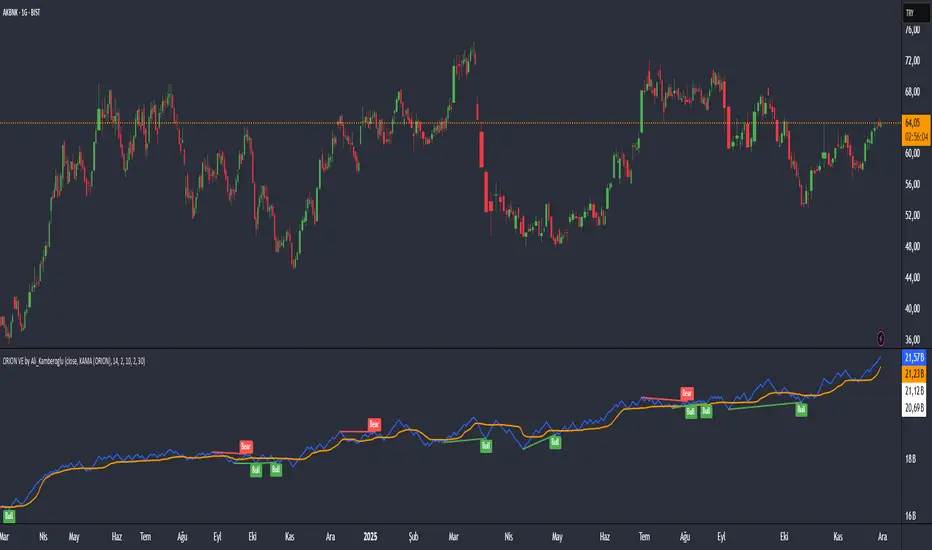
The ORION Volume Engine (VE) is a sophisticated market force analysis center that steps in where standard volume indicators fall short. This tool takes the classic On-Balance Volume (OBV) indicator and transforms it into an intelligent analysis engine that filters market noise, detects "explosions" in volume, and, most importantly, automatically uncovers the critical divergences between price and volume.
ORION VE tells you not just where the volume is flowing, but also when that flow might be signaling an impending trend reversal.
The ORION Advantage: Why It's Different
The power of ORION VE comes from three intelligent layers that turn the standard OBV into an information hub:
Layer 1 - The Adaptive Signal Line (Smart KAMA Integration):
The raw data of OBV can be choppy and misleading. ORION VE uses the Adaptive KAMA engine to clean this noise, adapting to market conditions. When the market is flowing in a strong trend, KAMA speeds up to keep you in the trend. When the market is indecisive and sideways, it slows down, protecting you from early or false signals. This provides a revolutionary level of clarity in OBV analysis.
Layer 2 - Volume Volatility (Bollinger Bands on OBV):
This unique feature offers the option to draw Bollinger Bands not on the price, but directly on the OBV itself. What does this mean? You can now see when not just the price, but the volume flow itself is "squeezing" and when it's ready to "explode." A breakout of the OBV line from its own Bollinger Band is a powerful signal of an extraordinary increase in volume flow in that direction, confirming the current trend.
Layer 3 - The Game-Changing Feature: Fully Automatic Volume Divergence Engine
One of the most powerful signals heralding the end of a trend is a volume divergence. ORION VE finds these priceless signals for you, automatically:
Bullish Divergence 🐂: Is the price falling to new lows while the OBV (volume) refuses to fall, making higher lows? This is the clearest sign that selling pressure is exhausted and "smart money" is quietly accumulating. You are instantly alerted with a "Bull" label on your chart.
Bearish Divergence 🐻: Is the price hitting record highs, but the OBV is not supporting this rise with sufficient volume and is making lower highs? This is a signal that the power behind the trend is fading and a sharp decline may be imminent. The "Bear" label prepares you to protect your position or take profits.
High-Probability Trading Strategies:
Strongest BUY Signal:
A Bullish Divergence appears on the chart with a "Bull" label.
The OBV line crosses above its orange Adaptive KAMA signal line.
This is an A+ grade buying opportunity, indicating that smart money is stepping in and momentum is starting.
Strongest SELL Signal:
A Bearish Divergence appears on the chart with a "Bear" label.
The OBV line crosses below its orange Adaptive KAMA signal line.
This is a high-probability shorting opportunity, indicating that the uptrend is not supported by volume and momentum is shifting to the sellers.
Disclaimer
This indicator is a professional analysis tool developed to assist in your trading decisions. No signal or analysis constitutes investment advice. Trading in financial markets involves high risk, and past performance is not a guarantee of future results. Please always apply your own risk management strategies.
MA Crossover Scalper [4H]//@version=5
indicator("MA Crossover Scalper ", overlay=false)
// Market Cap Filter (Volume as proxy)
volumeValid = volume >= 500000 and volume <= 4000000
// MA Crossover System
ma9 = ta.sma(close, 9)
ma21 = ta.sma(close, 21)
bullishCross = ta.crossover(ma9, ma21) and close > ma21
bearishCross = ta.crossunder(ma9, ma21) and close < ma21
// Volume Confirmation
volumeSpike = volume > ta.sma(volume, 20) * 1.3
// Final Signals
bullSignal = bullishCross and volumeSpike and volumeValid
bearSignal = bearishCross and volumeSpike and volumeValid
// Output for Screener
plot(bullSignal ? 1 : 0, "Bull MA Cross", color=color.green)
plot(bearSignal ? 1 : 0, "Bear MA Cross", color=color.red)

DarkPool's RSi DarkPool's RSi is an enhanced momentum oscillator designed to automatically detect structural discrepancies between price action and the Relative Strength Index. While retaining the standard RSI visualization, this script overlays advanced divergence recognition logic to identify potential trend reversals.
The tool identifies pivot points in real-time and compares recent peaks and valleys against historical data. When the momentum of the RSI contradicts the direction of price action, the indicator highlights these events using dynamic trendlines, shape markers, and background coloring. A built-in dashboard table provides an immediate status check of active divergence signals.
Key Features
Automated Divergence Detection: Automatically spots both Regular Bullish and Regular Bearish divergences based on pivot lookback settings.
Dynamic Visuals: Draws physical lines connecting RSI peaks or troughs to visualize the divergence angle, alongside triangle markers indicating the signal direction.
Active Status Dashboard: A data table located on the chart monitors the current state of the market, flagging signals as "Active" when detected.
Standard RSI Overlay: Includes standard Overbought (70) and Oversold (30) reference lines for traditional momentum trading.
How to Use
1. Reading the Standard RSI The black line represents the Relative Strength Index.
Overbought (Above 70): Suggests the asset may be overvalued and due for a pullback.
Oversold (Below 30): Suggests the asset may be undervalued and due for a bounce.
Midline (50): Acts as a trend filter; values above 50 indicate bullish momentum, while values below 50 indicate bearish momentum.
2. Trading Divergences The primary function of this tool is to identify reversal setups.
Bullish Divergence (Green Triangle/Line): Occurs when Price makes a Lower Low, but the RSI makes a Higher Low. This indicates that selling momentum is exhausting and a price increase may follow.
Bearish Divergence (Red Triangle/Line): Occurs when Price makes a Higher High, but the RSI makes a Lower High. This indicates that buying momentum is fading and a price decrease may follow.
3. Visual Aids
Lines: The script draws solid lines directly on the RSI pane connecting the relevant pivot points to confirm the divergence slope.
Background Color: When a divergence is detected, the background of the indicator pane will highlight briefly (Green for Bullish, Red for Bearish) to draw attention to the new signal.
4. The Dashboard A small table in the bottom right corner tracks the status of the signals.
Status: ACTIVE: A divergence has been detected within the last 10 bars.
Status: None: No recent divergence patterns have been identified.
Disclaimer This indicator is provided for educational and informational purposes only. It does not constitute financial advice, investment recommendations, or a guarantee of future results. Trading cryptocurrencies and financial markets involves a high level of risk. Always perform your own due diligence before making any trading decisions.

ORION Fast Momentum Engine by Ali_KamberogluORION Fast Momentum Engine by Ali_Kamberoglu | Reinventing RSI: Adaptive Signals & Auto Divergences
Developer: Ali Kamberoğlu
Overview: Escape the Noise of Standard RSI
The ORION Fast Momentum Engine (FME) is an all-in-one analytical powerhouse that takes the classic RSI indicator and redesigns it for 21st-century market conditions. It is engineered to eliminate the biggest problems of the standard RSI: false signals, lag, and noise. This tool not only shows you the momentum but also automatically reveals its character, its volatility, and, most importantly, when it's diverging from the price.
ORION FME is not just another oscillator; it's an intelligent analysis engine built into the RSI.
The ORION Advantage: Why It's Different
The power of ORION FME comes from three revolutionary layers it adds to the standard RSI:
Layer 1 - The Smart Signal Line (Adaptive KAMA Integration):
Fixed-period moving averages are a thing of the past. ORION FME uses the Adaptive KAMA engine as its signal line, which adjusts to market conditions. When the market is trending, it speeds up to give you early signals. When the market is choppy and sideways, it slows down, protecting you from countless false trades (whipsaws). No more "blind" signal lines that behave the same way in every condition.
Layer 2 - Momentum Volatility (Bollinger Bands on RSI):
This is a feature you won't find anywhere else. ORION FME offers the option to draw Bollinger Bands not on the price, but directly on the RSI itself. What does this mean? You can now see when not just the price, but the momentum itself is "squeezing" and ready for a breakout. When the RSI breaks out of its own Bollinger Bands, it's a sign of an extraordinary surge in momentum.
Layer 3 - The Game-Changing Feature: Fully Automatic Divergence Engine
Put an end to the tedious task of hunting for divergences! ORION FME includes the powerful divergence engine that has become a signature of the ORION series.
Bullish Divergence 🐂: Is the price making lower lows while the RSI is making higher lows? ORION FME detects this instantly and marks it with a "Bull" label on your chart, signaling a potential bottom and a rally.
Bearish Divergence 🐻: Is the price renewing its highs while the RSI's momentum is fading? This is the clearest sign that the rally is losing its strength. The "Bear" label warns you in advance of a potential top and decline.
High-Probability Trading Strategies:
Strongest BUY Signal:
A Bullish Divergence appears on the chart with a "Bull" label.
The RSI turns up from the oversold zone (below 30) and crosses above its adaptive KAMA signal line.
This is an A+ grade, multi-confirmation buying opportunity.
Strongest SELL Signal:
A Bearish Divergence appears on the chart with a "Bear" label.
The RSI turns down from the overbought zone (above 70) and crosses below its adaptive KAMA signal line.
This is a high-probability shorting opportunity.
Disclaimer
This indicator is a professional analysis tool developed to assist in your trading decisions. No signal or analysis constitutes investment advice. Trading in financial markets involves high risk, and past performance is not a guarantee of future results. Please always apply your own risk management strategies.

ORION Energy Engine by Ali_KamberogluORION Energy Engine by Ali_Kamberoglu | Turn the Market's "Quiet" Moments into Explosive Moves
Developer: Ali Kamberoğlu
Overview: Go Beyond Momentum, Measure the Energy
The ORION Energy Engine is not an ordinary momentum indicator. It is a sophisticated energy measurement system designed to detect the seemingly calm "accumulation" periods in the market and to anticipate the explosive price movements that follow. By clearly distinguishing between moments when the market is coiling and storing energy (Potential Energy) and moments when it releases that energy (Kinetic Energy), it provides you with a flawless roadmap for the market's next big move.
Think of the ORION Energy Engine as a compressed spring; it shows you not only when the spring is being compressed, but also when and how powerfully it is about to be released.
The ORION Advantage: Why It's Different
The power of ORION comes from its integrated system that analyzes market energy in three distinct dimensions:
Layer 1 - Potential Energy Detection (The Squeeze Engine):
Before every major market move, there is a period of silence and indecision. ORION automatically detects these "squeeze" moments using Bollinger Bands and Keltner Channels. The dots on the zero line signal that the market is building up energy for its next move.
Purple Dot: Standard energy accumulation.
White Dot: A more reliable accumulation, confirmed by volume.
Yellow Dot: "Super Squeeze," occurring at historically low levels of volatility. This is a sign that the upcoming move could be much more violent.
Layer 2 - Kinetic Energy Measurement (The Four-Stage Momentum Histogram):
When the energy is released, ORION measures the power and acceleration of this movement. The histogram provides an instant status report with four different colors, showing not just the direction but also whether the trend is accelerating or decelerating:
Lime Green: A strengthening, accelerating uptrend.
Dark Green: A weakening, decelerating uptrend (a signal to take profit or be cautious).
Red: A strengthening, accelerating downtrend.
Maroon: A weakening, decelerating downtrend (the end of the decline may be near).
Layer 3 - Adaptive Energy Levels (Statistical Breakout Zones):
The energy dynamics of every instrument are different. ORION plots dynamic "Optimum" and "Maximum" energy levels for momentum based on statistical standard deviation calculations from past price action. These levels are objective reference points that show when a trend is becoming overextended and the probability of a correction or reversal is increasing.
The Game-Changing Feature: Automatic Energy Release Alert
Your most valuable asset is time. The ORION Energy Engine eliminates the need to constantly monitor the market. With its built-in alert system, it notifies you the very first moment an energy accumulation (Squeeze) ends and the move begins. This gives you an invaluable entry advantage, ensuring you never miss the start of a potential breakout.
High-Probability Trading Strategies:
Strongest BUY Signal (Super Breakout Setup):
Yellow (Super Squeeze) or White (Volume Squeeze) dots appear on the zero line.
The dots disappear, and the "Squeeze Released" alert is triggered.
The first bar on the alert generates a strong Lime Green momentum histogram.
This is an A+ grade buying opportunity where stored energy has converted into an upward explosion. Targets are the upper Adaptive Levels.
Strongest SELL Signal (Energy Discharge Setup):
An accumulation (preferably Yellow or White dots) is observed on the zero line.
The squeeze ends, and the alert is triggered.
The first bar on the alert generates a strong Red negative momentum histogram.
This is a high-probability shorting opportunity where energy is being released to the downside. Targets are the lower Adaptive Levels.
Disclaimer
This indicator is a professional analysis tool developed to assist in your trading decisions. No signal or analysis constitutes investment advice. Trading in financial markets involves high risk, and past performance is not a guarantee of future results. Please always apply your own risk management strategies.

ORION LTME by Ali_KamberogluORION Long-Term Momentum Engine by Ali_Kamberoglu | Silence the Noise, Hear the Real Signals
Developer: Ali Kamberoğlu
Overview: Go Beyond the Limits of Standard Indicators
The ORION Long-Term Momentum Engine is an all-in-one analytical powerhouse designed to filter market noise with surgical precision, eliminate signal lag, and, most importantly, automatically detect trend reversals that are impossible to see with the naked eye. This tool combines three different advanced mathematical engines (Chebyshev, Zero-Lag Gaussian, and Adaptive KAMA) into a single hybrid structure, offering a clarity and analytical depth that ordinary oscillators could never provide. ORION shows you not just what is happening, but what is about to happen.
The ORION Advantage: Why It's Different
The power of ORION comes from its three-layer filtering system, which works in perfect harmony:
Layer 1 - The Noise Shield (Chebyshev Filter):
Price action is chaotic. The Chebyshev filter is your first line of defense, cleaning out the meaningless noise (sudden spikes, minor fluctuations) from this chaos. The result? Smoother, more readable, and reliable baseline momentum data that won't mislead you.
Layer 2 - The Lag Enemy (Zero-Lag Gaussian Filter):
Cleaning noise is important, but a lagging signal is unacceptable. The Zero-Lag filter ensures that the cleaned signal reaches you almost in real-time with market movements. No more getting signals after the opportunities have passed. Speed and precision, combined.
Layer 3 - The Smart Navigation System (Adaptive KAMA Filter):
Not all market conditions are the same. ORION knows this. The Adaptive KAMA filter analyzes the current character of the market. If there's a strong trend, it speeds up to keep you in the move. If the market is choppy and indecisive, it slows down, protecting you from the loss-making whipsaw market.
The Game-Changing Feature: Automatic Divergence Engine
ORION's most valuable feature is its fully automatic divergence detection system, which alerts you to trend reversals before anyone else.
Bullish Divergence 🐂: Is the price making lower lows while ORION's momentum is making higher lows? This is the clearest sign that the downtrend is losing power and a strong rally is imminent. You are instantly alerted with a "Bull" label on your chart.
Bearish Divergence 🐻: Is the price hitting record highs while ORION's momentum is losing steam? This signals that the rally is nearing its end and a sharp decline could be starting. The "Bear" label prepares you to protect your position or take profits.
This feature alone reduces hours of manual analysis to seconds and gives you an invaluable strategic advantage.
Indicator Components & Strategies
🔵 ORION Momentum (Blue Line): The heart of the engine. Your fast, precise, and primary momentum line.
🟠 Signal Line (Orange Line): The confirmation mechanism. A smoother reference that validates the movements of the blue line.
💎 Adaptive KAMA (Turquoise Line): Your dynamic filter that keeps its finger on the pulse of the market.
High-Probability Trading Strategies:
Strongest BUY Signal:
A "Bull" label appears on the chart.
The blue line crosses above the orange line in the oversold zone (below the 20 level).
This is an A+ grade buying opportunity, combining a momentum reversal with an oversold market.
Strongest SELL Signal:
A "Bear" label appears on the chart.
The blue line crosses below the orange line in the overbought zone (above the 80 level).
This is a high-probability shorting opportunity, combining a loss of momentum with an overextended market.
Disclaimer
This indicator is a professional analysis tool developed to assist in your trading decisions. No signal or analysis constitutes investment advice. Trading in financial markets involves high risk, and past performance is not a guarantee of future results. Please always apply your own risk management strategies.

50 & 200 SMA + RSI Average Strategy (Long Only, Single Trade)It works better in trending markets. It delivers its best performance in the 4-hour to 1-day timeframes.

Fat Tony Composite Histogram Dual SettingsThis is an adaptation of Rob Booker's Fat Tony Composite Histogram which allows you to put two levels for signals.

Alpha Net Oscillator Buy Sell SignalAlpha Net Oscillator is a momentum-based mean reversion indicator designed to detect early shifts in trend direction and potential overbought/oversold conditions. It utilizes a normalized linear regression oscillator with visual threshold zones and confirmation markers to highlight potential trading opportunities.
This tool is built for traders who rely on oscillator-style signals to support entries and exits, especially in markets exhibiting cyclical or range-bound behavior.

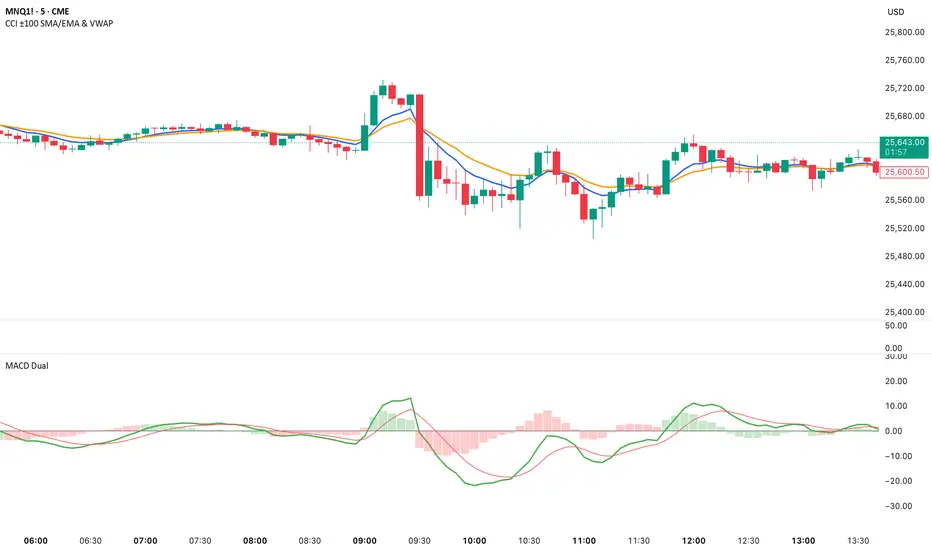
Dual MACD📘 Dual MACD — Synopsis
The Dual MACD indicator displays two separate MACD systems inside the same pane, allowing traders to compare fast and slow momentum behavior simultaneously.
What It Includes
Two fully adjustable MACDs
MACD 1 default: 12 / 12 / 9
MACD 2 default: 8 / 20 / 6
Show/Hide Toggles so each MACD can be viewed independently or together.
MACD Lines, Signal Lines, and Histograms for both systems.
Clean layout with a compact panel title: “MACD x2”
What It Helps You See
Short-term vs. longer-term momentum shifts
Faster MACD reacting to quick trend changes
Slower MACD confirming or filtering signals
Trend strength, momentum acceleration, and crossover behavior in a single pane
Why It’s Useful
The Dual MACD gives you momentum confirmation, fakeout filtering, and multi-speed trend insight—making it valuable for scalpers, intraday traders, and swing traders who want to reduce noise and improve signal quality.
Ghost Universal Flow ® – PremiumGhost Universal Flow ® – Premium (Invite-only)
A high-performance trend-flow indicator delivering early confirmed entries and heavily filtered exits.
Features
• Dual-trigger entry system for faster reaction on strong momentum
• Built-in noise reduction and false-signal protection
• Ultra-smooth dynamic flow line with adaptive offset
• Clean, locked buy/sell alerts – no repainting
Proprietary momentum-based flow system with fully custom filtering, trend validation and visual smoothing – developed 2025.
Works on all markets • Particularly strong on 1h–daily timeframes.
Invite-only access.
Past performance is not indicative of future results.
To request access, send me a private message with the word “Ghost Flow”.

OBV WaveTrend FlowOBV WaveTrend Pressure — A Volume-Powered Momentum Oscillator
OBV WaveTrend Pressure combines Hybrid OBV (volume × price delta) with the classic LazyBear WaveTrend framework to create a volume-weighted momentum oscillator that highlights real buying/selling pressure before price reacts.
While standard WaveTrend uses price averages alone, this tool feeds a cumulative hybrid OBV source into WT1/WT2, producing a much more sensitive, order-flow-aware momentum signal. The result is a clean, MACD-style histogram built from the slope of WT1, revealing when volume-backed momentum flips from bullish to bearish and vice-versa.
This is designed as a companion to volatility tools (e.g., TTM Squeeze, SQZMOM) and standard price-based WaveTrend indicators.
⸻
Features
1. Hybrid OBV Source (Vol × ΔPrice)
Captures true directional volume pressure, giving earlier and more reliable inflection points than price-based oscillators.
2. WaveTrend Applied to OBV
Applies LazyBear’s WT logic to a volume-driven source:
• WT1 (fast)
• WT2 (signal)
• Optional slope-aware color themes
3. MACD-Style Pressure Histogram
Shows momentum contraction/expansion clearly:
• Bright green/blue → Strong bull pressure
• Pale green/blue → Weakening bull
• Bright red → Strong bear pressure
• Pale red → Weakening bear
4. Dynamic OB/OS Bands
Adaptive overbought/oversold computed from:
• Rolling mean of WT1
• Rolling standard deviation
Helps identify exhaustion relative to market conditions, not fixed numbers.
5. Zero-Line Momentum Flips (with alerts)
Alerts fire when:
• WT1 slope crosses above zero → Bull momentum shift
• WT1 slope crosses below zero → Bear momentum shift
6. Optional Price Bar Coloring
Mirror the histogram state onto price bars for fast visual bias confirmation.
⸻
How to Use
Bullish Signals
• Histogram flips positive
• WT1 rising
• WT1 or WT2 near dynamic oversold zone
• Useful for positioning early in momentum cycles
Bearish Signals
• Histogram flips negative
• WT1 falling
• WT1 or WT2 near dynamic overbought zone
Best Applications
• Trend continuation entries
• Confirming TTM squeeze setups
• Early identification of pressure reversals
• Pairing with price-based WaveTrend for dual confirmation
⸻
Why It Works
WaveTrend is already one of the most reliable oscillators for structure and reversals — but this version feeds it volume pressure instead of price.
Volume often shifts before candles do, making this a leading indicator in many cases.

UM Nadaraya-Watson OscillatorDescription
This is a different take on the Nadaraya-Watson Estimator from both Jdhorty and LuxAlgo. Both great scripts, I encourage everyone to check them out. Think of this script as a measure of trend direction, direction change, and trend acceleration or deceleration. It is not a Moving Average, but you could think of it as loosely as an intelligent adaptive regression curve with the focus on trend direction. The Gaussian calculations prefer and add more weight to the most recent bars. The end result is the oscillator is more responsive with less lag and less prone to pure price noise.
How it Works
The indicator was added to the chart twice; once with an MA, once without. The oscillator indicates trend change by crossing up through the zero line or down through the zero line. Once the indicator turns positive, we are in a positive trend until it crosses below zero and then the trend turns negative. I implemented a Moving Average overlay for additional signal determination; if the configured MA (EMA, SMA, WMA, or Nadaraya-Watson Estimator) trends higher, it is green. When trending down, it is red. The indicator also changes the color of the price bars; when the indicator below zero and red, the price bars are red. When the indicator is above zero and green, the price bars are green.
I marked up the chart and indicator to identify LONG, SHORT, and divergences between price and oscillator.
Default Settings
The default settings are 16 for Bandwidth and a WMA with 110. This is shown in the chart example. There directional arrows, but they are off by default. The Price bars are colored green or red to match the oscillator and the bar coloring is on by default.
All settings are user-configurable including bandwidth, MA type, MA length, bar coloring, and arrows.
Suggested Settings and uses
I personally like the 30 min chart with a bandwidth of 16 and a WMA of 110. The bandwidth 8 and 8 period EMA or WMA also work well on 6 hour and daily charts. Add this to your chart arsenal and use your favorite indicators for confirmation. This indicator works well on the 30 minute chart for inverse ETFs as well (SQQQ, SOXS, TZA). Also, the oscillator is good for identifying divergences between price and and indicator. (see chart for illustration)
Experiment with settings and adapt them to your trading style.
Alerts
If you right click the indicator, and select add alert, I have configured 4 standard alerts: A bullish cross above zero, A bearish cross below zero, An MA bullish turned up to trend higher, (green), and an MA bearish turned down to trend lower (red).

PGI Pro v6 — FREE Squeeze Killer (GME/AMC Classic)PGI Pro v6 — FREE Classic Squeeze Killer (GME/AMC Edition)
The original indicator that called every single GME & AMC squeeze since 2021.
Current GME daily reading: –38.19 → deeper than 2021 or 2024.
Rule: First daily close ≥ –10 = violent move starts (never failed once).
FREE protected version — add it now and see the nuclear reading live.
Want the $149 PRIVATE GOD MODE?
→ Universal (works perfectly on BTC, SPY, forex, everything)
→ Auto-detects meme stocks + screams “NUCLEAR SQUEEZE”
→ Tighter settings + private lifetime + all future updates
DM me on X @TimmyCryto78 or reply below — first 100 only. Timothy.walton45@gmail.com

TriPrimeTriPrime is a multi-layer momentum-distance engine designed to capture structural trend behavior and directional transitions.
The system decomposes market displacement into three response-speed layers, representing different structural components of trend development:
Alpha – fast-response distance
Beta – medium-response distance
Gamma – slow-response distance
Together, the three layers reveal:
• Trend rising vs. trend falling cycles
• Multi-speed directional alignment
• Early-stage rotation signals
• Trend continuation and weakening phases
Bright colors indicate a rising trend.
Soft colors indicate a falling trend.
A synchronized-movement alert is included, highlighting moments when all three layers rise or fall together — conditions commonly associated with highly clear market direction.
TriPrime is designed for professional trading workflows, multi-layer momentum analysis, and structural trend validation.
TriPrime 是一套多层动能-距离分析引擎,用于捕捉结构性趋势、方向变化与趋势阶段特征。
系统将市场位移拆分为三个不同反应速度的层级,代表趋势结构中的多速度特性:
Alpha — 快速反应距离
Beta — 中速反应距离
Gamma — 慢速反应距离
三层结构可揭示:
• 趋势上升 / 趋势下降周期
• 多速度趋势一致性
• 趋势早期方向旋转信号
• 趋势延续与趋势衰减阶段
亮色代表趋势上升。
柔色代表趋势下降。
系统包含同步提醒
用于标记三层同时趋势上升或趋势下降的时刻 —— 通常对应趋势方向非常明确的行情阶段。
TriPrime 适用于专业交易流程、多层动能研究与趋势结构验证。

GME Cycle Predictor# 🚀 GME Cycle Predictor - Advanced Technical Analysis Tool
**Comprehensive GameStop (GME) cycle tracking indicator based on historical patterns and market mechanics.**
## 📊 **What This Indicator Does:**
- Tracks **147-day quarterly cycles** from the January 28, 2021 squeeze
- Monitors the **1704-day major cycle** (the theoretical "big one")
- Identifies **T+35 FTD settlement periods** for forced buying pressure
- Marks **quarterly OPEX** and **swap roll dates**
- Provides **real-time buy/sell recommendations** based on cycle timing
## 🎯 **Key Features:**
### **Visual Cycle Markers:**
- 🔴 **Red Circles**: 147-day quarterly cycles
- 🟡 **Yellow Diamonds**: 1704-day major cycle (CRITICAL)
- 🟢 **Green Squares**: T+35 FTD settlement dates
- 🟠 **Orange Triangles**: Quarterly OPEX periods
- 🟣 **Purple X's**: Swap roll periods
### **Smart Trading Signals:**
- **🚀 MAJOR BUY**: 10+ days before 1704-day cycle
- **📈 BUY ZONE**: 5-10 days before 147-day cycle
- **💚 FTD BUY**: 2-5 days before T+35 settlement
- **📉 SELL ZONE**: Day of cycle completion
- **⏳ WAIT**: No active signals
## 📈 **How to Use:**
### **For Swing Trading:**
1. **BUY** when cheat sheet shows active buy signals
2. **SELL** on cycle completion days
3. **HODL** through the 1704-day major cycle
### **For Long-term Investors:**
- Monitor the **1704-day countdown** (major cycle theory)
- Accumulate during **confluence periods** (multiple cycles aligning)
- Use **147-day cycles** for entry/exit timing
## 🔧 **Technical Foundation:**
- Based on **Fail-to-Deliver (FTD)** settlement mechanics
- **Quarterly swap theory** and institutional obligations
- **Options expiration (OPEX)** pressure points
- **Historical pattern recognition** from 2021 squeeze
## ⚡ **Real-Time Features:**
- **Live countdown timers** to next major cycles
- **Dynamic trading recommendations**
- **Confluence detection** when multiple cycles align
- **Volume confirmation** for signal validation
- **Clean visual design** with minimal chart clutter
## 🎯 **Perfect For:**
- GME traders following cycle theory
- Technical analysts studying market mechanics
- Swing traders using institutional obligation cycles
- Anyone tracking the theoretical "MOASS" timing
## ⚠️ **Important Notes:**
- This indicator is based on **theoretical cycle patterns**
- Past performance does not guarantee future results
- Always use proper risk management
- The 1704-day cycle is **unproven theory** - trade responsibly
- Best used in conjunction with other technical analysis
## 🚀 **Special Feature:**
The **1704-day major cycle** countdown tracks the theoretical "Mother of All Short Squeezes" (MOASS) timing, calculated from the January 28, 2021 squeeze peak. This is the cycle many GME theorists believe will trigger the ultimate price movement.
---
**Perfect for both beginners and advanced traders who want to incorporate GME cycle theory into their technical analysis toolkit.**
*Disclaimer: This is a theoretical analysis tool based on community research. Not financial advice. Trade at your own risk.*

