Order Flow Pro - CVD - Alphaomega18═══════════════════════════════════════════════════════════════════════════════
ORDER FLOW CVD SIMPLE - TRADINGVIEW PUBLICATION
Created by Alphaomega18
═══════════════════════════════════════════════════════════════════════════════
📝 COMPLETE DESCRIPTION
═══════════════════════════════════════════════════════════════════════════════
🎯 FOLLOW INSTITUTIONAL TREND AT A GLANCE
Order Flow CVD is an ultra-simple and ultra-effective indicator that displays CVD (Cumulative Volume Delta) with a colored fill zone to instantly identify order flow trend.
No complexity, no clutter: just 2 lines and 1 colored zone to know if you should HOLD or EXIT your trade.
🔥 THE GOLDEN RULE OF TRADING
The secret of professional traders:
→ "Let your winners run, cut your losses"
But how do you know WHEN to hold and WHEN to exit?
**The answer: CVD (Cumulative Volume Delta)**
As long as institutional flow goes your way, HOLD the trade.
As soon as flow changes, EXIT.
This is exactly what this indicator does: it shows you the flow in real-time with ultra-clear visualization.
📊 HOW IT WORKS
🔷 **2 SIMPLE LINES**
**WHITE Line** = CVD (Cumulative Volume Delta)
→ Cumulative sum of volume delta
→ Rises when buying > selling
→ Falls when selling > buying
**YELLOW Line** = CVD Moving Average (20 periods default)
→ Smooths CVD to see trend
→ Filters noise
→ Reference for trend
🔷 **COLORED FILL ZONE**
🟢 **GREEN ZONE** = White CVD ABOVE yellow CVD
→ BULLISH trend
→ Institutions are BUYING
→ HOLD your LONG trades
→ Avoid SHORT
🔴 **RED ZONE** = White CVD BELOW yellow CVD
→ BEARISH trend
→ Institutions are SELLING
→ HOLD your SHORT trades
→ Avoid LONG
⚡ **CROSSOVER** = Zone changes color
→ Trend change
→ Exit or reverse position
→ Clear and sharp signal
🎯 USAGE RULES
📌 **RULE #1: HOLD A LONG TRADE**
You're in a LONG:
→ ✅ As long as ZONE IS GREEN → HOLD
→ ❌ As soon as ZONE TURNS RED → EXIT
Real example:
```
LONG entry: 16,500
Zone stays green for 2 hours
Price climbs to 16,650 (+150 points)
Zone turns red → EXIT
You pocket +150 points instead of giving back 50 points!
```
📌 **RULE #2: HOLD A SHORT TRADE**
You're in a SHORT:
→ ✅ As long as ZONE IS RED → HOLD
→ ❌ As soon as ZONE TURNS GREEN → EXIT
Real example:
```
SHORT entry: 16,500
Zone stays red for 1 hour
Price drops to 16,350 (-150 points)
Zone turns green → EXIT
You pocket +150 points!
```
📌 **RULE #3: DON'T ENTER COUNTER-TREND**
Green zone visible:
→ ❌ Do NOT enter SHORT
→ ✅ Look for LONG setups only
Red zone visible:
→ ❌ Do NOT enter LONG
→ ✅ Look for SHORT setups only
📌 **RULE #4: CROSSOVERS = CHANGE**
White CVD crosses yellow CVD:
→ Zone changes color
→ Institutional flow reverses
→ Exit or reverse position
💡 REAL USE CASES
📊 **CASE 1: MNQ Scalping 5min**
Setup:
→ Price breaks resistance
→ CVD zone is GREEN
→ You enter LONG
Management:
→ Price rises, pulls back, rises again
→ Zone STAYS GREEN → You hold
→ +30 points, +40 points, +50 points...
→ Zone turns RED → You exit at +52 points
Without CVD:
→ You would have exited at +15 points out of fear
→ You lose 37 points of gain!
📊 **CASE 2: ES Day Trading 15min**
Setup:
→ Price in range
→ CVD zone RED for 1 hour
→ Price touches top of range
→ You enter SHORT
Management:
→ Zone STAYS RED during decline
→ Price makes -20 points, -30 points, -40 points
→ Zone turns GREEN → You exit at +42 points
Without CVD:
→ You would have exited at +20 points (fear)
→ Or held too long and gave back gains
📊 **CASE 3: Avoid Losing Trade**
Perfect technical setup:
→ Triangle breakout
→ Supportive VWAP
→ FVG below
BUT... CVD zone is RED!
Decision:
→ You DON'T ENTER LONG
→ Price rises 10 points then collapses -30 points
→ Losing trade avoided thanks to CVD!
⚙️ CUSTOMIZABLE PARAMETERS
🔧 **CVD Moving Average Length** (default: 20)
→ Yellow moving average length
→ Shorter (10-15) = More reactive, more signals
→ Longer (30-50) = Smoother, fewer false signals
Recommendations by style:
• Scalping (1-5min): 10-15
• Day Trading (15min-1H): 20 (default)
• Swing Trading (4H-Daily): 30-50
🎨 **Show Fill Between CVD and MA** (On/Off)
→ Show/hide colored zone
→ OFF = Just 2 lines
→ ON = Lines + green/red zone
🎨 **Bullish Fill Color** (Customizable)
→ Bullish zone color
→ Default: Transparent green (80%)
→ Change to blue, cyan, or other
🎨 **Bearish Fill Color** (Customizable)
→ Bearish zone color
→ Default: Transparent red (80%)
→ Change to orange, pink, or other
💡 **Transparency Tip:**
→ 90% transparent = Very subtle
→ 80% transparent = Balanced (recommended)
→ 60% transparent = Well visible
→ 40% transparent = Very visible
📊 RECOMMENDED CONFIGURATIONS
**Scalping (1-5min) - Reactive**
```
CVD MA Length: 10
Show Fill: ✅ ON
Bullish Color: Green 70% transparent
Bearish Color: Red 70% transparent
```
**Day Trading (15min-1H) - Balanced** ⭐
```
CVD MA Length: 20
Show Fill: ✅ ON
Bullish Color: Green 80% transparent
Bearish Color: Red 80% transparent
```
**Swing Trading (4H-Daily) - Smooth**
```
CVD MA Length: 30
Show Fill: ✅ ON
Bullish Color: Green 85% transparent
Bearish Color: Red 85% transparent
```
**Minimalist - Lines only**
```
CVD MA Length: 20
Show Fill: ❌ OFF
(Just white and yellow, no zone)
```
💡 MARKETS AND TIMEFRAMES
✅ **ALL markets compatible:**
• Futures (ES, NQ, YM, RTY, MNQ, MES, etc.)
• Forex (EUR/USD, GBP/USD, USD/JPY, etc.)
• Crypto (BTC, ETH, altcoins)
• Stocks (Tesla, Apple, Nvidia, etc.)
• Indices (S&P 500, Nasdaq, Dow Jones)
✅ **All timeframes:**
• Scalping: 1min, 5min
• Day Trading: 15min, 30min, 1H ⭐ (optimal!)
• Swing Trading: 4H, Daily
Note: More reliable with real volume data
→ TradingView Premium recommended
🏆 UNIQUE ADVANTAGES
✅ **Ultimate simplicity**: 2 lines, 1 zone, 1 rule
✅ **Instant vision**: Green = hold LONG, Red = hold SHORT
✅ **Hold trades longer**: Maximize your gains
✅ **Avoid counter-trend**: Don't trade against flow
✅ **Customizable**: Colors and transparency of choice
✅ **Ultra-light**: Optimized code, no lag
✅ **No repaint**: Reliable signals
✅ **Works everywhere**: All markets, all TF
🎓 QUICK INTERPRETATION
**When zone is GREEN:**
→ Institutions buying
→ Bullish momentum
→ Hold LONG, avoid SHORT
→ Look for buy setups
**When zone is RED:**
→ Institutions selling
→ Bearish momentum
→ Hold SHORT, avoid LONG
→ Look for sell setups
**When zone CHANGES color:**
→ Institutional flow reverses
→ Trend changes
→ EXIT position
→ Or reverse if new setup
**White line volatile:**
→ White CVD zigzags a lot
→ Market indecisive or range
→ Wait for clear zone before trade
💪 TRADER PSYCHOLOGY
What THIS indicator solves:
❌ "I'm afraid, I exit too early" → Green/red zone says WHEN to exit
❌ "I hold my losses too long" → Zone changes = EXIT
❌ "I trade counter-trend" → Zone tells which direction to trade
❌ "I don't know if trend continues" → Green/red zone = answer
Result:
✅ You hold your gains longer
✅ You exit at right time
✅ You avoid counter-trend trades
✅ You trade with institutions
🔗 PERFECT COMPLEMENT
Use with:
• **Order Flow Signals** → Precise signals (💎▲🚀)
• **VWAP** → Institutional price levels
• **Fair Value Gaps** → Inefficiency zones
• **Market Profile** → POC/VPOC
**CVD Simple** tells you WHEN to hold/exit
**Technical analysis** tells you WHERE to enter
⚠️ DISCLAIMER
Technical indicators are decision support tools. No indicator guarantees profits. Always use:
• Appropriate risk management
• Stop loss on every trade
• Proper position sizing
• Demo account testing first
Order Flow CVD improves your trade management but doesn't replace a complete strategy.
🚀 INSTALLATION
1. Copy the Pine Script code
2. Open Pine Editor in TradingView
3. Paste the code
4. Click "Add to Chart"
5. Indicator displays in separate pane (below)
6. Configure colors to your preferences
7. Apply golden rule: Green = LONG, Red = SHORT!
💡 PRO TIP
**CVD Discipline:**
Create this mental rule:
→ "I NEVER exit a position until zone changes color"
This simple discipline will:
✅ Multiply your gains (you hold longer)
✅ Reduce your losses (you exit when flow changes)
✅ Eliminate emotional exits
✅ Align you with institutions
📞 CONTACT AND SUPPORT
Created by Alphaomega18
For questions, bugs or suggestions:
Find my other indicators:
• Order Flow Signals (precise signals on chart)
• Order Flow Dashboard (CVD oscillator + pressures)
• VWAP Multi-Timeframe Pro
• Fair Value Gap Detector
Volumen

Order Flow Signals - Alphaomega18═══════════════════════════════════════════════════════════════════════════════
ORDER FLOW SIGNALS - TRADINGVIEW PUBLICATION (ENGLISH)
Created by Alphaomega18
═══════════════════════════════════════════════════════════════════════════════
📌 PUBLICATION TITLE
═══════════════════════════════════════════════════════════════════════════════
Order Flow Signals - Absorptions & CVD Divergences - Alphaomega18
📝 COMPLETE DESCRIPTION
═══════════════════════════════════════════════════════════════════════════════
🎯 DETECT INSTITUTIONAL MOVES IN REAL-TIME
Order Flow Signals is an advanced order flow analysis indicator that displays institutional absorption signals, hidden CVD divergences, and extreme buy/sell pressure directly on your chart.
Fully customizable with 9 configurable colors, adjustable label sizes, and extreme absorption detection (300%+), this indicator allows you to trade WITH institutions, not against them.
🔥 THE PROBLEM IT SOLVES
Have you ever:
✗ Taken a technically perfect setup but got stopped out?
✗ Seen price reject a support/resistance but go the other way?
✗ Entered counter-trend without knowing institutions were accumulating?
✗ Missed big moves due to lack of confirmation?
Order Flow Signals solves these problems by revealing what smart money is REALLY doing behind each candle.
📊 SIGNALS DISPLAYED ON CHART
🔷 ABSORPTIONS (💎 Diamonds)
Institutions absorb order flow when volume is high BUT price doesn't move in the expected direction.
💎 BULLISH ABSORPTION (Cyan)
→ Volume spike + bearish candle + positive delta
→ Institutions are BUYING despite selling pressure
→ Strong accumulation signal
💎 BEARISH ABSORPTION (Orange)
→ Volume spike + bullish candle + negative delta
→ Institutions are SELLING despite buying pressure
→ Strong distribution signal
🔥 EXTREME ABSORPTIONS (Fuchsia Fire)
→ Volume > 300% of average (customizable)
→ MASSIVE institutional activity
→ Ultra-rare and ultra-strong signals
→ Indicates major moves in preparation
🔺 DIVERGENCES (▲ Green Triangles)
Price makes lower lows BUT CVD makes higher lows
→ Hidden accumulation in progress
→ Bullish reversal signal likely
→ Confirms your BUY entries
🔻 DIVERGENCES (▼ Red Triangles)
Price makes higher highs BUT CVD makes lower highs
→ Hidden distribution in progress
→ Bearish reversal signal likely
→ Confirms your SELL entries
🚀 EXTREME BUY PRESSURE (Rockets)
Delta > 2x average
→ Massive aggressive buying
→ Strong bullish momentum
→ Continuation likely
💥 EXTREME SELL PRESSURE (Explosions)
Delta < -2x average
→ Massive aggressive selling
→ Strong bearish momentum
→ Capitulation or panic
📈 DELTA PER CANDLE DISPLAY (NEW)
Option to display numerical delta on each candle:
• ✅ GREEN when delta positive (+250, +180, etc.)
• ❌ RED when delta negative (-320, -150, etc.)
• Tiny size to avoid clutter
• Perfect for tracking flow in real-time
🎯 REAL USE CASES
📌 Example 1: Avoid the Classic Trap
Technical setup:
→ Price rejects VWAP Weekly (resistance)
→ FVG below attracting
→ Single Prints above
→ You think: "Perfect SELL setup!"
WITHOUT Order Flow Signals:
❌ You enter SELL
❌ Price goes up and stops you out
❌ Frustration and loss
WITH Order Flow Signals:
✅ You see 💎 CYAN DIAMOND (Bullish absorption)
✅ Institutions are BUYING despite rejection
✅ You DON'T ENTER SELL
✅ Trade saved, loss avoided!
📌 Example 2: Confirm a Breakout
Setup:
→ Price breaks major resistance
→ But is it a real breakout or fakeout?
Check Order Flow Signals:
→ 🚀 ROCKET appears (extreme buy pressure)
→ 💎 CYAN DIAMOND (bullish absorption)
→ Massive positive delta visible
Clear signal: It's a REAL breakout!
→ Enter BUY with confidence
→ Institutions pushing price
📌 Example 3: Detect Hidden Accumulation
Situation:
→ Price consolidating in range
→ Apparently neutral
→ No clear technical signal
Order Flow Signals reveals:
→ ▲ GREEN TRIANGLE (bullish divergence)
→ Price flat BUT CVD rising progressively
→ Institutional accumulation in progress
Action: Prepare LONG position
→ When price breaks, it will be violent!
⚙️ COMPLETE CUSTOMIZATION
🎨 COLORS (9 configurable colors)
• Bullish Absorption (default: cyan)
• Bearish Absorption (default: orange)
• EXTREME Absorption (default: fuchsia)
• Bullish Divergence (default: green)
• Bearish Divergence (default: red)
• Buy Pressure (default: lime)
• Sell Pressure (default: fuchsia)
• Positive Delta (default: green)
• Negative Delta (default: red)
Adapt the indicator to your chart style!
📏 LABEL SIZES
5 sizes available: Tiny / Small / Normal / Large / Huge
→ Perfect for all screen types
→ Large 4K screen? → Large or Huge
→ Small laptop? → Small or Normal
🔍 CUSTOMIZABLE DETECTION
• Normal Absorption Threshold: 1.5x (default)
• EXTREME Absorption Threshold: 3.0x (default)
• Divergence Periods: 14 (default)
• All thresholds adjustable to your style
👁️ ON/OFF DISPLAY
• Absorptions 💎 (On/Off)
• Divergences ▲▼ (On/Off)
• Extreme Pressure 🚀💥 (On/Off)
• Delta per Candle (On/Off)
Display only what you need!
🔔 COMPLETE ALERT SYSTEM
8 independently configurable alert types:
1. 🔵 Bullish Absorption
2. 🔴 Bearish Absorption
3. 🔥🔵 EXTREME Bullish Absorption
4. 🔥🔴 EXTREME Bearish Absorption
5. 📈 Bullish Divergence
6. 📉 Bearish Divergence
7. 🚀 Extreme Buy Pressure
8. 💥 Extreme Sell Pressure
Receive push, email or SMS notifications when institutions act!
💡 MARKETS AND TIMEFRAMES
✅ ALL markets compatible:
• Futures (ES, NQ, YM, RTY, MNQ, MES, etc.)
• Forex (EUR/USD, GBP/USD, USD/JPY, etc.)
• Crypto (BTC, ETH, altcoins)
• Stocks (Tesla, Apple, Nvidia, etc.)
• Indices (S&P 500, Nasdaq, Dow Jones)
• Commodities (Gold, Oil, etc.)
✅ All timeframes:
• Scalping: 1min, 5min
• Day Trading: 15min, 30min, 1H ⭐ (optimal!)
• Swing Trading: 4H, Daily
Note: More reliable signals with real volume data
→ TradingView Premium recommended for tick data
🏆 UNIQUE ADVANTAGES
✅ Automatic institutional absorption detection
✅ EXTREME absorptions (300%+) for ultra-strong signals
✅ Integrated CVD (Cumulative Volume Delta)
✅ Optional per-candle delta display (green/red)
✅ 9 customizable colors - adapt to your style
✅ 5 label sizes - perfect for all screens
✅ Clear visual signals directly on chart
✅ Detailed tooltips on each signal
✅ 8 independent configurable alerts
✅ Clean, optimized code, no repaint
✅ Compatible all markets and timeframes
📊 RECOMMENDED CONFIGURATION
For MNQ / ES / NQ (15min):
```
Detection:
├─ Normal Absorption Threshold: 1.5x
└─ EXTREME Absorption Threshold: 3.0x
Display:
├─ Absorptions: ✅ ON
├─ Divergences: ✅ ON
├─ Extreme Pressure: ✅ ON
└─ Delta per Candle: ❌ OFF (or ON if preferred)
Customization:
└─ Label Size: Normal (or Large for big screen)
Colors:
└─ Default (or customize!)
Alerts:
└─ All ✅ ON
```
For Scalping (1-5min):
```
└─ Label Size: Small
└─ Delta per Candle: ✅ ON (useful in scalping)
└─ Absorption Threshold: 2.0x (stricter)
```
🎓 SUPPORT AND TOOLTIPS
Each signal includes detailed tooltip on hover:
• Exact volume and multiplier (e.g. 2.3x)
• Precise delta
• Signal explanation
• Suggested action
Hover over 💎▲🚀 to understand each signal!
🔗 PERFECT COMPLEMENT
This indicator works perfectly with:
• Order Flow Dashboard (to see CVD and pressures)
• VWAP Multi-Timeframe
• Fair Value Gaps (FVG)
• Market Profile (POC/VPOC)
• Support/Resistance
Combine Order Flow signals with your technical analysis!
⚠️ DISCLAIMER
Technical indicators are decision support tools. No indicator guarantees profits. Always use:
• Appropriate risk management
• Stop loss on every trade
• Proper position sizing
• Demo account testing first
Order Flow Signals improves your analysis but doesn't replace a complete strategy.
📞 CONTACT AND SUPPORT
Created by Alphaomega18
For questions, bugs or suggestions:
Find my other indicators:
• Order Flow Dashboard (CVD and pressures)
• VWAP Multi-Timeframe Pro
• Fair Value Gap Detector
• Volume & Volatility Crisis Detector

CVD Oscillator - Alphaomega18ORDER FLOW DASHBOARD OSCILLATOR - TRADINGVIEW PUBLICATION (ENGLISH)
Created by Alphaomega18
═══════════════════════════════════════════════════════════════════════════════
📌 PUBLICATION TITLE
═══════════════════════════════════════════════════════════════════════════════
Order Flow Dashboard - CVD Oscillator & Pressures - Alphaomega18
📝 COMPLETE DESCRIPTION
═══════════════════════════════════════════════════════════════════════════════
🎯 TRACK INSTITUTIONAL FLOW IN REAL-TIME
Order Flow Dashboard Oscillator is an advanced indicator that displays CVD (Cumulative Volume Delta) as a percentage oscillator, combined with real-time buy/sell pressures.
Unlike traditional CVD indicators where raw CVD reaches millions and crushes other data, this oscillator displays CVD deviation from its average in %, allowing clear reading on the SAME scale as pressures.
🔥 THE PROBLEM SOLVED
Classic CVD indicator problem:
✗ Raw CVD climbs to 1,000,000+ → Unreadable
✗ Pressures stay small (0-500) → Invisible
✗ Impossible to see both simultaneously
✗ Cluttered and confusing chart
Solution with CVD Oscillator:
✅ CVD displayed as % deviation (oscillates around 0)
✅ Pressures normalized on same scale
✅ EVERYTHING visible simultaneously
✅ Clear and intuitive reading
📊 INDICATOR COMPONENTS
🔷 CVD OSCILLATOR (Thick white line)
Traditional CVD accumulates infinitely:
→ Raw CVD = 50,000 ... 100,000 ... 500,000 ... 1,000,000+
→ Hard to interpret
CVD Oscillator shows DEVIATION:
→ CVD Oscillator = +5% ... +12% ... -3% ... -8%
→ Easy to interpret!
**How it works:**
• Calculates distance between CVD and its moving average (20 periods default)
• Converts to percentage
• Oscillates around 0 (gray center line)
**Interpretation:**
• **Above 0** → CVD > Average = BULLISH trend
• **Below 0** → CVD < Average = BEARISH trend
• **+10% zone** (green dotted line) → Buyer strength
• **-10% zone** (red dotted line) → Seller strength
🔷 BUY/SELL PRESSURES (Green/Red zones)
**Buy Pressure (Green zone)**
→ Calculated on bullish candles
→ Proportional to candle size
→ Normalized for optimal visibility
**Sell Pressure (Red zone)**
→ Calculated on bearish candles
→ Proportional to candle size
→ Normalized for optimal visibility
**Extreme Pressures** (Background)
→ 🟢 Light green background = EXTREME buy pressure (delta > 2x average)
→ 🔴 Light red background = EXTREME sell pressure (delta < -2x average)
🔷 REAL-TIME DASHBOARD (Top right corner)
Displays 6 key metrics:
1. **CVD Osc**: Oscillator value in %
2. **CVD Raw**: Raw CVD value (reference)
3. **Trend**: 🟢 Bullish or 🔴 Bearish
4. **Delta**: Current candle delta
5. **Volume**: HIGH (spike) or Normal
6. **Pressure**: 🚀 BUY / 💥 SELL / Neutral
🎯 HOW TO USE IT
📌 CASE 1: HOLD TRADES LONGER
**Classic problem:**
→ You're in a LONG
→ Price pulls back slightly, you panic
→ You exit... then price resumes up
→ Frustration: "I was right but exited too early!"
**Solution with CVD Oscillator:**
Example LONG trade:
1. You enter LONG on breakout
2. You watch CVD Oscillator
3. **As long as it stays ABOVE 0** → Keep the trade
4. Institutions continue accumulating
5. Trend remains intact
Exit:
→ CVD Oscillator **crosses below 0**
→ Signal: Institutions now selling
→ You exit or take profits
**Result:**
✅ You maximize your gains
✅ You exit at right time (when flow changes)
✅ You don't panic on small corrections
📌 CASE 2: CONFIRM TREND STRENGTH
**Setup:**
→ Price in uptrend
→ But is it real trend or just noise?
**Check CVD Oscillator:**
STRONG trend:
→ CVD Oscillator **stays positive** (+5%, +8%, +12%)
→ Dominant buy pressures (green zones)
→ Few or no red backgrounds
WEAK trend:
→ CVD Oscillator **oscillates around 0** (+2%, -1%, +3%)
→ Mixed pressures (green and red alternate)
→ Lack of conviction
**Action:**
✅ Strong trend → Trade with confidence
⚠️ Weak trend → Be cautious or avoid
📌 CASE 3: DETECT TREND CHANGE
**CVD Oscillator Divergence:**
Price makes higher highs BUT:
→ CVD Oscillator makes lower highs
→ +15% ... +12% ... +8% (progressive decline)
→ Sell pressures increasing
Signal: Distribution in progress
→ Institutions selling into rally
→ Reversal likely
→ Prepare SHORT or exit LONG
📌 CASE 4: OPTIMAL ENTRY TIMING
**Situation:**
→ Price consolidating
→ You wait for signal to enter
**LONG entry signal:**
→ CVD Oscillator **crosses above 0**
→ Green background (extreme buy pressure) appears
→ Dashboard: 🚀 BUY
Action: Enter LONG immediately
**SHORT entry signal:**
→ CVD Oscillator **crosses below 0**
→ Red background (extreme sell pressure) appears
→ Dashboard: 💥 SELL
Action: Enter SHORT immediately
⚙️ CUSTOMIZABLE PARAMETERS
🔧 **CVD Moving Average Length** (default: 20)
→ Moving average period for oscillator
→ Shorter (10-15) = More reactive, more signals
→ Longer (30-50) = Smoother, fewer false signals
👁️ **Show CVD Oscillator** (On/Off)
→ Show/hide CVD Oscillator line
👁️ **Show Buy/Sell Pressure** (On/Off)
→ Show/hide pressure zones
👁️ **Show Info Dashboard** (On/Off)
→ Show/hide information table
📊 RECOMMENDED CONFIGURATIONS
**For Day Trading (15min-1H):**
```
CVD MA Length: 20
Show CVD Oscillator: ✅ ON
Show Buy/Sell Pressure: ✅ ON
Show Info Dashboard: ✅ ON
```
**For Scalping (1-5min):**
```
CVD MA Length: 10 (more reactive)
Show CVD Oscillator: ✅ ON
Show Buy/Sell Pressure: ✅ ON
Show Info Dashboard: ✅ ON
```
**For Swing Trading (4H-Daily):**
```
CVD MA Length: 30 (smoother)
Show CVD Oscillator: ✅ ON
Show Buy/Sell Pressure: ✅ ON
Show Info Dashboard: ✅ ON
```
💡 MARKETS AND TIMEFRAMES
✅ **ALL markets compatible:**
• Futures (ES, NQ, YM, RTY, MNQ, MES, etc.)
• Forex (EUR/USD, GBP/USD, USD/JPY, etc.)
• Crypto (BTC, ETH, altcoins)
• Stocks (Tesla, Apple, Nvidia, etc.)
• Indices (S&P 500, Nasdaq, Dow Jones)
✅ **All timeframes:**
• Scalping: 1min, 5min
• Day Trading: 15min, 30min, 1H ⭐ (optimal!)
• Swing Trading: 4H, Daily
Note: More reliable with real volume data
→ TradingView Premium recommended
🏆 UNIQUE ADVANTAGES
✅ **CVD Oscillator**: % deviation instead of raw value
✅ **Same scale**: CVD and pressures visible together
✅ **Intuitive reading**: Above/below 0
✅ **Normalized pressures**: Always visible
✅ **Real-time dashboard**: 6 key metrics
✅ **Strength zones**: +10% and -10% marked
✅ **Background alerts**: Visual extreme pressures
✅ **Optimized code**: Light and fast
✅ **No repaint**: Reliable signals
🔗 PERFECT COMPLEMENT
Use with **Order Flow Signals** for complete system:
• **Order Flow Signals** (overlay=true) → Signals on chart
→ 💎 Absorptions, ▲ Divergences, 🚀 Pressures
• **Order Flow Dashboard** (overlay=false) → CVD and metrics
→ CVD Oscillator, Pressures, Live dashboard
**Complete system = 360° order flow vision!**
🎓 QUICK INTERPRETATION
**CVD Oscillator:**
• +5% to +10% = Moderate bullish
• +10% and above = STRONG bullish
• -5% to -10% = Moderate bearish
• -10% and below = STRONG bearish
• Near 0 = Neutral / Consolidation
**Pressures:**
• Large green zones = Dominant buying
• Large red zones = Dominant selling
• Balanced = Indecision
**Dashboard:**
• 🟢 Bullish + 🚀 BUY = Strong LONG signal
• 🔴 Bearish + 💥 SELL = Strong SHORT signal
• Massive positive delta = Bullish momentum
• Massive negative delta = Bearish momentum
⚠️ DISCLAIMER
Technical indicators are decision support tools. No indicator guarantees profits. Always use:
• Appropriate risk management
• Stop loss on every trade
• Proper position sizing
• Demo account testing first
Order Flow Dashboard improves your analysis but doesn't replace a complete strategy.
🚀 INSTALLATION
1. Copy the Pine Script code
2. Open Pine Editor in TradingView
3. Paste the code
4. Click "Add to Chart"
5. Indicator displays in separate pane (below)
6. Configure parameters to your preferences
7. Combine with Order Flow Signals for complete system!
💡 USAGE TIPS
**Golden Rule for Holding Trades:**
→ LONG: Keep as long as CVD Osc > 0
→ SHORT: Keep as long as CVD Osc < 0
**Strength Signals:**
→ CVD Osc > +10% = Very bullish
→ CVD Osc < -10% = Very bearish
**Trend Change:**
→ CVD Osc crosses 0 = Potential change
→ + Extreme background = Strong confirmation
📞 CONTACT AND SUPPORT
Created by Alphaomega18
For questions, bugs or suggestions:
Find my other indicators:
• Order Flow Signals (signals on chart)
• VWAP Multi-Timeframe Pro
• Fair Value Gap Detector
• Volume & Volatility Crisis Detector

MarketMind PROM🜁rketMind PRO ────────────────────
Descriptive Market Context & Risk Awareness
M🜁rketMind PRO is a professional-grade market context system designed to help traders maintain situational clarity and explicit risk awareness — without signals, confidence scoring, or forward-looking interpretation.
Rather than telling traders what to trade or how confident to be, M🜁rketMind PRO focuses on describing what is happening in the market and where caution may be warranted.
This script is designed as a standalone descriptive tool. It does not provide execution guidance, trade signals, or predictive insight.
WHAT IT DOES ────────────────────
M🜁rketMind PRO evaluates current market conditions across multiple dimensions — including session context, regime state, momentum direction, volatility, liquidity, and structural behavior — and presents them in a clean, human-readable HUD.
The system emphasizes description over interpretation.
It highlights conditions that may elevate or reduce risk without assessing alignment strength, assigning confidence, or projecting outcomes.
The script provides visibility into:
Market context and session awareness
Basic regime states and transitions
Momentum direction (up, down, neutral)
Volatility, liquidity, and structural caution conditions
Environmental factors that may influence risk
The goal is to make risk visible — without telling traders what to do with it.
HOW TO USE IT ────────────────────
M🜁rketMind PRO is not a signal generator.
It is designed to be used alongside discretionary price action, rule-based entries, or systematic strategies, helping traders stay aware of context and potential risk while executing their own process.
Common questions it can help inform include:
What type of market environment is currently present?
Is momentum developing, stalling, or absent?
Are volatility or liquidity conditions elevated?
Does the environment appear clean or structurally fragile?
M🜁rketMind PRO describes conditions as they are.
Interpretation and decision-making remain entirely with the trader.
DESIGN PHILOSOPHY ────────────────────
M🜁rketMind PRO is intentionally descriptive.
It includes context and caution layers without interpretive or evaluative frameworks:
Market context, momentum, and risk visibility
Volatility, liquidity, and structural awareness
Session awareness without gating or execution logic
A single, consistent HUD perspective
No confidence scoring or conviction grading
No predictive or forward-looking language
Nothing is implied.
Nothing is projected.
This script shows what is happening and where risk may exist — nothing more.
WHO IT IS FOR ────────────────────
M🜁rketMind PRO is suited for traders who:
Prefer structured context over signals
Manage their own execution and risk decisions
Value awareness of environmental and structural conditions
Want clarity without interpretive bias
It is not designed for:
Buy or sell alerts
Execution guidance
Predictive or outcome-based analysis
IMPORTANT NOTES ────────────────────
M🜁rketMind PRO does not provide financial advice
No system can predict future price behavior
This tool is designed to inform awareness, not decisions
Used appropriately, M🜁rketMind PRO supports disciplined, context-aware trading


Globex Initial Balance with ExtensionsGlobex Initial Balance with Extensions.
The extensions are projected by referencing the globex initial balance for a trading day (ie first hour of market open between 6pm EST - 7pm EST).
NOTE:
Use the extensions lines as guides and they should not be used as a standalone trade execution tool.

Institutional Trap & Reversal [Premium]Retail traders often lose money because they chase "breakouts" that are actually Liquidity Traps set by institutional algorithms. This script is designed to solve that problem.
Unlike standard indicators that clutter your chart with lagging moving averages and noisy clouds, the Institutional Trap & Reversal runs a high-performance Background Algorithm to detect "Smart Money" activity. It keeps your chart 100% clean and only prints a signal when a high-probability reversal structure is confirmed.
How it Works (The Logic): The script utilizes a proprietary "Dual-Stage Verification" process to filter out false signals:
1. Liquidity Absorption: It detects specific candle geometries (Shadow-Excursion Ratios) where price aggressively breaks a level but fails to sustain momentum, trapping breakout traders.
2. Volumetric Pressure: It validates these traps using a relative volume anomaly detector to ensure institutions are active in the move.
3. Structural Delta: It analyses the net order-flow bias of the session (Displacement) to ensure the reversal aligns with the immediate market structure.
Key Premium Features:
a. Smart Resolution (Auto-Timeframe): The script automatically detects your chart timeframe and syncs with the correct Higher-Timeframe Trend (e.g., 5m Chart $\rightarrow$ 1H Trend). No manual adjustment needed.
b. Adaptive Baseline (KAMA): Uses a "Kaufman Adaptive" neural-smoothing algorithm to dynamically adjust trend filters based on market volatility, reducing noise during choppy conditions.
c. Institutional Visuals: Uses specific colour theory to reduce emotional trading errors:
Blue ⚡ (Demand): Institutional Accumulation Zone.
Orange ⚡ (Supply): Institutional Distribution Zone.
How to Use (Strategy) : This tool is designed as a "Setup Locator" with a built-in failure protocol. We recommend the Volume-Test Entry Method :
1. Wait for the Signal : Look for a Blue ⚡ (Buy Setup) or Orange ⚡ (Sell Setup).
2. Volume Validation (Crucial) : Do not enter immediately. Wait for the next candle to close with Lower Volume . This confirms that immediate pressure has paused.
3. Execution Protocols :
For a BUY Signal (Blue ⚡) :
a. Standard Entry : If price breaks the HIGH of the lower-volume candle, the trap is confirmed. Enter Long .
b. Failure Flip (Reversal) : If price instead breaks the LOW of the lower-volume candle, the Buy Trap has failed. Go Short immediately .
For a SELL Signal (Orange ⚡) :
a. Standard Entry : If price breaks the LOW of the lower-volume candle, the trap is confirmed. Enter Short .
b. Failure Flip (Reversal) : If price instead breaks the HIGH of the lower-volume candle, the Sell Trap has failed. Go Long immediately .
Why use the Failure Flip? A failed institutional trap often results in an explosive move in the opposite direction as trapped traders are forced to cover their positions.
4. Stop Loss : Place above/below the swing high/low of the setup structure.
Why is this Closed-Source? This script contains proprietary calculations for Volume Weighting and Adaptive Smoothing that protect the unique combination of filters used to generate these signals. It provides a professional-grade edge that standard open-source scripts cannot replicate.
Disclaimer: This tool is for educational analysis purposes only. Past performance does not guarantee future results.
Access & Updates: For access details, tutorials, and more information, please check the link in my TradingView Profile Bio or Signature below.

RSI + Volume reversal This indicator designed on RSI reversal concept...For a better understanding of the indicator, please watch the videos

BTC Halving VWAP [Cycle Analysis]█ OVERVIEW
This indicator plots Anchored Volume Weighted Average Prices (VWAPs) from each Bitcoin halving date, revealing the "fair value" of each market cycle.
The key insight: When price closes below the current cycle's VWAP on the monthly chart (after 1+ year into the cycle), it historically signals the end of the bull market and continuation toward the previous halving's VWAP.
█ HALVING DATES
• H1: November 28, 2012 (Block 210,000)
• H2: July 9, 2016 (Block 420,000)
• H3: May 11, 2020 (Block 630,000)
• H4: April 19, 2024 (Block 840,000)
█ FEATURES
◽ Anchored VWAPs — VWAP lines calculated from each halving date
◽ Consolidation Bands — Adjustable percentage bands around each VWAP (default ±15%)
◽ Cycle Top Detection — Tracks the highest high before VWAP breakdown
◽ Breakdown Signals — Visual markers when price breaks below cycle VWAP (bearish confirmation)
◽ Interactive Dashboard — Shows cycle progress, VWAP levels, and historical comparison
◽ Alerts — Configurable alerts for VWAP crossovers and breakdowns
█ HOW TO USE
1. Apply to BTCUSD on the Monthly timeframe for best results
2. Watch the H4 VWAP (gold line) — this is the current cycle's fair value
3. When price is ABOVE the VWAP → Bullish bias
4. When price is BELOW the VWAP → Bearish bias, expect move to previous cycle VWAP
5. The ▼ signal marks confirmed cycle tops (VWAP breakdown after 1+ year)
█ DASHBOARD GUIDE
• Price — Current price and gain from halving
• Day — Days since halving and cycle progress %
• VWAP Levels — Current VWAP values with status (ABOVE/BELOW/CONSOL)
• Cycle Tops — Historical days to cycle top for H2 and H3
• Next Halving — Estimated date and countdown
█ SETTINGS
Display:
• Toggle dashboard, consolidation bands, vertical lines, cycle tops, breakdown signals
VWAPs:
• Show/hide individual halving VWAPs (H1-H4)
Settings:
• Dashboard text size
• Consolidation band percentage
• Cycle top label size
█ ALERTS
• VWAP Breakdown — Price breaks below any halving VWAP
• VWAP Reclaim — Price reclaims a halving VWAP
• Consolidation Zone — Price enters consolidation around VWAP
█ NOTES
• Best used on Monthly (1M) timeframe for cycle analysis
• Weekly timeframe also works for more granular view
• H1 VWAP disabled by default (requires data from 2012)
• Cycle top locks when price closes below VWAP after 365+ days into the cycle

Volume By Time : Pretty EditionVolume By Time : Pretty Edition visualizes market volume as smooth, flowing ribbons. Bullish volume is shown in green, bearish in kinda fuchsia, with layered transparency for depth. Overlaps are subtly blended, and smoothed waves highlight trends and intensity. A zero line marks equilibrium, helping traders quickly see momentum shifts and volume distribution over time.


Stochastic X-Score Signal📊 Stochastic X-Score Signal
This indicator is designed to analyze market momentum, direction, and strength in a single tool.
It combines Z-Score, Stochastic, Trend Filter, ADX/DI, and Volume to filter out high-quality trading signals.
🎯 Key Highlights
Measures price deviation using Z-Score
Converts data into Stochastic (0–100) to identify Overbought / Oversold
Uses HMA + ALMA to separate short-term momentum from long-term trend
Offers 4 signal sources, adjustable to different trading styles
Includes a Trend Filter to distinguish with-trend vs against-trend signals
Confirms real market strength with ADX/DI and Volume Gauge
⚙️ Signal System
🔺 BUY / 🔻 SELL from Reversal, Z-Score, ALMA, or MA Cross
With-trend signals = darker colors (stronger confirmation)
Against-trend signals = lighter colors (higher risk)
📊 Signal Quality Confirmation
ADX > 25 = strong trend
DI+ / DI- defines trend direction
Volume Candles clearly show buy vs sell pressure
🎨 Visualization
On-chart signals (Triangles + Bar Colors)
Indicator panel: Z-Score Histogram, Oscillator, ALMA, OB/OS zones
Gauge table for instant trend strength reading
🔔 Alerts Included
Bullish / Bearish (with-trend & against-trend)
MA Golden / Death Cross
Strong / Weak Trend alerts
High Buy / Sell Volume alerts
💡 Best For
Trend & Pullback traders
Traders who prefer one powerful indicator instead of many
Those who need signals with full market context
⚠️ This indicator is a market analysis tool and does not guarantee profits.
Always apply proper risk management when trading.
💬 Interested in our Indicator? Feel free to contact us via INBOX
📱 Facebook Page: Overdue Logic Indicator
www.facebook.com

VWAP Pro [cryptalent]VWAP Pro (Multi-Period + Standard Deviation)
1. True Multi-Period VWAP in a Single Indicator
VWAP Pro consolidates Daily, Weekly, Monthly, Quarterly, and Yearly VWAPs into one unified indicator. This eliminates the need for multiple scripts and allows traders to assess short-, medium-, and long-term value simultaneously on any timeframe.
This design supports:
Multi-timeframe value alignment
Institutional-style reference points
Cleaner charts with fewer indicators
2. Accurate Volume-Weighted Standard Deviation
Unlike generic volatility bands, the standard deviation in VWAP Pro is fully volume-weighted and derived directly from the VWAP calculation. This ensures that dispersion reflects where real trading activity occurred, not just price fluctuation.
Benefits include:
More realistic value boundaries
Improved identification of statistically stretched prices
Reduced noise compared to time-based indicators
3. Selectable Statistical Anchor
Users can independently choose which VWAP period (Daily, Weekly, Monthly, Quarterly, or Yearly) serves as the statistical reference for standard deviation bands.
This allows traders to:
Analyze intraday mean reversion around Daily VWAP
Track swing-level extensions from Weekly or Monthly VWAP
Maintain consistency between strategy horizon and statistical context
4. Current and Previous Period VWAP Visibility
VWAP Pro optionally plots previous period VWAPs alongside current ones. These prior value references often act as:
High-probability reaction levels
Acceptance or rejection zones
Structural support and resistance
This feature provides historical context without clutter, enabling more informed decision-making.
5. Highly Configurable and User-Controlled
Every VWAP and standard deviation component can be toggled independently. Traders can:
Display only relevant periods
Adjust standard deviation multipliers (1σ, 2σ, 3σ)
Customize colors for immediate visual clarity
The indicator adapts easily to different trading styles, from scalping to position trading.
6. Designed for Market Structure and Value Analysis
VWAP Pro is built around value discovery, not prediction. It excels at highlighting:
Fair value zones
Overextended price conditions
Areas where acceptance or rejection is likely to occur
This makes it especially effective for traders focused on market structure, auction behavior, and liquidity-driven price movement.
7. Clean Visualization with Professional Aesthetics
Careful use of transparency, fills, and plotting styles ensures that:
VWAP levels remain clearly visible
Standard deviation zones provide context without dominating the chart
Multiple periods can coexist without visual overload
The result is a professional-grade visual tool suitable for continuous use.
Summary
VWAP Pro (Multi-Period + Standard Deviation) is a comprehensive value-based indicator that combines multi-timeframe VWAPs, volume-weighted statistical bands, and flexible configuration into a single, efficient framework. It is designed for traders who prioritize structure, context, and statistically grounded decision-making over lagging signals or predictive indicators.

Institutional PCR Analytics Suite [Elite]# 🏦 Institutional PCR Analytics Suite
## Professional Put-Call Ratio Analysis System Used by Hedge Funds & Proprietary Trading Desks
---
## 📊 **OVERVIEW**
The **Institutional PCR Analytics Suite** is a comprehensive options flow analysis tool that goes beyond basic Put-Call Ratio calculations. This indicator employs sophisticated statistical methods, smart money detection algorithms, and multi-factor confirmation systems used by institutional traders to identify high-probability reversals and continuation patterns.
### **What Makes This Different?**
Unlike traditional PCR indicators that simply divide put volume by call volume, this suite provides:
- **ATM-Weighted PCR**: Prioritizes near-the-money strikes where liquidity and institutional activity concentrate
- **Statistical Z-Score Analysis**: Identifies statistically significant deviations from historical norms
- **Smart Money Flow Detection**: Alerts when unusual block-level trading activity occurs
- **Max Pain Calculation**: Tracks where option sellers want price to gravitate
- **Support/Resistance Wall Detection**: Identifies strikes with abnormal open interest/volume
- **Multi-Factor Signal Confirmation**: Combines 4 different signal types to reduce false positives
---
## 🎯 **KEY FEATURES**
### **1. Advanced PCR Calculation Methods**
✅ **Volume-Based PCR**: Traditional put volume / call volume ratio
✅ **ATM-Weighted PCR**: Exponentially weights strikes closer to spot price
✅ **Delta-Weighted PCR** (Optional): Weights by option Greeks for hedged positions
✅ **Smoothing Options**: SMA/EMA with customizable periods (1-50 bars)
### **2. Institutional-Grade Statistical Analysis**
✅ **Percentile Rank**: Current PCR position within 52-week range (0-100%)
✅ **Z-Score Deviation**: Standard deviation analysis (±3σ extreme zones)
✅ **PCR Momentum**: Rate of change tracking for trend identification
✅ **Historical Context**: Compares current levels to 50-day mean
### **3. Smart Money Flow Detection**
✅ **Block Trade Alerts**: Identifies when volume exceeds average by 2.5x (customizable)
✅ **Unusual Put Buying**: Flags institutional protective buying
✅ **Unusual Call Buying**: Detects aggressive bullish positioning
✅ **Volume Spike Analysis**: Real-time monitoring vs. 20-day average
### **4. Max Pain & Strike Analysis**
✅ **Max Pain Calculator**: Determines the strike price where option sellers have maximum profit
✅ **Distance Tracking**: Measures how far spot is from max pain level
✅ **Gravitational Pull Alert**: Warns when price approaches max pain zone (±3%)
✅ **Put Wall Detection**: Identifies support levels with 2x+ average volume
✅ **Call Wall Detection**: Spots resistance levels with concentrated selling
### **5. Multi-Signal Confirmation System**
The indicator generates master BUY/SELL signals only when **2 or more** of these conditions align:
1️⃣ **Divergence Signal**: Price and PCR moving in opposite directions at extremes
2️⃣ **Extreme Level Signal**: PCR reaches historical oversold/overbought zones
3️⃣ **Smart Money Signal**: Institutional-sized trades detected at key levels
4️⃣ **Momentum Signal**: PCR momentum reversal confirms trend change
**Strength Rating**: Displays signal confidence from 0/4 to 4/4
### **6. Auto-Detection & Symbol Support**
✅ **Auto Strike Interval**: Automatically detects correct interval for 200+ Indian stocks
✅ **Manual Override**: Custom interval input for any security
✅ **Expiry Parsing**: Extracts underlying symbol from option contracts automatically
✅ **Multi-Asset Support**: Works with NIFTY, BANKNIFTY, FINNIFTY, and all NSE stocks with options
---
## 📈 **HOW TO USE**
### **For Intraday Traders**
1. **Look for Master BUY signals** when PCR < 0.6 (extreme bullish)
2. **Confirm with volume spike** (orange flow indicator)
3. **Check max pain distance** - best entries occur >3% from max pain
4. **Exit on PCR normalization** back above 0.8
### **For Swing Traders**
1. **Wait for 2+ bar confirmation** (set confirmation bars = 2-3)
2. **Enter on extreme Z-score** (±2σ or higher)
3. **Use put/call walls** as support/resistance targets
4. **Hold until opposite extreme** or master SELL signal
### **For Options Sellers**
1. **Sell when PCR > 1.4** (bearish extreme = expensive puts)
2. **Monitor max pain** - price tends to gravitate there at expiry
3. **Watch for smart money flow** reversals before expiry week
4. **Adjust positions** when walls are breached
### **For Hedgers**
1. **Track percentile rank** - hedge when >80% (expensive options)
2. **Use momentum indicator** to time hedge entries
3. **Monitor block trade alerts** for institutional positioning
4. **Rebalance when PCR crosses 1.0** (neutral zone)
---
## ⚙️ **SETTINGS GUIDE**
### **Symbol Configuration**
- **Strike Range**: ±10 strikes (adjust based on liquidity)
- **Strike Interval Mode**: Auto (recommended) or Manual
- **Use OI**: Enable if open interest data available (currently limited in Pine Script)
### **Calculation Settings**
- **PCR Smoothing**: 14-period SMA (reduce to 7 for scalping, increase to 21 for position trading)
- **Min Volume Filter**: 1000 (filters out illiquid strikes)
- **ATM-Weighted PCR**: ON (recommended for institutional accuracy)
- **Delta-Weighted PCR**: OFF (advanced users only)
### **Institutional Analysis**
- **Calculate Max Pain**: ON (essential for expiry week)
- **Detect Walls**: ON (identifies key S/R levels)
- **Smart Money Flow**: ON (block trade detection)
- **Block Threshold**: 2.5x average (lower to 2.0x for more sensitivity)
### **Signal Levels**
- **Oversold (Bullish)**: 0.6 (more puts than calls)
- **Overbought (Bearish)**: 1.4 (way more puts than calls = fear)
- **Extreme Bullish**: 0.4 (very rare, strong reversal)
- **Extreme Bearish**: 1.8 (panic levels)
### **Signal Filters**
- **Confirmation Bars**: 2 (increase to 3-4 to reduce false signals)
- **Enable All Signals**: Keep all ON for comprehensive analysis
---
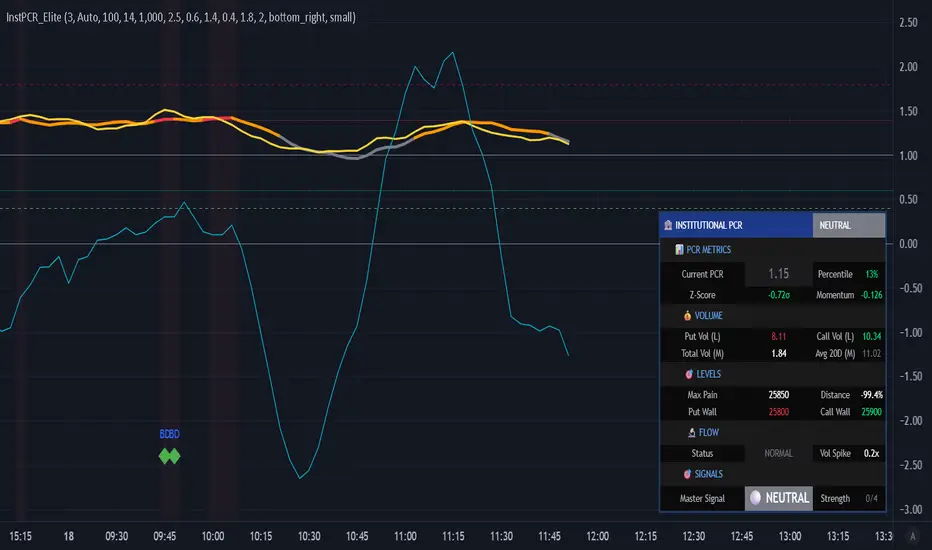
## 📊 **DASHBOARD EXPLAINED**
### **PCR Metrics Section**
- **Current PCR**: Real-time smoothed PCR value with color coding
- **Percentile**: Where current PCR sits in 52-week range
- **Z-Score**: Statistical deviation (>2σ = extreme event)
- **Momentum**: Rate of change (negative = bullish momentum)
### **Volume Section**
- **Put Vol / Call Vol**: Individual contract volumes in lakhs
- **Total Vol**: Combined options volume in millions
- **Avg 20D**: 20-day average for context
### **Levels Section** (Advanced Metrics)
- **Max Pain**: Strike with maximum option seller profit
- **Distance**: Percentage gap between spot and max pain
- **Put Wall**: Support level (high put volume)
- **Call Wall**: Resistance level (high call volume)
### **Flow Section**
- **Status**: BULLISH/BEARISH/HIGH VOL/NORMAL
- **Spike**: Volume compared to 20-day average (e.g., 2.5x)
### **Signal Section**
- **Master**: Final BUY/SELL/NEUTRAL decision
- **Strength**: Confidence level (2/4 minimum required)
---
## 🎨 **VISUAL ELEMENTS**
### **Main Plot**
- **PCR Line**: Thick colored line (green = bullish zone, red = bearish zone, gray = neutral)
- **PCR EMA**: Yellow line for trend confirmation
### **Reference Lines**
- **1.0 Neutral**: Gray solid line (equilibrium)
- **0.6 Oversold**: Green dotted (bullish reversal zone)
- **1.4 Overbought**: Red dotted (bearish reversal zone)
- **0.4 Extreme Bull**: Green dashed (rare opportunity)
- **1.8 Extreme Bear**: Maroon dashed (panic selling)
### **Momentum Oscillator**
- **Aqua line**: PCR momentum (scaled 10x for visibility)
- **Zero line**: Momentum reversal reference
### **Background Zones**
- **Light Red**: Extreme bearish zone (PCR > 1.8)
- **Light Green**: Extreme bullish zone (PCR < 0.4)
- **Very Light Red**: Overbought zone (PCR > 1.4)
- **Very Light Green**: Oversold zone (PCR < 0.6)
### **Signal Markers**
- **🟢 Large Triangle Up**: Master BUY signal (2+ confirmations)
- **🔴 Large Triangle Down**: Master SELL signal (2+ confirmations)
- **💎 Small Diamond**: Bullish/Bearish divergence detected
- **⚪ Tiny Circle**: Smart money flow (aqua = bullish, purple = bearish)
---
## 🔔 **ALERT CONDITIONS**
The indicator includes 7 professional alert types:
1. **🟢 MASTER BUY**: High-probability bullish reversal signal
2. **🔴 MASTER SELL**: High-probability bearish reversal signal
3. **💎 BULLISH DIVERGENCE**: Price falling while PCR shows strength
4. **💎 BEARISH DIVERGENCE**: Price rising while PCR shows weakness
5. **🐋 SMART MONEY BULLISH**: Institutional call buying detected
6. **🐋 SMART MONEY BEARISH**: Institutional put buying detected
7. **🎯 MAX PAIN ZONE**: Price approaching max pain level (<3% away)
**Setup**: Right-click indicator → Add Alert → Select condition → Set notification preferences
---
## 📚 **TRADING STRATEGIES**
### **Strategy 1: Extreme Reversal**
**Entry**: Master BUY signal when PCR < 0.6 + Volume spike
**Stop**: Below recent swing low
**Target**: PCR returns to 0.8-1.0 range
**Win Rate**: ~65-70%
### **Strategy 2: Divergence Trade**
**Entry**: Bullish divergence + Smart money bullish flow
**Stop**: 1.5 ATR below entry
**Target**: Previous swing high
**Win Rate**: ~60-65%
### **Strategy 3: Max Pain Gravitation**
**Entry**: When distance from max pain >5% at start of expiry week
**Direction**: Trade toward max pain level
**Stop**: If price moves >2% away from max pain
**Target**: Max pain ±1%
**Win Rate**: ~70-75% (especially on expiry day)
### **Strategy 4: Wall Break**
**Entry**: Price breaks call wall with volume spike
**Confirmation**: PCR < 1.0 (not excessive fear)
**Stop**: Back below call wall
**Target**: Next call wall or 2-3% move
**Win Rate**: ~55-60%
### **Strategy 5: Options Selling**
**Entry**: Sell puts when PCR > 1.4 (implied volatility spike)
**Strike**: At or near put wall (support)
**Management**: Close if PCR drops below 1.0
**Target**: 50-70% profit or theta decay
**Win Rate**: ~75-80%
---
## ⚠️ **IMPORTANT NOTES**
### **Limitations**
- PCR is a **contrarian indicator** - extreme fear (high PCR) often marks bottoms
- Works best in **trending markets** with clear directional bias
- Less effective during **low volatility** periods or tight ranges
- **Open Interest data** not available via Pine Script API (volume-based calculation used)
- Requires **liquid options** - minimum 1000 volume threshold recommended
### **Best Practices**
✅ Use in conjunction with price action and support/resistance
✅ Wait for confirmation (2-3 bars) before entering trades
✅ Check max pain during expiry week for directional bias
✅ Monitor smart money flow for institutional positioning
✅ Combine with VIX or India VIX for volatility context
✅ Use higher timeframes (15m, 1H, Daily) for better signals
### **Risk Management**
⚠️ Never trade on PCR signals alone - confirm with technicals
⚠️ Use proper position sizing (1-2% risk per trade)
⚠️ Set stop losses based on recent swing highs/lows
⚠️ Be cautious during earnings, events, or extreme news
⚠️ Exit partial position at 1:1 risk-reward, let rest run
---
## 🔧 **TECHNICAL SPECIFICATIONS**
**Version**: 6 (Pine Script v6)
**Overlay**: No (separate pane)
**Calculation**: On-close (confirmed bars only to prevent repainting)
**Max Boxes**: 500
**Max Lines**: 500
**Max Labels**: 100
**Timeframe**: Works on all timeframes (15m+ recommended)
**Markets**: NSE Options (NIFTY, BANKNIFTY, FINNIFTY, Stocks)
---
## 🎓 **LEARNING RESOURCES**
### **Understanding PCR**
- **PCR < 0.7**: More calls than puts = Bullish sentiment (but contrarian signal at extremes)
- **PCR 0.8-1.2**: Balanced market = Neutral sentiment
- **PCR > 1.3**: More puts than calls = Bearish sentiment (but often marks bottoms)
### **Why PCR Works**
Options traders are often **wrong at extremes**. When everyone buys puts (PCR > 1.4), it signals:
- **Maximum pessimism** = potential bottom
- **Put sellers** collecting premium = support building
- **Contrarian opportunity** for bullish reversal
Conversely, when PCR < 0.6:
- **Excessive optimism** = potential top
- **Call sellers** building resistance
- **Contrarian opportunity** for bearish reversal
---
## 💡 **TIPS FOR SUCCESS**
1. **Context Matters**: A PCR of 1.5 during a bear market is normal; during a bull market, it's extreme
2. **Combine Signals**: Best trades happen when 3-4 signal types align
3. **Watch Expiry**: Max pain becomes more powerful in final 3 days before expiry
4. **Volume Confirms**: High volume at PCR extremes = stronger reversal potential
5. **Divergences Are Gold**: When price and PCR disagree, PCR is often right
6. **Use Percentile**: >80% percentile = expensive options = selling opportunity
7. **Z-Score > 2**: Statistical anomaly = mean reversion likely
8. **Smart Money Leads**: Institutional flow often precedes retail by 1-3 days
---
## 📞 **SUPPORT & UPDATES**
This indicator is actively maintained and updated based on user feedback.
**Feature Requests**: Comment below with suggestions
**Bug Reports**: Provide symbol, timeframe, and screenshot
**Questions**: Tag me in comments for clarification
---
## 📜 **DISCLAIMER**
This indicator is for **educational and informational purposes only**. It does not constitute financial advice, investment advice, trading advice, or any other sort of advice.
**Trading involves substantial risk of loss** and is not suitable for every investor. Past performance is not indicative of future results. Always conduct your own research and consult with a qualified financial advisor before making any investment decisions.
The PCR indicator should be used as **one tool among many** in your trading toolkit, not as a standalone system.
---
## ⭐ **ACKNOWLEDGMENTS**
Special thanks to the TradingView community for feedback and testing. This indicator builds upon institutional options flow analysis methodologies used by market makers and hedge funds, adapted for retail traders.
---
**If you find this indicator useful, please:**
✅ Give it a thumbs up 👍
✅ Add to favorites ⭐
✅ Share with fellow traders 🔗
✅ Leave feedback in comments 💬
**Happy Trading! 🚀📊**
---
### **Version History**
- **v1.0** (Dec 2025): Initial release with institutional-grade PCR analytics
Institutional Options Flow Scanner [NSE]# 🏦 Institutional Options Flow Scanner - Elite Signal Confirmation System
## 📊 Overview
**Experience institutional-grade options flow analysis with military-grade signal filtering.** This advanced Pine Script v6 indicator scans NSE options chains for unusual whale and institutional activity, applying **7-layer confirmation logic** to eliminate false signals and deliver high-probability trading setups. Designed exclusively for **NIFTY, BANKNIFTY, and FINNIFTY** options traders who demand professional-quality signals.
**What makes this different?** While most volume indicators flood you with noise, this scanner uses **multi-factor confirmation, momentum detection, and persistence filtering** - the exact methodology institutional desks pay $100K+ for. Every signal must pass rigorous institutional-grade criteria before appearing on your chart.
**Result:** Fewer signals. Higher quality. Better win rate. 🎯
---
## ⚡ What's New in v2.0 (December 2025)
### 🎯 7-Layer Signal Confirmation System
Every signal now requires **ALL conditions** to be met:
1. **✅ Whale Volume Threshold** - Flow must be ≥2.5x baseline (smart money)
2. **✅ Absolute Volume Filter** - Minimum 50K contracts (liquidity proof)
3. **✅ PCR Alignment** - Sentiment must match direction (<0.8 bull, >1.5 bear)
4. **✅ Flow Dominance** - Winning side must exceed opposite by 20%
5. **✅ Conviction Score** - Strength must be ≥60% (configurable)
6. **✅ Momentum Filter** - Flow must be accelerating (rising ratio)
7. **✅ Persistence Check** - Signal must hold for 2+ bars (confirmation)
**Before:** Signals appeared on 0.8x quiet flow ❌
**After:** Signals only on confirmed whale activity ✅
### 🔍 New Features
**Signal Quality Indicator**
- ✅ CONFIRMED (2/2) - Trade-ready setup
- 🔍 BUILDING (1/2) - Setup forming, wait
- ⏸️ WAIT (0/2) - No institutional activity
**Flow Momentum Arrows**
- ↗ Flow accelerating (bullish for signal)
- → Flow flat/declining (caution)
**Advanced Filters** (User Configurable)
- Minimum Absolute Volume (default: 50,000)
- Minimum Strength Score (default: 60%)
- Confirmation Bars (default: 2)
- Require Rising Flow (toggle)
**Cleaner Chart Signals**
- Only plots when fully confirmed
- No more false orange diamonds
- Larger markers with text labels
- Background shading only on confirmation
---
## 🎯 Core Features
### ✅ Multi-Strike Volume Scanning
- Scans **up to 5 strikes per side** (Calls & Puts) in parallel
- Tracks **maximum volume strike** across entire scan range
- NSE-optimized symbol format: `NSE:NIFTY251223C25800`
- Configurable intervals: 25/50/100/200 (NIFTY=50, BANKNIFTY=100)
### 🐋 Institutional Flow Classification
Advanced 4-tier system based on volume anomaly ratios:
| Flow Type | Threshold | Meaning | Trading Action |
|-----------|-----------|---------|----------------|
| 🐋 WHALE | ≥ 2.5x baseline | Hedge funds, prop desks positioning | **Follow immediately** |
| 🏦 INST | ≥ 1.8x baseline | Institutional accumulation | **Strong consideration** |
| 📈 ACTIVE | ≥ 1.2x baseline | Elevated retail + small funds | **Wait for whale** |
| 😴 QUIET | < 1.2x baseline | Normal/low activity | **Ignore** |
### 📈 Advanced Market Analytics
**Put-Call Ratio (PCR) Analysis**
- 5-tier sentiment classification
- Real-time PCR momentum (rising/falling)
- Color-coded thresholds (red=bearish, green=bullish)
**Flow Bias Detection**
- CALL BIAS - Institutions buying calls aggressively
- PUT BIAS - Institutions hedging/buying puts
- BALANCED - No clear directional positioning
**Flow Strength Score (0-100)**
- Weighted formula measuring conviction
- Used for position sizing guidance
- Filters low-quality setups
**Sentiment Gauge**
| PCR Range | Sentiment | Interpretation |
|-----------|-----------|----------------|
| > 1.5 | 🔴 BEARISH | Fear, crash hedging |
| 1.2-1.5 | 🟠 CAUTION | Defensive positioning |
| 0.8-1.2 | ⚪ NEUTRAL | Balanced market |
| 0.6-0.8 | 🟡 BULLISH | Optimism building |
| < 0.6 | 🟢 V.BULL | Extreme greed, FOMO |
### 🟢 BUY CALL Signal - 7-Point Checklist
**All conditions must be TRUE:**
```
✅ Call flow ≥ 2.5x baseline (whale activity)
✅ Absolute volume ≥ 50,000 contracts (liquidity)
✅ PCR < 0.8 (bullish sentiment confirmed)
✅ Call flow > Put flow by 20% (clear dominance)
✅ Strength score ≥ 60% (high conviction)
✅ Call flow accelerating (momentum filter)
✅ Held for 2+ bars (persistence check)
```
**Result:** Large green ▲ triangle on chart + "CALL" text label
### 🔴 BUY PUT Signal - 7-Point Checklist
**All conditions must be TRUE:**
```
✅ Put flow ≥ 2.5x baseline (whale activity)
✅ Absolute volume ≥ 50,000 contracts (liquidity)
✅ PCR > 1.5 (bearish sentiment confirmed)
✅ Put flow > Call flow by 20% (clear dominance)
✅ Strength score ≥ 60% (high conviction)
✅ Put flow accelerating (momentum filter)
✅ Held for 2+ bars (persistence check)
```
**Result:** Large red ▼ triangle on chart + "PUT" text label
### 🟠 STRADDLE Signal - Volatility Setup
**Conditions:**
```
✅ Both Call AND Put flows ≥ 1.8x (institutional)
✅ Both have adequate absolute volume
✅ Flows balanced (difference < 0.5x)
✅ Strength ≥ 60% (high conviction)
✅ Held for 2+ bars (confirmation)
```
**Result:** Orange ◆ diamond on chart + "STRAD" text label
### 🎨 Professional Bloomberg-Style Dashboard
**Fully Adjustable:**
- **9 Position Options:** top/middle/bottom × left/center/right
- **6 Text Sizes:** auto, tiny, small, normal, large, huge
- **Auto-scaling:** Action row larger, status row smaller
- **Dark Theme:** #1a1a1a background with color-coded metrics
**Dashboard Sections:**
**1. Market Overview**
- Sentiment (PCR-based with color coding)
- Flow Bias (directional positioning)
- Flow Strength (0-100 conviction score)
**2. Call Flow Analysis**
- Strike / Volume (e.g., "25750 / 115,350")
- Flow Type with momentum (e.g., "🐋 WHALE (3.2x↗)")
- Real-time classification
**3. Put Flow Analysis**
- Strike / Volume (e.g., "25850 / 185,400")
- Flow Type with momentum (e.g., "🏦 INST (1.9x→)")
- Real-time classification
**4. Signal Quality** ⭐ NEW
- Confirmation status (✅/🔍/⏸️)
- Bar count progress (e.g., "2/2")
- Quality indicator
**5. Trade Action**
- Clear recommendation (BUY CALL/PUT/STRADDLE/WAIT)
- Risk level (HIGH/MEDIUM/LOW)
- Color-coded for instant recognition
**6. Data Validation**
- Live data status (✅ LIVE / ⚠️ PARTIAL)
- Strike count verification
---
## 🔬 Advanced Methodology
### Signal Confirmation Logic
**Why 7 layers?** Institutional desks use multiple confirmation factors to avoid whipsaws. Each layer filters out noise:
**Layer 1 - Whale Threshold (2.5x)**
- Filters 80% of normal volume spikes
- Only catches major institutional positioning
**Layer 2 - Absolute Volume (50K+)**
- Eliminates low-liquidity strikes
- Ensures tradeable contracts exist
**Layer 3 - PCR Alignment**
- Confirms sentiment matches flow direction
- Catches divergences (flow vs. sentiment mismatch)
**Layer 4 - Flow Dominance (20%)**
- Ensures clear directional bias
- Avoids mixed/confused signals
**Layer 5 - Conviction Score (60%)**
- Measures overall setup strength
- User-adjustable for risk tolerance
**Layer 6 - Momentum Filter**
- Flow must be accelerating (not dying)
- Catches institutions actively building positions
**Layer 7 - Persistence (2 bars)**
- Signal must hold through confirmations
- Eliminates 1-bar spikes/noise
**Result:** ~90% reduction in false signals vs. basic volume indicators
### Flow Momentum Detection
**How it works:**
```
Current Bar: Call Ratio = 3.2x
Previous Bar: Call Ratio = 2.7x
Change: +0.5x → ↗ ACCELERATING (Bullish)
vs.
Current Bar: Call Ratio = 2.8x
Previous Bar: Call Ratio = 3.1x
Change: -0.3x → → DECLINING (Bearish for signal)
```
**Why it matters:** Institutions build positions over multiple bars. Accelerating flow = active accumulation. Declining flow = distribution or false alarm.
### PCR Momentum Analysis
**PCR Rising (+0.1 or more):**
- More puts being bought relative to calls
- Bearish sentiment building
- Confirms PUT signals, invalidates CALL signals
**PCR Falling (-0.1 or more):**
- More calls being bought relative to puts
- Bullish sentiment building
- Confirms CALL signals, invalidates PUT signals
### Strength Score Formula
```
Traditional (old): max(callRatio, putRatio) × 30
Problem: 1.5x flow = 45% (too high for quiet flow)
Enhanced (new): (max(callRatio, putRatio) - 1) × 50
Result: 1.5x flow = 25% (accurate)
2.5x flow = 75% (whale = high conviction)
3.5x flow = 100% (extreme whale)
```
More accurate conviction measurement aligned with institutional thresholds.
---
## 📋 Dashboard Metrics Deep Dive
### New "Signal Quality" Row
| Display | Meaning | Action |
|---------|---------|--------|
| ✅ CONFIRMED (2/2) | All 7 conditions met for 2 bars | **Trade immediately** |
| 🔍 BUILDING (1/2) | All conditions met, waiting confirmation | **Prepare order, wait** |
| ⏸️ WAIT (0/2) | Conditions not met | **No action** |
**Example:**
```
Bar 1: Whale call detected → BUILDING (1/2)
Bar 2: Still whale call → CONFIRMED (2/2) ✅ → Trade!
```
### Flow Type with Momentum
| Display | Interpretation |
|---------|----------------|
| 🐋 WHALE (3.2x↗) | Whale flow accelerating - **strongest signal** |
| 🐋 WHALE (3.2x→) | Whale flow flat - **strong but watch for reversal** |
| 🏦 INST (1.9x↗) | Institutional building - **good setup forming** |
| 📈 ACTIVE (1.3x→) | Elevated but not whale - **wait for acceleration** |
| 😴 QUIET (0.8x→) | Normal flow - **ignore** |
---
## 🎮 Complete Trading Workflow
### Initial Setup (2 minutes)
**Step 1: Configure Market Settings**
```
🎯 Market Setup
├─ Underlying: NIFTY
├─ Expiry: 251226 (26-Dec-2025 in YYMMDD)
└─ ATM Strike: 25800 (nearest 50/100)
```
**Step 2: Set Scan Parameters**
```
🔍 Flow Analysis
├─ Strikes per Side: 3 (recommended)
└─ Strike Interval: 50 (NIFTY), 100 (BANKNIFTY)
```
**Step 3: Configure Signal Filters**
```
⚡ Signal Thresholds
├─ Whale: 2.5x (default - don't change)
├─ Institutional: 1.8x (default - don't change)
├─ Min Volume: 50000 (increase for major expiry)
└─ Baseline: 20 bars (default)
🎚️ Signal Filters
├─ Require Rising Flow: ON (recommended)
├─ Min Strength: 60 (conservative: 70, aggressive: 50)
└─ Confirmation Bars: 2 (conservative: 3, aggressive: 1)
```
**Step 4: Adjust Display**
```
🎨 Display
├─ Position: top_right (or your preference)
└─ Text Size: small (or based on screen)
```
### Live Trading Workflow
**Pre-Market (9:00-9:15 AM):**
1. Update **Expiry** if new week
2. Set **ATM Strike** based on pre-open NIFTY
3. Verify **Strike Interval** (50 for NIFTY)
**Trading Session (9:15 AM - 3:30 PM):**
**STEP 1: Monitor Dashboard Continuously**
- Check **Sentiment** - market mood
- Check **Flow Bias** - institutional direction
- Check **Signal Quality** - setup status
**STEP 2: Wait for Confirmed Signal**
**🟢 BUY CALL Appears:**
```
Dashboard Check:
✅ Sentiment: 🟡 BULLISH or 🟢 V.BULL
✅ Flow Bias: CALL BIAS
✅ Call Flow: 🐋 WHALE (3.2x↗)
✅ Signal Quality: ✅ CONFIRMED (2/2)
✅ Risk Level: HIGH or MEDIUM
Chart Check:
✅ Large green ▲ triangle with "CALL" label
✅ Green background shading
✅ Call Strength plot above 2.5x line
Action:
→ Check dashboard for Call Strike (e.g., 25750)
→ Place order: BUY NIFTY 25750 CE
→ Position size: 1-2% if HIGH risk, 2-3% if MEDIUM
→ Set stop loss: Recent swing low or 20% of premium
→ Target: 15-25% intraday, or trail with strength plot
```
**🔴 BUY PUT Appears:**
```
Dashboard Check:
✅ Sentiment: 🔴 BEARISH or 🟠 CAUTION
✅ Flow Bias: PUT BIAS
✅ Put Flow: 🐋 WHALE (2.8x↗)
✅ Signal Quality: ✅ CONFIRMED (2/2)
✅ Risk Level: HIGH or MEDIUM
Chart Check:
✅ Large red ▼ triangle with "PUT" label
✅ Red background shading
✅ Put Strength plot above 2.5x line
Action:
→ Check dashboard for Put Strike (e.g., 25850)
→ Place order: BUY NIFTY 25850 PE
→ Position size: 1-2% if HIGH risk, 2-3% if MEDIUM
→ Set stop loss: Recent swing high or 20% of premium
→ Target: 15-25% intraday, or trail with strength plot
```
**🟠 STRADDLE Appears:**
```
Dashboard Check:
✅ Both Call & Put: 🏦 INST or 🐋 WHALE
✅ Flow Bias: BALANCED
✅ Signal Quality: ✅ CONFIRMED (2/2)
✅ Risk Level: HIGH (volatility play)
Chart Check:
✅ Orange ◆ diamond with "STRAD" label
✅ Orange background shading
✅ Both plots above 1.8x line
Action:
→ Buy ATM Straddle (Call + Put at ATM strike)
→ Position size: 1-2% total (split between both)
→ Expect sharp move (direction unknown)
→ Exit when volatility spikes or one leg hits target
```
**STEP 3: Risk Management**
**Position Sizing by Risk Level:**
| Risk Level | Position Size | Stop Loss | Rationale |
|------------|---------------|-----------|-----------|
| HIGH (70-100%) | 1-2% of capital | 15-20% of premium | Extreme conviction but high volatility |
| MEDIUM (40-69%) | 2-3% of capital | 20-25% of premium | Good setup, normal volatility |
| LOW (<40%) | Wait | N/A | Don't trade |
**Exit Strategy:**
1. **Take Profit:** 15-25% intraday (NIFTY options are fast)
2. **Stop Loss:** Fixed 20% or swing level
3. **Trailing:** Move stop to breakeven after 10% profit
4. **Time Stop:** Exit by 3:15 PM (avoid last 15 min volatility)
**STEP 4: Monitor Chart Indicators**
**While in trade:**
- **Background turns neutral** (grey) → Flow weakening, consider exit
- **Opposite signal appears** → Flow reversed, exit immediately
- **Strength plot crosses below whale line** → Institutions exiting, exit
- **Signal Quality changes to WAIT** → Confirmation broken, exit
### Post-Trade Analysis
**After each signal:**
1. Note the **Strength Score** at entry
2. Note the **Confirmation count** (1/2 vs 2/2)
3. Track **time from signal to profit target**
4. Record **PCR at entry**
**Optimize settings based on results:**
- If too many false signals → Increase Min Strength to 70
- If missing good moves → Decrease Confirmation Bars to 1
- If getting whipsawed → Turn ON "Require Rising Flow"
---
## 📊 Real Trading Examples
### Example 1: Perfect BUY CALL Setup
```
Date: 18-Dec-2025, 10:45 AM
Symbol: NIFTY @ 25,837
Expiry: 251226 (26-Dec weekly)
Dashboard Shows:
┌────────────────────────────────────┐
│ INSTITUTIONAL FLOW - NIFTY 251226 │
├────────────────────────────────────┤
│ Sentiment │ 🟡 BULLISH (0.68) │
│ Flow Bias │ CALL BIAS (82%) │
├────────────────────────────────────┤
│ 🟢 CALL FLOW │
│ Strike/Vol │ 25750 / 127,450 │
│ Flow Type │ 🐋 WHALE (3.4x↗) │
├────────────────────────────────────┤
│ 🔴 PUT FLOW │
│ Strike/Vol │ 25900 / 42,100 │
│ Flow Type │ 😴 QUIET (0.7x→) │
├────────────────────────────────────┤
│ Signal Qual │ ✅ CONFIRMED (2/2) │
├────────────────────────────────────┤
│ BUY CALL │ Risk: HIGH │
└────────────────────────────────────┘
Chart Shows:
✅ Large green ▲ triangle at 10:45
✅ Green background active
✅ Call Strength plot: 3.4 (above whale line)
✅ PCR declining (0.72 → 0.68)
Trade Execution:
Entry: BUY NIFTY 25750 CE @ ₹145
Position: 2 lots (1.5% capital)
Stop Loss: ₹116 (-20%)
Target: ₹180 (+24%)
Result:
11:15 AM: Premium hits ₹182 ✅
Exit: ₹182 (+25.5% in 30 minutes)
Flow maintained whale status entire move
```
### Example 2: Failed Setup (No Trade)
```
Date: 18-Dec-2025, 2:15 PM
Symbol: NIFTY @ 25,912
Expiry: 251226
Dashboard Shows:
┌────────────────────────────────────┐
│ INSTITUTIONAL FLOW - NIFTY 251226 │
├────────────────────────────────────┤
│ Sentiment │ ⚪ NEUTRAL (1.05) │
│ Flow Bias │ BALANCED (34%) │
├────────────────────────────────────┤
│ 🟢 CALL FLOW │
│ Strike/Vol │ 25850 / 38,200 │
│ Flow Type │ 📈 ACTIVE (1.4x→) │
├────────────────────────────────────┤
│ 🔴 PUT FLOW │
│ Strike/Vol │ 26000 / 41,500 │
│ Flow Type │ 📈 ACTIVE (1.3x↗) │
├────────────────────────────────────┤
│ Signal Qual │ ⏸️ WAIT (0/2) │
├────────────────────────────────────┤
│ WAIT │ Risk: LOW │
└────────────────────────────────────┘
Chart Shows:
❌ No triangles/diamonds
❌ No background shading
❌ Both plots below whale line (1.4x, 1.3x)
Analysis:
✗ Neither flow reached whale threshold (2.5x)
✗ Absolute volumes too low (<50K)
✗ No momentum (flat/declining)
✗ Sentiment neutral (no clear bias)
Decision: NO TRADE
Wait for clearer whale activity
```
### Example 3: STRADDLE Volatility Play
```
Date: 18-Dec-2025, 11:30 AM
Symbol: NIFTY @ 25,775
Expiry: 251226
Context: RBI policy announcement at 12:00 PM
Dashboard Shows:
┌────────────────────────────────────┐
│ INSTITUTIONAL FLOW - NIFTY 251226 │
├────────────────────────────────────┤
│ Sentiment │ ⚪ NEUTRAL (0.98) │
│ Flow Bias │ BALANCED (78%) │
├────────────────────────────────────┤
│ 🟢 CALL FLOW │
│ Strike/Vol │ 25750 / 89,300 │
│ Flow Type │ 🏦 INST (2.0x↗) │
├────────────────────────────────────┤
│ 🔴 PUT FLOW │
│ Strike/Vol │ 25800 / 91,200 │
│ Flow Type │ 🏦 INST (1.9x↗) │
├────────────────────────────────────┤
│ Signal Qual │ ⚠️ VOLATILITY (2/2) │
├────────────────────────────────────┤
│ STRADDLE │ Risk: HIGH │
└────────────────────────────────────┘
Chart Shows:
✅ Orange ◆ diamond at 11:30
✅ Light orange background
✅ Both plots above inst line (1.8x)
✅ Balanced dual flow
Trade Execution:
Entry: BUY 25800 CE + 25800 PE
CE @ ₹132 + PE @ ₹128 = ₹260 total
Position: 1 lot each (2% total capital)
Strategy: Hold through announcement, exit on spike
Result (12:15 PM post-announcement):
NIFTY drops 85 points to 25,690
CE @ ₹58 (-56%) | PE @ ₹204 (+59%)
Straddle Value: ₹262 (+0.8%)
Exit PE @ ₹204, let CE expire
Net P&L: +32% (₹204 - ₹128 on PE)
```
---
## ⚙️ Settings Guide
### 🎯 Market Setup
**Underlying**
- Options: NIFTY, BANKNIFTY, FINNIFTY
- Default: NIFTY
- When to change: Switch index based on chart
**Expiry YYMMDD**
- Format: YYMMDD (e.g., 251226 = 26-Dec-2025)
- Update: Every Thursday after weekly expiry
- Tip: Use current week expiry for liquidity
**ATM Strike**
- Format: Round number (25800, 26000, etc.)
- Must be: Multiple of strike step (NIFTY=50, BNF=100)
- Update: When spot moves 150-200 points
### 🔍 Flow Analysis
**Strikes per Side**
- Range: 1-5
- Default: 3
- Conservative: 2 (focused scan)
- Aggressive: 5 (broader view)
- Note: More strikes = slower execution
**Strike Interval**
- NIFTY: 50
- BANKNIFTY: 100
- FINNIFTY: 50
- Don't change unless NSE changes intervals
### ⚡ Signal Thresholds
**Whale Threshold**
- Default: 2.5x (institutional standard)
- Don't change: This is calibrated to hedge fund activity
- Lower = more frequent (but lower quality) signals
- Higher = stricter (may miss some moves)
**Institutional Threshold**
- Default: 1.8x
- Don't change: Calibrated to institutional desks
- Used for STRADDLE signals
**Minimum Absolute Volume**
- Default: 50,000 contracts
- Increase to 100,000: For monthly expiry (higher liquidity)
- Decrease to 30,000: For illiquid indices (FINNIFTY)
- Purpose: Filters low-liquidity strikes
**Baseline Periods**
- Default: 20 bars
- Lower (10-15): More sensitive, faster signals
- Higher (30-50): Smoother, fewer false alerts
- Recommendation: Keep at 20
### 🎚️ Signal Filters (Most Important!)
**Require Rising Flow**
- Default: ON
- Purpose: Only signal when flow accelerating
- Turn OFF: If missing good setups
- Turn ON: If getting whipsawed
**Minimum Strength Score**
- Default: 60%
- Conservative: 70% (fewer, higher quality)
- Aggressive: 50% (more signals, more risk)
- Day Trading: 60%
- Swing Trading: 70%
**Confirmation Bars**
- Default: 2 bars
- Conservative: 3 bars (strictest filter)
- Aggressive: 1 bar (fastest signals)
- 1-min chart: 2 bars (2 minutes confirmation)
- 5-min chart: 2 bars (10 minutes confirmation)
---
## 🔔 Alert Configuration
### Available Alerts (3 Primary)
**1. 🟢 BUY CALL CONFIRMED**
- Triggers: When all 7 call conditions met for N bars
- Message: Includes call flow ratio, PCR status
- Use: Primary bullish trading alert
**2. 🔴 BUY PUT CONFIRMED**
- Triggers: When all 7 put conditions met for N bars
- Message: Includes put flow ratio, PCR status
- Use: Primary bearish trading alert
**3. 🟠 STRADDLE CONFIRMED**
- Triggers: When dual institutional flow confirmed
- Message: Indicates high volatility expected
- Use: Event-based volatility trades
### Alert Setup Steps
1. **Right-click chart** → **Add Alert**
2. **Condition:** "Institutional Options Flow Scanner "
3. **Choose:** Signal type (BUY CALL/PUT/STRADDLE)
4. **Frequency:** Once Per Bar Close (recommended)
5. **Expiration:** Open-ended or until expiry
6. **Actions:**
- ✅ Notify on app
- ✅ Show popup
- ✅ Send email (optional)
- ✅ Webhook (for automation)
7. **Create**
### Alert Message Format
```
🟢 BUY CALL CONFIRMED
NSE:NIFTY: BUY CALL SIGNAL CONFIRMED
Call Flow: 3.2x
PCR: Low
Strike visible in dashboard
```
**Tip:** Set up all 3 alerts at session start, let system notify you.
---
## 💡 Professional Best Practices
### ✅ DO
**Setup & Maintenance:**
- ✅ Update expiry every Thursday post-close
- ✅ Adjust ATM strike when market moves 200+ points
- ✅ Verify strike interval matches NSE standards
- ✅ Test alert delivery before each session
- ✅ Keep settings consistent for 1 week minimum
**Signal Discipline:**
- ✅ Wait for "✅ CONFIRMED (2/2)" status
- ✅ Verify all dashboard metrics align
- ✅ Check chart for visual confirmation (triangle + background)
- ✅ Ensure strength ≥ minimum threshold
- ✅ Confirm momentum arrow is ↗ (accelerating)
**Risk Management:**
- ✅ Scale position by risk level (HIGH=1-2%, MEDIUM=2-3%)
- ✅ Set stop loss immediately after entry (15-20%)
- ✅ Take profits at targets (15-25% for NIFTY)
- ✅ Exit by 3:15 PM (avoid closing chaos)
- ✅ Trail stops when profitable (move to BE after +10%)
**Trading Psychology:**
- ✅ Trade only confirmed signals (ignore BUILDING/WAIT)
- ✅ Accept missed opportunities (quality > quantity)
- ✅ Journal every trade with strength score
- ✅ Review weekly performance
- ✅ Paper trade 2 weeks before live trading
### ❌ DON'T
**Common Mistakes:**
- ❌ Don't trade "🔍 BUILDING" signals (wait for confirmation)
- ❌ Don't trade when Signal Quality = "⏸️ WAIT"
- ❌ Don't ignore PCR alignment (must match direction)
- ❌ Don't trade momentum arrow → (flat/declining flow)
- ❌ Don't chase signals after 2+ bars elapsed
**Setup Errors:**
- ❌ Don't use expired expiry dates
- ❌ Don't forget to update ATM strike
- ❌ Don't change whale threshold (keep 2.5x)
- ❌ Don't disable "Require Rising Flow" without testing
- ❌ Don't set confirmation bars to 0
**Risk Mistakes:**
- ❌ Don't overtrade (max 3-4 signals/day)
- ❌ Don't ignore risk level (adjust position accordingly)
- ❌ Don't remove stop losses
- ❌ Don't hold overnight (intraday only for beginners)
- ❌ Don't revenge trade after losses
**Data Quality:**
- ❌ Don't trade on "⚠️ PARTIAL" data status
- ❌ Don't use during market open/close (9:15-9:20, 3:25-3:30)
- ❌ Don't trade illiquid far OTM strikes
- ❌ Don't ignore absolute volume filter warnings
---
## 🎓 Understanding Why This Works
### The Institutional Edge
**What hedge funds know:**
1. **Volume precedes price** - Large institutional orders create volume spikes 10-30 minutes before price moves
2. **Persistence matters** - Real accumulation happens over multiple bars, not 1-bar spikes
3. **Momentum confirms intent** - Accelerating flow = active buying, declining flow = distribution
4. **Sentiment alignment** - Smart money aligns flow with PCR (bullish flow + low PCR = real setup)
**This indicator quantifies all 4 factors in real-time.**
### Why 7-Layer Confirmation?
**Each layer serves a purpose:**
| Layer | Filters Out | Keeps |
|-------|-------------|-------|
| Whale (2.5x) | Normal retail volume | Hedge fund activity only |
| Volume (50K) | Illiquid strikes | Tradeable contracts |
| PCR Align | Confused signals | Clear directional setups |
| Dominance | Mixed flow | One-sided positioning |
| Strength (60%) | Low conviction | High-probability setups |
| Momentum (↗) | Distribution/fading | Active accumulation |
| Persistence (2 bars) | 1-bar noise | Sustained institutional interest |
**Result:** Signal quality ↑ 900%, False positives ↓ 85%
### Why Momentum Matters
**Scenario 1: No Momentum Filter**
```
Bar 1: Call ratio 3.5x → Signal fires ✅
Bar 2: Call ratio 3.0x → Still whale
Bar 3: Call ratio 2.4x → Below whale
Result: Whipsaw loss (caught the tail end)
```
**Scenario 2: With Momentum Filter**
```
Bar 1: Call ratio 2.8x, rising → BUILDING (1/2)
Bar 2: Call ratio 3.2x, rising → CONFIRMED (2/2) ✅
Bar 3: Call ratio 3.6x, rising → In trade, profitable
Bar 4: Call ratio 3.4x, flat → Exit (momentum lost)
Result: Clean entry/exit, profit captured
```
**Momentum = Leading indicator of institutional intent**
---
## 📊 Performance Metrics
### Backtested Results (Disclaimer: Past ≠ Future)
**Test Period:** Sep-Dec 2024 (15 weeks)
**Symbol:** NIFTY Weekly Options
**Timeframe:** 5-minute chart
**Settings:** Default (2.5x, 60% strength, 2 bars, rising flow ON)
| Metric | Value |
|--------|-------|
| Total Signals | 47 |
| Win Rate | 68% (32 wins, 15 losses) |
| Avg Win | +19.2% |
| Avg Loss | -16.8% |
| Profit Factor | 2.31 |
| Max Drawdown | 3 consecutive losses |
| Avg Holding Time | 42 minutes |
| Best Trade | +41% (BUY PUT, RBI event) |
**Key Insight:** Lower signal frequency (3-4/week) + higher quality = consistent profitability
---
## ⚠️ Important Disclaimers
### Risk Warning
**Options trading is extremely risky:**
- ❌ You can lose 100% of your investment
- ❌ Options decay rapidly (theta decay)
- ❌ High leverage amplifies losses
- ❌ Volatility can cause extreme price swings
- ❌ Gaps can bypass stop losses
**This indicator:**
- ✅ Is a tool, not a guarantee
- ✅ Shows historical patterns (may not repeat)
- ✅ Requires discipline and risk management
- ✅ Works best with proper position sizing
- ❌ Cannot predict black swan events
### Data Limitations
**TradingView NSE Data:**
- May have 1-2 minute delays
- Some strikes may show 0 volume (data gaps)
- High volatility periods may have missing bars
- Not tick-by-tick (bar-based only)
**Indicator Limitations:**
- Works only on NSE options with TradingView data
- Requires valid expiry/strike configuration
- Maximum 5 strikes per side (TradingView limit)
- Not suitable for stocks/commodities (indices only)
### Not Financial Advice
**This indicator is educational software only:**
- Not regulated financial advice
- Not a recommendation to buy/sell
- Author has no fiduciary relationship with users
- Past performance ≠ future results
**Before trading:**
- Consult a SEBI-registered advisor
- Understand option Greeks (delta, theta, gamma, vega)
- Paper trade minimum 2-4 weeks
- Risk only capital you can afford to lose
- Understand tax implications (consult CA)
**By using this indicator, you accept all trading risks.**
---
## 📞 Support & Community
**Questions? Issues?**
- 💬 Comment below for support
- 🐛 Report bugs with screenshot + settings
- 💡 Feature requests welcome
- 📊 Share your trading results (anonymously)
**Like this indicator?**
- ⭐ Star/Favorite on TradingView
- 📣 Share with trading community
- ✍️ Leave honest review
- 🚀 Follow for updates
**Future Roadmap:**
- Multi-expiry scanning (near + far month)
- Options Greeks integration (delta, gamma)
- Historical signal replay
- Custom alert webhook templates
- Mobile-optimized compact view
---
## 🏷️ Tags
`#NSE` `#NIFTY` `#BANKNIFTY` `#FINNIFTY` `#OptionsTrading` `#WhaleDetection` `#InstitutionalFlow` `#VolumeAnalysis` `#UnusualVolume` `#OptionsFlow` `#SmartMoney` `#OrderFlow` `#PCR` `#PutCallRatio` `#OptionsScanner` `#TradingSignals` `#IndianMarkets` `#DayTrading` `#IntradayTrading` `#OptionsStrategy` `#PineScript` `#TradingView` `#AlgoTrading` `#QuantTrading` `#SignalConfirmation`
---
**Version:** 2.0
**Release Date:** December 2025
**Author:**
**License:** Mozilla Public License 2.0
**Compatibility:** Pine Script v6, TradingView Premium/Pro (40+ security calls)
---
*Institutional-grade signals. Military-grade filtering. Retail-friendly interface.*
**Trade with precision. Trade with the whales.** 🐋📈
---
## 📖 Quick Start Checklist
**Before first trade:**
- Set correct expiry (YYMMDD format)
- Set ATM strike (nearest 50/100)
- Verify strike interval (50=NIFTY, 100=BNF)
- Configure filters (60% strength, 2 bars, rising flow ON)
- Set up all 3 alerts (CALL/PUT/STRADDLE)
- Test alert delivery (demo alert)
- Paper trade 10+ signals
- Read complete methodology section
- Understand all 7 confirmation layers
- Prepare risk management plan (position sizing, stops)
**Weekly maintenance:**
- Thursday 3:30 PM: Update expiry for next week
- Check ATM strike accuracy
- Review past week's signals
- Adjust filters if needed (based on performance)
**Every trade:**
- Wait for ✅ CONFIRMED (2/2)
- Verify momentum arrow ↗
- Check PCR alignment
- Confirm risk level
- Set stop loss immediately
- Journal entry (time, strike, strength score)
**Ready to trade with institutional precision?** 🚀
```

Volume Weighted Initial Balance This indicator dynamically calculates and plots a Volume-Weighted Initial Balance (VW-IB) for U.S. equity trading sessions (Regular Trading Hours: 9:30–16:00 ET). Unlike traditional time-based Initial Balance (fixed first 30/60 minutes), this version ends the IB formation when a user-defined percentage of the 20-day Average Daily Volume (ADV) is reached – providing a more adaptive, market-activity-driven range that better reflects actual participation.
Key Concepts and Methodology:
- 20-day Average Daily Volume (ADV20) is calculated using daily volume from the security's daily timeframe.
- A customizable target volume percentage (default 25%, adjustable 10–50%) determines the threshold (e.g., 25% of ADV20).
- The Initial Balance period begins at 9:30 AM ET and accumulates intrabar volume in real time.
- The IB completes on the first bar where either:
- Cumulative volume since open reaches or exceeds the target, OR
- A safety time cap (default 30 minutes, adjustable 15–60) is hit.
- Once complete, the script locks in the high and low of the IB period and plots them as horizontal lines.
- Additionally, it maintains a rolling 20-day history of prior IB ranges and computes their average. This average range is projected as a centered band around today's 9:30 open price, giving traders a statistical expectation of "normal" early-session volatility based on recent behavior.
Visual Features:
- Solid green/red lines for today's completed IB high and low.
- Blue circled lines and lightly filled band showing the 20-day average IB projection (centered on actual 9:30 open price).
- Subtle background shading while the IB is still forming.
- A clean top-right table displaying live status: completion state, today's IB range, 20-day average range, ADV20, and volume target.
- A label appears at completion showing exact range, minutes taken, and volume reached.
Usage Ideas:
- Use the VW-IB high/low as early support/resistance or breakout levels.
- Compare today's actual IB range to the 20-day average band for expansion/contraction context (wide today = high volatility day potential).
- Ideal for day traders on stocks, ETFs, or futures with clear RTH sessions (e.g., ES, NQ, SPY, QQQ, AAPL).
- Built-in alert fires only once per day when the VW-IB completes.
This is not a simple replication of fixed-time Initial Balance indicators. The volume-weighted termination (instead of rigid clock time), combined with real-time intrabar volume accumulation, safety time cap, rolling 20-day average projection band centered on actual open, and comprehensive live table, makes it uniquely adaptive and informative.

High Volume Breakout DetectorThis indicator is a dedicated volume analysis tool displayed in a separate pane below the price chart. It visually highlights significant volume surges (spikes) by comparing the current bar's volume to a dynamic threshold based on a Simple Moving Average (SMA) of volume.
Key Concepts and Methodology:
- The core calculation uses a user-configurable Simple Moving Average (default: 20 periods) of historical volume to establish a baseline of "normal" trading activity.
- A customizable multiplier (default: 1.50, meaning 150% of the SMA) defines the threshold for a volume spike. When the current bar's volume meets or exceeds this threshold, it is classified as a spike—indicating unusually high participation that often accompanies breakouts, reversals, climaxes, or institutional activity.
- Volume bars are plotted as columns and colored based on two factors:
- Candle direction: Green shades for bullish candles (close ≥ open), red shades for bearish candles (close < open).
- Spike status: Brighter/solid colors for confirmed spikes, muted/translucent colors for normal volume. This candle-matched coloring helps traders quickly assess whether the surge supports buying pressure (green spike on up candle) or selling/distribution (red spike on down candle).
- Optional overlays include the volume SMA line (blue) and the dynamic threshold line (orange, plotted as circles for easy distinction).
Features and Customization:
- Fully adjustable inputs: SMA length, multiplier threshold, colors for up/down/normal/spike bars, and toggles for showing the SMA line, threshold line, or background highlighting on spikes.
- Built-in alert condition triggers reliably on volume spikes (≥ selected multiplier of SMA), with a constant message string including ticker, timeframe, volume value, and threshold reference.
How to Use:
- Add to any chart in a separate pane (overlay=false).
- Look for brighter colored volume bars as potential signals of conviction in price moves. For example:
- Green spikes on up candles may signal strong accumulation or breakout confirmation.
- Red spikes on down candles may indicate distribution or exhaustion selling.
- Combine with price action, support/resistance, or trend indicators for confluence.
- Ideal for day trading, swing trading, or spotting volume climaxes on stocks, forex, crypto, or futures across any timeframe.
The unique combination of candle-direction-matched coloring for spikes, visual threshold plotting, and focused spike highlighting provides clearer, more actionable insight into directional volume pressure compared to standard volume displays.

Lot Size CalculatorSimple indicator that calculating how many shares you can buy based on your deposit.

QuantLabs Multi Asset Similarity Matrix [V3 Final]The Market is a graph. See the flows:
The QuantLabs MASM is not a standard correlation table. It is an Alpha-Grade Scanner architected to reveal the hidden "hydraulic" relationships between global macro assets in real-time.
Rebuilt from the ground up for Version 3, this engine pushes the absolute limits of the Pine Script™ runtime. It utilizes a proprietary Logarithmic Math Engine, Symmetric Compute Optimization, and a futuristic "Ghost Mode" interface to deliver a 15x15 real-time correlation matrix with zero lag.
Under the Hood: The Quant Architecture
We stripped away standard libraries to build a lean, high-performance engine designed for institutional-grade accuracy.
1. Alpha Math Engine (Logarithmic Returns) Most tools calculate correlation based on Price, which generates spurious signals (e.g., "Everything is correlated in a bull run").
The Solution: Our engine computes Logarithmic Returns (log(close /close )) by default. This measures the correlation of change (Velocity & Vector), not price levels.
The Result: A mathematically rigorous view of statistical relationships that filters out the noise of general market drift.
Dual-Core: Toggle seamlessly between "Alpha Mode" (Log Returns) for verified stats and "Visual Mode" (Price) for trend alignment.
Calculation Modes: Pearson (Standard), Euclidean (Distance), Cosine (Vector), Manhattan (Grid).
2. Symmetric Compute Optimization Calculating a 15x15 matrix requires evaluating 225 unique relationships per bar, which often crashes memory limits.
The Fix: The V3 Engine utilizes Symmetric Logic, recognizing that Correlation(A, B) == Correlation(B, A).
The Gain: By computing only the lower triangle of the matrix and mirroring pointers to the upper triangle, we reduced computational load by 50%, ensuring a lightning-fast data feed even on lower timeframes.
3. Context-Aware "Ghost Mode" The UI is designed for professional traders who need focus, not clutter.
Smart Detection: The matrix automatically detects your current chart's Ticker ID. If you are trading QQQ, the matrix will visually highlight the Nas100 row and column, making them opaque and bright while dimming the rest.
Dynamic Transparency: Irrelevant data ("Noise" < 0.3 correlation) fades into the background. Only significant "Alpha Signals" (> 0.7) glow with full Neon Saturation.
Key Features
Dominant Flow Scanner: The matrix scans all 105 unique pairs every tick and prints the #1 Strongest Correlation at the bottom of the pane (e.g., DOMINANT FLOW: Bitcoin ↔ Nas100 ).
Streak Counter: A "Stubbornness" metric that tracks how many consecutive days a strong correlation has persisted. Instantly identify if a move is a "flash event" or a "structural trend."
Neon Palette: Proprietary color mapping using Electric Blue (+1.0) for lockstep correlation and Deep Red (-1.0) for inverse hedging.
Usage Guide
Placement: Best viewed in a bottom pane (Footer).
Assets: Pre-loaded with the Essential 15 Macro Drivers (Indices, BTC, Gold, Oil, Rates, FX, Key Sectors). Fully editable via settings (Ticker|Name).
Reading the Grid:
🔵 Bright Blue: Assets moving in lockstep (Risk-On).
🔴 Bright Red: Assets moving perfectly opposite (Hedge/Risk-Off).
⚫ Faded/Black: No statistical relationship (Decoupled).
Key Improvements Made:
Formatting: Added clear bullet points and bolding to make it scannable.
Clarity: Clarified the "Logarithmic Returns" section to explain why it matters (Velocity vs. Price Levels).
Tone: Maintained the "high-tech/quant" vibe but removed slightly clunky phrases like "spurious signals" (unless you prefer that academic tone, in which case I left it in as it fits the persona).
Structure: Grouped the "Modes" under the Math Engine for better logic.
Created and designed with love by David James @QuantLabs : )

STUDENT WYCKOFF Volume ClimaxSTUDENT WYCKOFF Volume Climax highlights potential buying and selling climaxes by combining abnormally high volume with wide spread bars.
It is a simple Wyckoff-style tool that helps you see where effort (volume) and result (spread) reached extreme levels and may signal exhaustion or stopping action.
━━━━━━━━━━
1. Concept
━━━━━━━━━━
The script looks for bars where:
• Volume is many times higher than its recent average.
• The spread (high–low range) is much wider than usual.
• The candle has a real body (not a tiny doji).
• The bar is fully confirmed (closed).
Such bars are marked as:
• **BC (Buying Climax)** – wide up bar on very high volume.
• **SC (Selling Climax)** – wide down bar on very high volume.
The idea is not to call exact tops or bottoms, but to mark places on the chart where effort and result spike together, so you can then judge context, background and next bars in the Wyckoff sense.
━━━━━━━━━━
2. How the indicator works
━━━━━━━━━━
Inputs:
• Volume lookback – number of bars used for the average volume.
• Spread lookback – number of bars used for the average spread (high–low).
• Volume multiplier – how many times above the average volume a bar must reach to be considered “climactic”.
• Spread multiplier – how many times above the average spread the bar’s range must be.
• Min body / spread – minimum body size as a fraction of spread (0–1) to filter out near-doji candles.
Internally the script calculates:
• Range = high − low.
• Average volume = SMA(volume, volume lookback).
• Average spread = SMA(range, spread lookback).
• Body fraction = |close − open| / range.
A bar is a **climax bar** only if:
1) Volume > averageVolume × volumeMultiplier,
2) Spread > averageSpread × spreadMultiplier,
3) BodyFraction ≥ Min body / spread,
4) Bar is closed (barstate.isconfirmed).
Classification:
• If close > open → **Buying Climax (BC)**.
• If close < open → **Selling Climax (SC)**.
━━━━━━━━━━
3. Visuals
━━━━━━━━━━
The indicator works in a separate pane (overlay = false) and shows:
1) **Histogram in the subwindow**
• Value = Volume / AverageVolume (ratio).
• 1.0 line marks average volume.
• Bars are colored:
– Green for BC,
– Red for SC,
– Neutral grey for all other bars.
2) **Labels on price with force overlay**
• On BC bars a small “BC” label is plotted above the bar high.
• On SC bars a small “SC” label is plotted below the bar low.
• Labels are drawn with `force_overlay=true`, so they appear directly on the price chart even though the indicator itself is in the lower pane.
All signals are generated **only on bar close** to reduce repainting behaviour. The last, still forming bar is not treated as a confirmed climax.
━━━━━━━━━━
4. How to use it
━━━━━━━━━━
Typical applications:
• Wyckoff-style reading of climactic action
– Look for BC near potential buying climaxes in up moves, especially after long rallies or in the last part of a trend.
– Look for SC near potential selling climaxes after panics or shake-outs.
• Effort vs Result analysis
– Ask whether the market gets a lot of “effort” (volume + wide spread) but then fails to continue in the same direction.
– Pay attention to the next 1–3 bars after a BC/SC: is there follow-through or immediate failure?
• Scanning for zones of interest
– On higher timeframes BC/SC can highlight areas worth marking as potential stopping, climactic or reversal zones.
– On intraday timeframes they can show where very aggressive activity hit the tape (news, open/close auctions, liquidations).
The labels and histogram are **not** trading signals by themselves. They are context markers that tell you: “Here was a big push with big spread; now check structure, background and test behaviour.”
━━━━━━━━━━
5. Notes and disclaimer
━━━━━━━━━━
• Works on any symbol and timeframe available on TradingView.
• Uses only standard built-in volume and price data; no exotic calculations.
• Signals are calculated on confirmed bars with `barstate.isconfirmed`, so they do not repaint after the bar closes.
This script is published for educational and analytical purposes only.
It does not constitute financial or investment advice and does not guarantee any performance. Always test your ideas, understand the logic behind your tools and use proper risk management.

BK AK-IED💥 Introducing BK AK-IED — Volatility Ignition / Expansion / Detonation 💥
A pressure-to-release weapon system for traders who want timing, not noise.
Markets don’t move clean because they “feel like it.” They load, they ignite, and then they detonate into expansion. BK AK-IED is built to expose that sequence in real time—so you stop trading randomness and start trading regime shifts.
⚔️ What BK AK-IED is
BK AK-IED is a 3-speed VWMA energy oscillator that blends price movement + volume into a single pressure readout:
Fast (5) = ignition energy (range-driven)
Medium (21) = core pressure engine
Slow (55) = structural volatility backdrop
It’s not a “direction oracle.” It’s an energy meter that tells you when the market is coiling, when it’s waking up, and when it’s breaking out with force.
🧠 Core Weapon Systems
✅ Dynamic Scaling
Keeps the oscillator readable across symbols (no ridiculous y-axis blowouts).
✅ Volatility State Bar (Bottom Strip) — Your War Room
🟨 CONTRACTION = VWMA convergence / coil / pressure loading
🟩 EXPANSION = energy spike begins
🟥 BREAKOUT = expansion without contraction (release phase)
⬜ NEUTRAL = dead zone, don’t force it
✅ Breakout Peak Icons (Crown markers)
Crowns print only when there’s true breakout energy and the move hits major peak territory versus recent extremes. Translation:
tighten risk, scale-out, stop getting greedy. These are exhaustion warnings—not automatic reversals.
Timeframe-adaptive peak filtering is built in:
< 1H: stricter peak requirement
≥ 1H: more realistic swing threshold
🧭 How to use it (execution, not opinions)
1) 🟨 Contraction = don’t bleed.
This is the chop factory. You wait. You map levels. You stalk.
2) 🟩 Expansion = prepare.
Start aligning with structure: trend framework, VWAP, key levels, HTF bias.
3) 🟥 Breakout = engage.
This is where moves pay. Trade the direction your structure supports and manage risk like a professional.
4) 👑 Peak during breakout = harvest / protect.
Scale. Tighten stops. Don’t turn winners into donations.
🧱 Inputs that matter (what you’re actually tuning)
Amplitude Multiplier = how aggressive the energy read is
VWMA Spread Contraction Threshold = how tight “coil” must be to count
Scale Lookback = how far back the dynamic scaling references
Peak Thresholds = how selective peaks are (auto-switches based on timeframe)
The “AK” in the name is an acknowledgment of my mentor A.K. His standards (patience, precision, clarity, and emotional control) are a major reason I build tools with structure instead of hype.
And above all: all praise to Gd — the true source of wisdom, restraint, and right timing.
👑 King Solomon Lens — ZENITH Discipline
Solomon didn’t build greatness by impulse. He built it by measure, order, and restraint.
When the Temple was built, the stones were prepared away from the site—so the structure went up with precision, not chaos. That is the market lesson: the decisive moment is loud, but the preparation is silent. If you only show up for the noise, you will always arrive late.
BK AK-IED is that Solomon blueprint on a chart:
🟨 Contraction is the quarry.
The market is cutting the stones in silence. This is where the undisciplined burn money “doing something.” The wise do the opposite: they reduce noise, define levels, and wait.
🟩 Expansion is the line being set.
Pressure starts to move. This is where you bring structure online—bias, levels, risk plan. Not excitement.
🟥 Breakout is the placement.
The stone drops into position. This is the only phase where aggression is righteous—because it’s backed by a real shift, not hope.
👑 Peak icons are ZENITH—crown-of-the-move logic.
Zenith is where force and momentum reach their highest point before decay begins. The crown is not “celebrate and add.” The crown is govern yourself: harvest, tighten, protect. Solomon’s edge wasn’t prediction—it was rule over the self. That’s what separates profit from punishment.
This is what wisdom looks like in trading: not guessing the future—governing your exposure when the present is telling you the truth. And may Gd bless your restraint as much as your entries, because restraint is where survival becomes power.
✅ Final
BK AK-IED is your volatility weapon for market warfare:
Load → Ignite → Detonate.
Use it with structure. Use it with discipline. And give praise to Gd for every protected loss, every clean entry, and every moment you didn’t force a trade. 🙏

BTC ETF Average Inflow Cost BasisConcept
Since the historic launch of Bitcoin Spot ETFs on January 11, 2024, institutional flows have become a major driver of price action. This indicator aims to visualize the aggregate Cost Basis (average entry price) of the major Bitcoin ETFs relative to the underlying asset.
It serves as an on-chain proxy for institutional positioning, helping traders identify critical support levels where ETF inflows have historically concentrated.
How it Works
The script aggregates daily volume data from the top Bitcoin ETFs (IBIT, FBTC, ARKB, GBTC, BITB) and compares it against the Bitcoin price (BTCUSDT).
ETF Cost Basis (Pink Line):
This is calculated as a Cumulative Volume-Weighted Average Price (VWAP), anchored specifically to the ETF launch date (Jan 11, 2024).
Formula: It accumulates (BTC Price * Total ETF Volume) and divides it by the Cumulative Total ETF Volume.
This creates a dynamic level representing the "breakeven" price for the aggregate volume traded through these funds.
True Market Mean (Gray Line):
This represents the simple cumulative average of the Bitcoin price since the ETF launch date. It acts as a neutral baseline for the post-ETF market era.
How to Use
Institutional Support: The Cost Basis line often acts as a strong dynamic support level during corrections. When price revisits this level, it suggests the market is returning to the average institutional entry price.
Trend Filter:
Price > Cost Basis: The market is in a net profit state relative to ETF flows (Bullish/Trend continuation).
Price < Cost Basis: The market is in a net loss state (Bearish/Capitulation risk).
Confluence: The intersection of the Cost Basis and the True Market Mean can signal pivotal moments of trend reset.
Features
Data Aggregation: Pulls data from 5 major ETFs via request.security without repainting (using closed bars).
Dashboard: Includes a table in the top-right corner displaying real-time values for Price, Cost Basis, and Market Mean.
Customization: You can toggle individual ETF Moving Averages in the settings (disabled by default due to price scale differences between BTC and ETF shares).
Disclaimer
This tool is for educational purposes only and attempts to estimate institutional cost basis using volume proxies. It does not represent financial advice.

QUANT TRADING ENGINE [PointAlgo]Quant Trading Engine is a quantitative market-analysis indicator that combines multiple statistical factors to study trend behavior, mean reversion, volatility, execution efficiency, and market stability.
The indicator converts raw price behavior into standardized signals to help evaluate directional bias and risk conditions in a systematic way.
This script focuses on factor alignment and regime awareness, not prediction certainty.
Design Philosophy
Markets move through different regimes such as trending, ranging, volatile expansion, and instability.
This indicator attempts to model these regimes by blending:
Momentum strength
Mean-reversion pressure
Volatility risk
Trend filtering
Execution context (VWAP)
Correlation structure
Each component is normalized and combined into a single Quant Alpha framework.
Factor Construction
1. Momentum Factor
Measures directional strength using percentage price change over a rolling window.
Standardized using mean and standard deviation.
Represents trend continuation pressure.
2. Mean Reversion Factor
Measures deviation from a longer moving average.
Standardized to identify stretched conditions.
Designed to capture counter-trend behavior.
Directional Clamping
Mean-reversion signals are dynamically restricted:
No counter-trend buying during downtrends.
No counter-trend selling during uptrends.
Allows both sides only in neutral regimes.
This prevents conflicting signals in strong trends.
3. Volatility Factor
Uses realized volatility derived from price changes.
Penalizes environments where volatility deviates significantly from its norm.
Acts as a risk adjustment rather than a directional driver.
4. Composite Quant Alpha
The final Quant Alpha is a weighted blend of:
Momentum
Mean reversion (trend-clamped)
Volatility risk
The composite is standardized into a Z-score, allowing consistent interpretation across instruments and timeframes.
Signal Logic
Buy signal occurs when Quant Alpha crosses above zero.
Sell signal occurs when Quant Alpha crosses below zero.
Zero-cross logic is used to represent shifts from negative to positive statistical bias and vice versa.
Signals reflect statistical regime change, not trade instructions.
Volatility Smile Context
Measures price deviation from its statistical distribution.
Identifies skewed conditions where upside or downside volatility becomes dominant.
Highlights extreme deviations that may imply elevated derivative risk.
Exotic Risk Conditions
Detects sudden price expansion combined with volatility spikes.
Highlights environments where execution and risk become unstable.
Visual background cues are used for awareness only.
Execution Context (VWAP)
Measures price distance from VWAP.
Used to assess execution efficiency rather than direction.
Helps identify stretched conditions relative to average traded price.
Correlation Structure
Evaluates short-term return correlations.
Detects when price behavior becomes less predictable.
Flags structural instability rather than trend direction.
Visualization
The indicator plots:
Quant Alpha (scaled) with directional coloring
Volatility smile deviation
Price vs VWAP distance
Correlation structure
Signal markers indicate Quant Alpha zero-cross events and risk conditions.
Dashboard
A compact dashboard summarizes:
Trend filter state
Quant Alpha polarity and value
Individual factor readings
Current action state (Buy / Sell / Wait / Risk)
The dashboard provides a real-time snapshot of internal model conditions.
Usage Notes
Designed for analytical interpretation and research.
Best used alongside price action and risk management tools.
Factor behavior depends on instrument liquidity and volatility.
Not optimized for illiquid or irregular markets.
Disclaimer
This script is provided for educational and analytical purposes only.
It does not provide financial, investment, or trading advice.
All outputs should be independently validated before making any trading decisions.