Whale Flow PRO [Institutional Grade Trend System]Whale Flow PRO is an advanced market analysis algorithm designed to align retail traders with institutional liquidity cycles. Unlike standard lagging indicators, Whale Flow focuses on detecting the underlying phase of the market: Liquidity Building (Consolidation) vs. Institutional Expansion (Whale Runs).
This tool was engineered to solve the biggest problem in trading: getting trapped in choppy markets ("Whipsaws") and missing the true explosive moves.
⚙️ How It Works
The algorithm utilizes a proprietary volatility-adjusted volume model combined with dynamic price-action pivots. By analyzing the rate of change relative to historical volatility compression, the script identifies key "Pivot Lines" where liquidity is likely to flow.
Trend Filtering: It automatically filters out noise by calculating a custom "Consolidation Index". When the market is in a building phase, signals are suppressed to protect capital.
Whale Runs: When volatility expands beyond a specific threshold in the direction of the dominant trend, the system triggers a "Whale Run" mode, signaling high-probability entry zones.
📊 Key Features
Smart Dashboard (HUD): A real-time professional panel displaying the current Trend Direction, Market Phase (Run vs. Build), and active Pivot Levels.
Dynamic Heatmap: A visual ribbon at the bottom of the chart that tracks the historical strength of the trend flow.
Context-Aware Coloring:
Neon Green: Confirmed Bullish Flow (Whale Run).
Neon Red: Confirmed Bearish Flow (Dump).
Silver/Gray: Consolidation Zone (Safety Mode - No Trades).
Protection System: The "Liquidity Build" filter prevents entries during sideways movement, significantly increasing the win rate of the signals.
🔒 Access
This is an Invite-Only script dedicated to professional traders and community members. It is strictly protected to maintain the edge of its users.
To obtain access: Please visit the link in my signature or send me a private message (PM) here on TradingView for licensing details.
Disclaimer: This tool is for informational purposes only and does not constitute financial advice. Past performance (even of whales) is not indicative of future results.
In den Scripts nach "liquidity" suchen

USD Liquidity Regime IndexTrack global risk regimes with this USD Liquidity Composite —
It aims to be a daily macro indicator blending normalised DXY (50%), UUP (20%), 10Y Treasury yields (20%), and VIX (10%).
How to read:
When the blue index is above its red SMA: Strong USD, tightening liquidity → Risk-Off mode (often bearish for Nasdaq, BTC, and risk assets).
When the line is below: Weak USD, abundant liquidity → Risk-On (bullish environment).
Example: In 2022's bear market, the index stayed high above SMA most of the year, signalling persistent Risk-Off as USD surged.
Features on-chart table, regime background colors, and crossover alerts.
Great contextual tool for macro traders IMO.
Educational only — not financial advice.
Use at your own risk.
By @frank_vergaram

SmartMoney BOS Pro [Stansbooth]
## ✨ BOS + ICT RSI Indicator — Trade Like Smart Money ✨
The market doesn’t move randomly — it moves with **structure**, **liquidity**, and **institutional intent**.
This indicator is built to help you see exactly that.
Powered by **Break of Structure (BOS)** and advanced **ICT concepts**, this tool highlights when the market is truly shifting direction or continuing with strength — the same way **smart money** trades.
To make every setup even stronger, a **smart RSI confirmation** is seamlessly integrated, helping you stay out of weak trades and focus only on **high-quality, high-probability opportunities**.
### 🔥
What Makes It Special?
• Clear and accurate BOS signals
• ICT-based market structure & liquidity insight
• RSI confirmation to reduce false entries
• Clean visuals — no clutter, no confusion
• Designed for scalpers, intraday & swing traders
🎯
Who Is This For?
If you’re tired of lagging indicators…
If you want to understand **why** price moves…
If you want to trade with confidence instead of guessing…
This indicator is for you.
📊
Markets Supported:
Forex • Crypto • Stocks • Indices
Stop chasing price.
Start trading ** structure, liquidity, and smart money**.
🚀 **See the market differently. Trade better.**
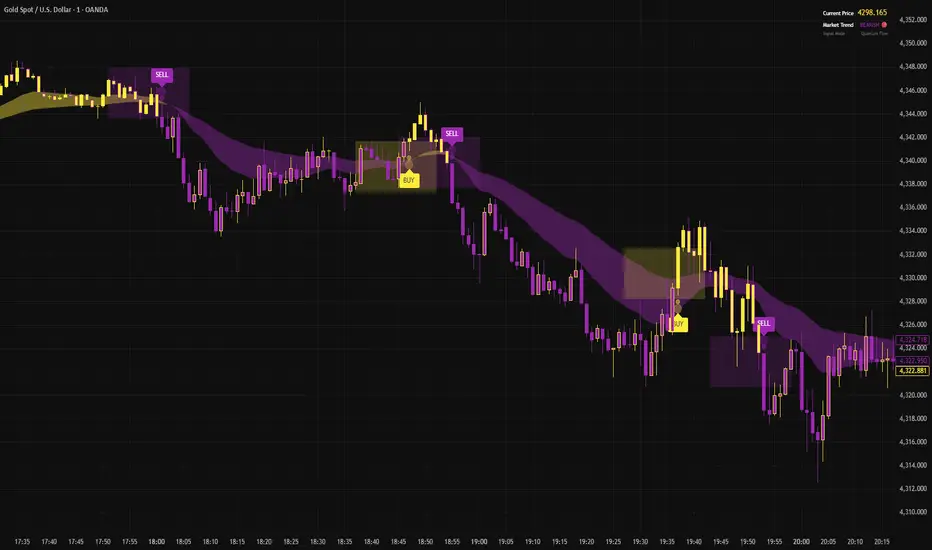
RSI Divergence LiquidityRSI Divergence Liquidity is an indicator designed to help you catch high-probability BUY reversals by combining two powerful concepts:
OANDA:XAUUSD
Liquidity Sweep / Swing Low: automatically marks swing-low levels and tracks when price sweeps below them and reacts back.
Bullish RSI Divergence: filters noise by comparing RSI at the swing area versus RSI at the retest, favoring reversals with stronger momentum confirmation.
How it works
The script draws Swing Low lines using Pivot Lows. When a new Swing Low forms, the previous one is cut/frozen .
When price retests a Swing Low and the candle conditions are met (bar n bullish, bar n-1 bearish), the script checks:
Whether RSI at n/n-1 is higher than the RSI at the swing (bullish divergence logic)
Whether min RSI at the swing is below a threshold (default < 36) to focus on oversold swing areas
If all conditions pass, the indicator prints an upward triangle right when bar n closes → a potential BUY signal.
How to use
Enter BUY when an up triangle appears at/near the Swing Low (liquidity sweep zone).
Stop Loss idea: below the most recent swing low / below the sweep wick.
Take Profit idea: nearest supply zone, prior high, or fixed RR such as 1:2 / 1:3 depending on your system.
Recommended settings
Best on: M5–H1 (depending on your style), especially effective when price is trending down and performs a clear sweep.
For stricter filtering: lower Max minRSI at Swing (x) to only take signals from deeper RSI lows.
Smaller Pivot Lookback → more swings/signals; larger values → fewer but cleaner swings.
Note: This tool improves probability, not certainty. Combine it with market structure / key levels and proper risk management for best results.

AETHER II: Quantum Liquidity EngineAETHER II is the final evolution of market scanning. It does not analyze price; it analyzes Physics.
Most traders view the chart as empty space where price moves freely. AETHER views the market as a Fluid Environment with varying degrees of Density and Viscosity.
Sometimes the market is "Thick" (High Friction). Price hits invisible walls and stops dead, even with high volume.
Sometimes the market is "Thin" (Zero Friction). Price slips rapidly through air pockets, leaving vacuums behind.
AETHER II simulates these fluid dynamics in real-time, visualizing the invisible "Dark Pool" orders that absorb liquidity and the "Liquidity Vacuums" that act as magnets for price.
Core Capabilities
1. 🛡️ Iceberg Detection (The Walls)
The Physics: When massive volume hits the market but price refuses to move, it means an institution is absorbing orders via hidden "Iceberg" limit orders.
The Signal: AETHER paints a persistent "Blockade Zone" (Green for Support, Red for Resistance).
Action: Treat these zones as concrete walls. Do not trade into them. Place your stops behind them.
2. 👻 Vacuum Detection (The Ghosts)
The Physics: When price moves rapidly with tiny volume, it creates a "Liquidity Vacuum." This is fake movement caused by slippage (Zero Friction).
The Signal: AETHER paints a "Ghost Zone" (Purple).
Action: Price hates vacuums and will almost always snap back to fill them. These are high-probability magnetic targets for Take Profits.
3. 📟 Quantum HUD (Heads-Up Display) A real-time dashboard in the top corner that grades the current market physics:
STATE: Tells you if the market is in "FLOW," hitting a "WALL," or slipping into a "VACUUM."
FRICTION: A raw density score. If this number spikes, movement is about to stop.
How to Use (The "Physics" Protocol)
AETHER is your map of the battlefield's terrain.
Scenario A (The Trap): You want to Buy. You check AETHER. There is a Red "Iceberg Zone" right above you.
Decision: WAIT. The friction is too high. Buying here is like running into a concrete wall. Wait for the wall to be breached.
Scenario B (The Slip): Price crashes down rapidly, leaving a trail of Purple "Vacuum Zones" behind.
Decision: TARGET THE GHOSTS. The move down was fake (low density). Price will likely reverse to fill the vacuum.
Disclaimer
This tool simulates order book density using Volume-Range efficiency metrics. It does not access Level 3 Dark Pool data (which is unavailable to retail traders).

NEXUS PRO: Institutional Flow & Liquidity EngineNEXUS PRO is a next-generation market scanner designed to help traders identify high-probability reversals by tracking what matters most: Institutional Capital Flow.
Most indicators lag behind price, trapping retail traders into late entries. NEXUS PRO takes a different approach. It combines Liquidity Sweep Detection, Orderflow Analysis, and Multi-Timeframe Trend Structure into a single proprietary "Neural Score."
Instead of guessing if a trend is valid, the engine processes millions of data points per candle to give you a single, actionable Confluence Grade (S, A, B, C, D).
Core Features
1. ⚔️ Liquidity Sweep Detection (The "Trap" Engine) Institutions often push price below key levels to trigger retail stop-losses before reversing. NEXUS PRO automatically detects these "Stop Hunts" and "Liquidity Grabs" in real-time, marking them on your chart. These are your highest-probability reversal zones.
2. 🧠 Proprietary "Neural" Scoring System Stop analyzing 10 different indicators manually. The on-chart Dashboard calculates a real-time Probability Score (0-100%) for every setup based on:
Structure: Is the market breaking structure (BOS) or just noise?
Valuation: Is price in a Premium or Discount zone relative to institutional VWAP?
Momentum: Are buyers or sellers actually in control?
Multi-Timeframe Alignment: Are the higher timeframes backing your trade?
3. 📊 Institutional Volume Analysis Detects "Volume Climaxes" and "Anomalies" that often mark the exact top or bottom of a move. The bars change color (Green/Red) to alert you when Smart Money is stepping in with size.
4. 🏦 Professional Dashboard A clean, non-intrusive heads-up display (HUD) that shows you the health of the current asset at a glance. Monitor the Trend, Momentum, Volatility, and Liquidity status without cluttering your chart.
How to Use (The "Sweep & Reverse" Strategy)
NEXUS PRO is optimized for catching Reversals and Trend Continuations.
Wait for the Signal: Look for a "⚔️ LIQ GRAB" label or a "BOS" (Break of Structure) marker. This indicates a potential institutional entry point.
Check the Dashboard: Glance at the SCORE.
Grade S or A (80-100%): Prime Institutional Setup. High confidence.
Grade B (60-79%): Valid Setup. Ensure proper risk management.
Grade C/D: Low probability / Noise. Recommended to stay flat.
Confirm Volume: Look for a Volume Climax (highlighted colored bars) to confirm that big money is participating in the move.
Settings & Customization
Signal Quality: Filter out noise by setting the engine to show only "High" or "Ultra" grade setups.
Dashboard Position: Move the HUD to any corner of the screen to fit your workspace.
Visuals: Fully customizable colors to match your dark/light mode preference.
Disclaimer
This tool is for educational and analytical purposes only. It quantifies market data to assist in decision-making but does not guarantee future results. Always use proper risk management.

Warpath Structure + Liquidity Tool (Updated - V3)Warpath visually organizes the key elements required to trade Gold professionally:
1. Market Structure Clarity
Automatically labels HH / HL / LH / LL on major pivot points (current chart timeframe). Makes directional bias immediately obvious. Helps prevent counter-trend trading in strong expansions.
2. Liquidity Sweep Detection (Wick-Only)
Highlights true liquidity sweeps using wick behavior (no breakout guessing). Marks the sweep wick with user-defined colors. Draws a swept-zone box that extends forward to show where liquidity was taken. Designed to identify fuel vs reversal behavior in trends.
3. Key Session Levels
Automatically plots:
Asian High / Low
Previous Day High / Low
Equal Highs / Equal Lows from current timeframe and higher timeframes (1H / 4H / Daily)
These levels represent where price is likely to react, not where trades should be forced.
4. Multi-Confluence HTF Bias Dashboard
Small dashboard showing bias for 15M, 1H, 4H, and Daily timeframes. Each timeframe bias is calculated using four confluence factors:
EMA Stack: 8/21/50 alignment and price position relative to EMAs
Structure: Recent HH/HL vs LH/LL pivot behavior
Price Patterns: Engulfing candles, hammers, double bottoms/tops, break of structure
Momentum: Recent candle direction and close trend
Displays a confluence score (e.g., "BULLS (4)") so you can see signal strength, not just direction. Overall bias weights higher timeframes more heavily for smarter alignment.
5. Trade Positioning Dashboard
Replaces basic overbought/oversold readings with actionable positioning context:
Range Position: Shows exactly where price sits within the selected range (Previous Session, Previous Day, or Weekly) as a percentage. Zones include Deep Discount (0-25%), Discount (25-40%), Equilibrium (40-60%), Premium (60-75%), and Deep Premium (75-100%).
VWAP Deviation: Displays distance from VWAP in standard deviations (σ). Readings beyond ±1.5σ indicate meaningful extension. Readings beyond ±2σ suggest caution on continuation and potential mean reversion.
Trade Favor: Combines HTF bias alignment, range position, and VWAP deviation into a single directional score. Displays as "LONGS ●●●○" or "SHORTS ●●○○" so you know at a glance whether conditions favor continuation or reversal.
6. Continuation Reload Awareness (Strong Trend Environments)
Built to handle markets that:
Remain overbought
Stay in premium
Sweep buy-side liquidity repeatedly
The multi-confluence scoring system catches trend continuation setups (like higher lows forming with bullish momentum) even before swing structure fully confirms. Supports compression → expansion continuation behavior. Prevents missed participation during multi-day trends without abandoning discipline.

APS - Sweeps & BOSThis indicator identifies pivot highs and lows, detects liquidity sweeps, and marks Break of Structure (BOS).
Key Features:
1) Pivot Detection :
The script uses configurable left and right bar parameters to identify significant pivot highs and lows, marking them with "X" labels on the chart. These pivots represent potential areas where price may react.
2) Sweep Detection :
A sweep occurs when price temporarily moves beyond a previous pivot level but closes back inside, suggesting a liquidity grab or stop hunt. The indicator draws horizontal lines connecting the original pivot to the sweep location and labels these events. Sweeps often precede reversals as they collect liquidity before moving in the opposite direction.
3) Break of Structure (BOS) :
BOS events are marked when price closes beyond a previous pivot level, indicating a potential shift in market structure. Bullish BOS occurs when price closes above a pivot high, while Bearish BOS occurs when price closes below a pivot low. These can signal continuation moves or trend changes.
4) Previous Day High/Low (PDH/PDL):
The indicator tracks the previous session's high and low (based on 6 PM ET session breaks, which auto-adjusts for DST) and displays whether these levels have been breached. It also calculates and displays a 50% equilibrium line between PDH and PDL.
5) Higher Timeframe Context :
A table in the top-right corner shows whether the higher timeframe close is in premium (above equilibrium) or discount (below equilibrium) territory. The HTF automatically adjusts based on your current timeframe.
6) Customization Options:
Adjustable pivot sensitivity (left/right bars)
Configurable sweep lookback period
Customizable colors, line styles, and label sizes for all elements
Toggle visibility for any component
Optional alerts for sweeps and BOS events
How to Use:
Sweeps near support/resistance often indicate liquidity grabs before reversals
BOS events can confirm directional bias changes
Use PDH/PDL levels as reference points for intraday trading
Consider HTF context when taking trades (discount zones for longs, premium zones for shorts)
Important Notes:
This indicator is designed for educational purposes and market analysis. Past patterns do not guarantee future results. Please follow proper risk management.

Fed Balance Sheet vs GDP RatioThis indicator tracks the size of the Federal Reserve’s Balance Sheet relative to the total US Economy (Nominal GDP). It serves as a primary gauge for systemic liquidity and the extent of monetary intervention in the markets.
How it Works: The script calculates the ratio between:
Fed Total Assets (FRED:WALCL) - The total amount of bonds and assets held by the Fed.
US Nominal GDP (FRED:GDP) - The annualized economic output of the US.
How to Read the Levels: I have plotted historical reference lines to help contextualize the current cycle:
🔴 35% (Pandemic Peak): The absolute high of monetary stimulus (2020–2022). This represents maximum liquidity, where the Fed "printed" massive amounts of money to support the economy.
🟠 ~20% (The "Danger Zone"): This was the range established after the 2008 Financial Crisis (2014–2019). Watch this level closely. In late 2019, when the Fed tried to push the ratio below ~18%, the banking plumbing broke (the Repo Crisis), forcing them to restart QE. We are currently approaching this level again.
⚪ 6% (Pre-2008 Normal): The historical baseline before the era of Quantitative Easing (QE) began.
Why This Matters:
Rising Ratio: Suggests the Fed is expanding liquidity (QE) faster than the economy is growing. Historically, this is a tailwind for risk assets (Stocks, Crypto).
Falling Ratio: Suggests the Fed is tightening (QT) or the economy is outgrowing the money supply. This represents a headwind for liquidity and risk assets.
Methodology Note:
Data Source: Federal Reserve Economic Data (FRED).
Calculation: No manual annualization is applied to GDP, as FRED:GDP is already reported as a Seasonally Adjusted Annual Rate (SAAR).

Warpath Structure + Liquidity ToolWarpath visually organizes the key elements required to trade Gold professionally:
1. Market Structure Clarity
Automatically labels HH / HL / LH / LL on major pivot points (current chart timeframe)
Makes directional bias immediately obvious
Helps prevent counter-trend trading in strong expansions
2. Liquidity Sweep Detection (Wick-Only)
Highlights true liquidity sweeps using wick behavior (no breakout guessing)
Marks the sweep wick with user-defined colors
Draws a swept-zone box that extends forward to show where liquidity was taken
Designed to identify fuel vs reversal behavior in trends
3. Key Session Levels
Automatically plots:
Asian High / Low
London High / Low
New York High / Low
Previous Day High / Low
Includes Equal Highs / Equal Lows from:
current timeframe
higher timeframes (1H / 4H / Daily)
These levels represent where price is likely to react, not where trades should be forced.
4. HTF Bias Dashboard (Minimal & Clean)
Small dashboard in the corner showing:
15M bias
1H bias
4H bias
Daily bias
Keeps higher-timeframe alignment visible without clutter
5. Premium / Discount & Market State Awareness
Uses previous session equilibrium (50%) with a neutral buffer
Helps frame:
premium vs discount
neutral vs expansion environments
Designed for context, not entry signals
6. Continuation Reload Awareness (Strong Trend Environments)
Built to handle markets that:
remain overbought
stay in premium
sweep buy-side liquidity repeatedly
Supports compression → expansion continuation behavior
Prevents missed participation during multi-day trends without abandoning discipline

Warpath Structure + Liquidity ToolWarpath visually organizes the key elements required to trade Gold professionally:
1. Market Structure Clarity
Automatically labels HH / HL / LH / LL on major pivot points (current chart timeframe)
Makes directional bias immediately obvious
Helps prevent counter-trend trading in strong expansions
2. Liquidity Sweep Detection (Wick-Only)
Highlights true liquidity sweeps using wick behavior (no breakout guessing)
Marks the sweep wick with user-defined colors
Draws a swept-zone box that extends forward to show where liquidity was taken
Designed to identify fuel vs reversal behavior in trends
3. Key Session Levels
Automatically plots:
Asian High / Low
London High / Low
New York High / Low
Previous Day High / Low
Includes Equal Highs / Equal Lows from:
current timeframe
higher timeframes (1H / 4H / Daily)
These levels represent where price is likely to react, not where trades should be forced.
4. HTF Bias Dashboard (Minimal & Clean)
Small dashboard in the corner showing:
15M bias
1H bias
4H bias
Daily bias
Keeps higher-timeframe alignment visible without clutter
5. Premium / Discount & Market State Awareness
Uses previous session equilibrium (50%) with a neutral buffer
Helps frame:
premium vs discount
neutral vs expansion environments
Designed for context, not entry signals
6. Continuation Reload Awareness (Strong Trend Environments)
Built to handle markets that:
remain overbought
stay in premium
sweep buy-side liquidity repeatedly
Supports compression → expansion continuation behavior
Prevents missed participation during multi-day trends without abandoning discipline

JP7FX Signals ProJP7FX Signals Pro
Smart session signals based on structure, liquidity shifts and volatility filters.
Designed for use on the 1 minute timeframe.
What this tool does
This indicator builds signals around three things traders track every day.
• session ranges for Asia, Frankfurt, London and New York
• Fair Value Gap behaviour
• Supertrend shifts with volatility confirmation
The script draws each session range on your chart. It tracks when price breaks a session high or low, then checks if the market is above or below the daily open. These conditions help filter trades by direction during different sessions.
It also detects bullish and bearish Fair Value Gaps. The script tracks when an FVG forms, when price enters the imbalance and when it gets mitigated. These checks create part of the signal logic.
Supertrend is used as an extra filter. A crossover above or below the Supertrend gives a directional bias. When combined with session behaviour and FVG conditions, the script can mark possible long or short signals during London or New York.
How the signals form
A signal only prints when the script has all conditions in place.
This includes:
• a session range break in the correct direction
• a price position relative to the daily open
• confirmation from Supertrend
• FVG creation or mitigation on the right side of price
• liquidity taken in previous sessions
These rules reduce noise and avoid signals that appear in weak conditions.
What the indicator is for
• understanding how sessions behave on the 1 minute chart
• tracking liquidity behaviour
• seeing when a clean break and trend shift takes place
• getting notified when the market forms the conditions you set
This is not a buy or sell system on its own
Signals do not replace analysis. You still need market structure, higher timeframe direction, orderblocks or your own trade model.
A signal is only a prompt to look at the chart, not a confirmation to enter a trade.
Price can shift quickly around sessions, so check the context before acting on any alert.
Important notes
• designed for the 1 minute timeframe
• signals do not guarantee trend continuation
• conditions can form in strong or weak market phases
• use your own risk rules and validation before entering trades
JP7FX Signals Pro helps you track session behaviour and FVG interaction more efficiently, but trading decisions still need your full chart process.

3-bar Swing Liquidity Grab📊 3-BAR SWING LIQUIDITY GRAB
WHAT IT DOES
Automatically detects 3-bar swing highs/lows and alerts you to liquidity grab moments — when price breaks structural levels to trigger stop-losses, then reverses.
SIGNALS AT A GLANCE
Signal What It Means Trade Idea
SH 🟠▼ Swing High (Resistance) Reference level
SL 🔵▲ Swing Low (Support) Reference level
LQH 🔴❌ Fake break ABOVE resistance SHORT ⬇️
LQL 🟢❌ Fake break BELOW support LONG ⬆️
HOW TO TRADE IT
Spot the trend — Is price going up or down?
Wait for signal — LQL (green) in uptrend, LQH (red) in downtrend
Enter on signal — Place order on that bar
Stop Loss — Just outside the swing level
Take Profit — At the next swing level
SETTINGS EXPLAINED
Swing length: 1 = 3-bar swing, 2 = 5-bar swing (use 1 for scalp, 2 for larger TF)
Lookback bars: Time window to find liquidity grabs (10-20 for scalp, 50+ for position)
Toggles: Show/hide swing markers and signals
BEST ON THESE TIMEFRAMES
TF Type Settings
M5-M15 Scalp SL: 1, LB: 10-15
M15-H1 Intraday SL: 1, LB: 15-20
H1-H4 Swing SL: 1-2, LB: 20-50
D+ Position SL: 2, LB: 50+
KEY RULES
✅ DO:
Trade signals aligned with major trend
Always use stop loss
Use 2-5% risk per trade
Confirm with price action
❌ DON'T:
Trade choppy/sideways markets
Ignore the trend
Chase signals
Overtrade
REAL EXAMPLE
LONG Trade (LQL Signal):
text
Uptrend → Swing Low forms at 1.0950
→ Price dips to 1.0930 (below SL)
→ Closes at 1.0955 (above SL) = GREEN ❌ (LQL)
→ BUY at 1.0960
→ Stop Loss: 1.0920
→ Take Profit: 1.1050 (previous Swing High)
WORKS ON
✅ Crypto (Bitcoin, Ethereum, Altcoins)
✅ Forex (EUR/USD, GBP/USD, etc.)
✅ Stocks & Indices
✅ Commodities (Gold, Oil, etc.)
Any asset, any timeframe, any market.
DISCLAIMER
This is a technical analysis tool, not financial advice. Past performance does not guarantee future results. Always use proper risk management and test on a demo account first.

HTCTS - Session & Time LiquidityHTCTS - Session & Time Liquidity
1. ภาพรวมการทำงาน (Overview)
อินดิเคเตอร์ตัวนี้ทำหน้าที่ 4 อย่างหลักพร้อมกัน:
Auto DST (ปรับเวลาตามฤดูอัตโนมัติ): คุณไม่ต้องมานั่งแก้เวลาเมื่อตลาดต่างประเทศเปลี่ยนเวลา (Daylight Saving Time) เพราะโค้ดอ้างอิง Timezone ของตลาดนั้นๆ โดยตรง (เช่น NY ใช้ America/New_York)
Session Bars: แสดงแถบสีเล็กๆ ด้านล่างจอเพื่อบอกว่าตอนนี้อยู่ใน Session ไหน (Asia, London, NY AM, NY PM, Thai) แทนการถมสีพื้นหลังซึ่งอาจจะรกตา
High/Low Levels & Sweeps: เมื่อจบ Session โปรแกรมจะตีเส้น High และ Low ของช่วงเวลานั้นทิ้งไว้ ถ้ากราฟวิ่งไปชนเส้นเหล่านั้น (Breakout/Sweep) เส้นจะเปลี่ยนเป็นเส้นประและขึ้นข้อความว่า "(Swept)"
1. Indicator Overview and Purpose (ICT/SMC Framework)
This custom Pine Script indicator is designed specifically for traders utilizing ICT (Inner Circle Trader) or SMC (Smart Money Concepts) methodologies. Its primary function is to simplify the analysis of Time & Price by automatically defining and tracking key market sessions, their resulting liquidity levels (High/Low), and detecting liquidity sweeps (Stop Hunts).
The indicator is designed to be Zero-Maintenance regarding time zones, as it automatically adjusts for Daylight Saving Time (DST) changes in major financial centers (London, New York).
2. Key Features and Logic
A. Automatic DST Handling (Auto-DST)
The script uses specific, location-based time zones for global markets instead of a fixed GMT/UTC offset.
Asia: Uses Asia/Tokyo.
London: Uses Europe/London (Automatically adjusts for BST).
New York (AM/PM): Uses America/New_York (Automatically adjusts for EST/EDT).
This guarantees that the session times displayed on your chart (regardless of your local time, e.g., Thailand GMT+7) always align with the actual opening and closing moments of the corresponding financial market.

For Vietnamese: 3D Volume Weighted Liquidity LevelIntroduction
The 3D Volume Weighted Liquidity Level indicator visualizes market structure by identifying key support and resistance zones based on Pivot Highs and Lows. Unlike standard support/resistance lines, this tool adds a "3D" dimension by calculating the depth of the zone based on Accumulated Volume and Volatility (ATR). This helps traders visualize the "weighted" or significance of a specific price level.
Key Features
- 3D Visualization: Draws geometric boxes connecting similar Pivot points to create clear structural zones.
- Volume & Volatility Depth: The height (depth) of the box is not random. It is calculated dynamically using the accumulated volume between pivots multiplied by the ATR. Thicker boxes imply higher volume accumulation and volatility at that level.
- Liquidity Grab Detection: The indicator automatically detects and highlights bars that "grab liquidity" (break the top of a resistance box or the bottom of a support box), signaling potential stop hunts or reversals.
- Customizable Sensitivity: Users can adjust pivot lengths, search depth, and the volume scaling factor to fit different timeframes and assets.
How to Use
- Support & Resistance: Use the Blue Boxes as potential Support zones and Red Boxes as potential Resistance zones.
- Trend Reversals: Watch for the Liquidity Grab signals (colored bars). If price pierces a box but fails to close significantly beyond it, it often indicates a trap or a reversal setup.
- Volume Analysis: Pay attention to the thickness of the boxes. A thicker box suggests that a significant amount of volume was traded to form that structure, making it a stronger level of interest.

XAUUSD Liquidity Sweep + Engulfing (4H/2H/15m)Key Features in This Script:
4H Bias (Trend): We use RSI on 4H to determine if the market is in a bullish or bearish trend.
2H Setup: When price sweeps below previous lows or above previous highs (liquidity sweep), we confirm it with RSI and an engulfing candle.
15m Entry: After the liquidity sweep is confirmed on the 15m chart, we check for a bullish engulfing (for buys) or bearish engulfing (for sells) with RSI confirmation.
How to Use It:
Add the Script: Copy-paste the code above into TradingView’s Pine Editor.
Apply it to the 15-minute chart for XAUUSD (Gold).
Alerts: Set up alerts when a Buy or Sell signal appears based on the conditions.
Alerts Example:
When a liquidity sweep and RSI flip happens with an engulfing candle, TradingView will notify you, helping you enter at the right time.
🚀 Next Steps:
Try it out and let me know how the alerts and signals are working for you.
If you'd like to add custom stop-loss or take-profit calculations, or include Fibonacci levels, let me know!

USD Liquidity / FX Swap + Money Market StressThis indicator shows, in a simple way, how tight or loose USD liquidity is. It combines two things: signs of stress in the FX market (Fed swap lines + dollar strength) and signs from the money market (the difference between repo rates like SOFR/TGCR and the Fed’s IORB rate). All of this is merged into a single blue line: when it rises, liquidity tends to be more abundant; when it falls, there is more stress and the dollar becomes “expensive” to obtain.
You read it like a traffic light:
If the background is red, the indicator is below the lower threshold → liquidity stress, an environment that is more prone to sell-offs and violent moves in risk assets (including crypto).
If the background is green, the indicator is above the upper threshold → more relaxed liquidity, a backdrop that is more favorable for risk rallies to be sustained.
No background color → neutral zone, neither very good nor very bad: you trade according to your usual system.
It is designed as a macro context filter, not as a buy/sell signal. In red, it makes sense to be more defensive with risk and leverage; in green, if your technical system gives a long signal, you have a somewhat more favorable tailwind. It should always be used together with other tools and strict risk management.

Key Levels, Liquidity Zones & CC liteSyntropy Liquidity & Key Levels Pro — All-in-One Institutional Toolkit
The ultimate clean confluence tool used by serious ICT/SMC traders worldwide.
This single indicator combines three legendary components into one flawless, non-repainting dashboard:
1. Key Institutional Levels
• Monday Range (High / Low / Mid)
• Current & Previous Weekly Open + Range
• Current & Previous Monthly Open + Range
• Quarterly Open + Range
• Smart level merging (no duplicate lines)
• Right-anchored or standard display
• Fully customizable colors, styles & shorthand labels
2. Advanced Liquidity Zones
• Volume-strength filtered swing highs/lows
• Dynamic or fixed ATR-based liquidity pools
• Real-time "Liquidity Grab" detection with visual markers
• Clean boxes + extension lines
• Small dashboard showing current mode & zone count
3. 9 Logic – Clean Version)
• Classic 6–9 countdowns with modern styling
• Standard & Aggressive 13 signals
• Customizable shapes (labels, arrows, triangles, etc.)
• Buy signals marked with green check, Sell with red cross (clean & intuitive)
Why thousands of traders trust this version:
• Zero repainting – 100% reliable structure
• Institutional-grade clean aesthetics
• Works perfectly on Crypto, Forex, Stocks, Futures
• No lag, no clutter, maximum clarity
• All features fully customizable
This is not just another multi-tool.
This is the final confluence indicator most professional traders keep on their main chart 24/7.
Add to favorites. You won’t trade without it again.
Enjoy the edge,
Syntropy Labs

RT-Liquidation Engine-DeltaIntroduction
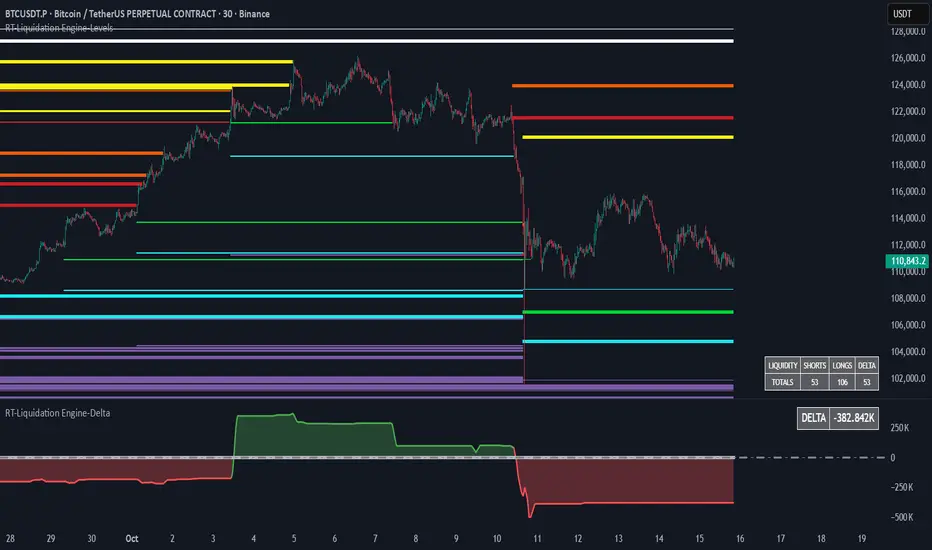
The RT-Liquidation Engine-Levels is a liquidity mapping tool designed to highlight where leveraged long and short positions may be vulnerable to liquidation. It plots projected Liquidation Levels above and below price, grouped by leverage tiers, so traders can see where the algorithm estimates clustered liquidation zones might sit relative to current price. The RT-Liquidation Engine-Levels indicator is intended to be used in conjunction with the RT-Liquidation Engine-Delta indicator. This writeup will cover both indicators in depth and explain how they work together.
Liquidity Theory – What This Tool Is Looking At
Liquidity levels are a data point that advanced traders study to understand the price levels where positions may be forced out of the market. While exchanges can show open orders in an order book, they do not publish where traders will be liquidated. However, market participants who can estimate those zones often pay close attention to them, because a single wick can be enough to trigger liquidations and force positions to close into the market.
The RT-Liquidation Engine is built around this concept. It uses on-chart information and volume to approximate where these potential liquidation areas may be and displays them directly on the price chart so traders can see the projected levels they may want to monitor.
How It Works
Because real Liquidation Levels are not published by exchanges, the indicator cannot read them directly. Instead, it uses an internal algorithm that studies current prices, direction, and volume to estimate where common leveraged positions might be at risk.
Conceptually, the algorithm: Uses the visible data on the chart to approximate where typical leveraged long and short positions may be clustered.
Projects those estimates as horizontal levels above and below current price.
Keeps those projected levels on the chart until price action trades into them and the level is considered “touched.” The result is a set of dynamic levels that act as an estimated map of where liquidation events might be more likely, based on the chart’s own history and current structure. Trader Math And Leverage Levels
Traders using perpetual futures often use different leverage levels for their positions. The higher the leverage, the more vulnerable those positions are to being liquidated by relatively small moves in price.
While the exact leverage of individual traders is unknown, the Liquidation Engine focuses on four commonly referenced leverage tiers: 5x Leverage
10x Leverage
25x Leverage
50x Leverage Each tier can be displayed as its own set of projected Liquidation Levels on the chart so traders can see a structured view of where different leverage groups may be sensitive.
The Liquidation Levels can be displayed with Multi Color options or in Red/Green depending on the trader's preference.
The above chart shows the Liquidation Levels being displayed with Multi Colors. The above chart shows the Liquidation Levels being displayed in Red/Green.
Reading The Levels
Above and below the candles you will see projected Liquidation Levels. These levels appear at the prices where the algorithm estimates that leveraged positions for each tier could be vulnerable, and they remain drawn until price has traded through them.
In the default view: Thickness of the level – Indicates the estimated size of the position. Thicker lines represent larger projected positions.
Color of the level – Indicates which leverage group the level belongs to (5x, 10x, 25x, or 50x).
Length of the level – Indicates how long the estimated leveraged position has been open according to the algorithm.
This combination provides a visual profile of which zones have more concentrated projected liquidation interest and which have been standing in the market for longer.
Tuning Options
The Liquidation Engine includes a focused set of tuning options so traders can adjust how much information is plotted and how it appears on their charts. Custom Tuning Options Include: Sensitivity Filter – Adjusts the overall threshold the algorithm uses when estimating positions. Increasing this value reduces the number of plotted levels and focuses on larger estimated positions. Decreasing it allows smaller estimated positions to be considered, increasing the number of displayed levels.
Leverage Level Toggles – Individual toggles for each leverage group (5x, 10x, 25x, 50x).
These allow traders to show or hide specific tiers depending on which groups they want to monitor.
Color Settings – Controls the colors and transparency of the levels.
Traders can adjust these settings to match their chart theme and highlight or soften specific leverage groups.
Summary Table Options – Controls the on-chart table that tracks the estimated number of Long versus Short positions. Table On/Off – Toggles the table on or off.
Table Position – Moves the table to different corners of the chart.
Table Background Color / Table Text Color – Customizes the table’s appearance.
Liquidation Engine – Delta
In addition to plotting projected Liquidation Levels, the RT-Liquidation Engine-Levels Indicator is to be used in conjunction with the RT-Liquidation Engine-Delta Indicator. This tool displays the Liquidation Delta data that the algorithm estimates on the imbalance between long and short exposure. Conceptually, the RT-Liquidation Engine-Delta Indicator computes the following items:
Aggregates the estimated long and short positions from the projected Liquidation Levels.
Calculates a net difference (delta) between those two estimates.
Displays that difference so traders can see when the projected open interest appears skewed to one side. When the estimated order book is heavily skewed in one direction, the market may sometimes move in the opposite direction as conditions rebalance. The delta view is designed to provide context for those potential rebalancing moves, not to predict exact turning points.
Tuning options for the RT-Liquidation Engine-Delta Indicator are aligned with the RT-Liquidation Engine-Levels Indicator settings. If you change filters, toggles, or colors in the Levels tool, it is recommended to mirror those settings in the Delta tool so both views remain synchronized.
Best Practices
Some common usage patterns include:
Timeframes – Many traders prefer to use Liquidation Engine on intraday timeframes under 60 minutes. Timeframes such as 30-minute candles or smaller are often used when monitoring leveraged flows.
Load Times – The algorithm performs a significant amount of calculations to project these Liquidation Levels and Deltas. On some symbols and timeframes, this can take noticeable time to load the chart. When changing settings, keep an eye on the loading indicator in the chart header to confirm calculations are still running. In normal conditions, these calculations are completed in less than 30 seconds.
Market Sessions And Levels Out Of Range – If projected levels appear far from current price or do not align with visible action, check the chart’s session settings in the bottom-left of the chart (for example, ETH vs RTH sessions). Ensuring the correct session is active can help keep the displayed levels in a more relevant range.
These guidelines are intended to make the tool easier to work with and to keep expectations realistic when interpreting the projections.
What Makes This Tool Different
While many indicators focus on price alone, the Liquidation Engine Levels and Delta tools are designed specifically around estimated liquidation behavior: It concentrates on where leveraged positions may be at risk, rather than only where price has been in the past.
It segments projected levels by leverage tier so traders can distinguish between different risk profiles on the chart.
It includes both a level-mapping view and a delta view, providing context for both where levels sit and how imbalanced the estimated positioning might be.
Important Note
The RT-Liquidation Engine-Levels and RT-Liquidation Engine-Delta tools provide an approximation of where leveraged positions might be vulnerable based solely on chart data. They do not access actual exchange liquidation feeds, does not reveal real trader positions, and cannot guarantee that a projected level will cause price to react.
This indicator is intended to provide additional context around potential liquidation zones and positioning imbalances. It is not a standalone signal generator and should always be used together with your own analysis, testing, and risk management. Historical interactions with projected Liquidation Levels, including any illustrative examples, do not guarantee future results.
🐋 Tight lines and happy trading!

RT-Liquidation Engine-LevelsIntroduction
The RT-Liquidation Engine-Levels is a liquidity mapping tool designed to highlight where leveraged long and short positions may be vulnerable to liquidation. It plots projected Liquidation Levels above and below price, grouped by leverage tiers, so traders can see where the algorithm estimates clustered liquidation zones might sit relative to current price. The RT-Liquidation Engine-Levels indicator is intended to be used in conjunction with the RT-Liquidation Engine-Delta indicator. This writeup will cover both indicators in depth and explain how they work together.
Liquidity Theory – What This Tool Is Looking At
Liquidity levels are a data point that advanced traders study to understand the price levels where positions may be forced out of the market. While exchanges can show open orders in an order book, they do not publish where traders will be liquidated. However, market participants who can estimate those zones often pay close attention to them, because a single wick can be enough to trigger liquidations and force positions to close into the market.
The RT-Liquidation Engine is built around this concept. It uses on-chart information and volume to approximate where these potential liquidation areas may be and displays them directly on the price chart so traders can see the projected levels they may want to monitor.
How It Works
Because real Liquidation Levels are not published by exchanges, the indicator cannot read them directly. Instead, it uses an internal algorithm that studies current prices, direction, and volume to estimate where common leveraged positions might be at risk.
Conceptually, the algorithm: Uses the visible data on the chart to approximate where typical leveraged long and short positions may be clustered.
Projects those estimates as horizontal levels above and below current price.
Keeps those projected levels on the chart until price action trades into them and the level is considered “touched.” The result is a set of dynamic levels that act as an estimated map of where liquidation events might be more likely, based on the chart’s own history and current structure. Trader Math And Leverage Levels
Traders using perpetual futures often use different leverage levels for their positions. The higher the leverage, the more vulnerable those positions are to being liquidated by relatively small moves in price.
While the exact leverage of individual traders is unknown, the Liquidation Engine focuses on four commonly referenced leverage tiers: 5x Leverage
10x Leverage
25x Leverage
50x Leverage Each tier can be displayed as its own set of projected Liquidation Levels on the chart so traders can see a structured view of where different leverage groups may be sensitive.
The Liquidation Levels can be displayed with Multi Color options or in Red/Green depending on the trader's preference.
The above chart shows the Liquidation Levels being displayed with Multi Colors. The above chart shows the Liquidation Levels being displayed in Red/Green.
Reading The Levels
Above and below the candles you will see projected Liquidation Levels. These levels appear at the prices where the algorithm estimates that leveraged positions for each tier could be vulnerable, and they remain drawn until price has traded through them.
In the default view: Thickness of the level – Indicates the estimated size of the position. Thicker lines represent larger projected positions.
Color of the level – Indicates which leverage group the level belongs to (5x, 10x, 25x, or 50x).
Length of the level – Indicates how long the estimated leveraged position has been open according to the algorithm.
This combination provides a visual profile of which zones have more concentrated projected liquidation interest and which have been standing in the market for longer.
Tuning Options
The Liquidation Engine includes a focused set of tuning options so traders can adjust how much information is plotted and how it appears on their charts. Custom Tuning Options Include: Sensitivity Filter – Adjusts the overall threshold the algorithm uses when estimating positions. Increasing this value reduces the number of plotted levels and focuses on larger estimated positions. Decreasing it allows smaller estimated positions to be considered, increasing the number of displayed levels.
Leverage Level Toggles – Individual toggles for each leverage group (5x, 10x, 25x, 50x).
These allow traders to show or hide specific tiers depending on which groups they want to monitor.
Color Settings – Controls the colors and transparency of the levels.
Traders can adjust these settings to match their chart theme and highlight or soften specific leverage groups.
Summary Table Options – Controls the on-chart table that tracks the estimated number of Long versus Short positions. Table On/Off – Toggles the table on or off.
Table Position – Moves the table to different corners of the chart.
Table Background Color / Table Text Color – Customizes the table’s appearance.
Liquidation Engine – Delta
In addition to plotting projected Liquidation Levels, the RT-Liquidation Engine-Levels Indicator is to be used in conjunction with the RT-Liquidation Engine-Delta Indicator. This tool displays the Liquidation Delta data that the algorithm estimates on the imbalance between long and short exposure. Conceptually, the RT-Liquidation Engine-Delta Indicator computes the following items:
Aggregates the estimated long and short positions from the projected Liquidation Levels.
Calculates a net difference (delta) between those two estimates.
Displays that difference so traders can see when the projected open interest appears skewed to one side. When the estimated order book is heavily skewed in one direction, the market may sometimes move in the opposite direction as conditions rebalance. The delta view is designed to provide context for those potential rebalancing moves, not to predict exact turning points.
Tuning options for the RT-Liquidation Engine-Delta Indicator are aligned with the RT-Liquidation Engine-Levels Indicator settings. If you change filters, toggles, or colors in the Levels tool, it is recommended to mirror those settings in the Delta tool so both views remain synchronized.
Best Practices
Some common usage patterns include:
Timeframes – Many traders prefer to use Liquidation Engine on intraday timeframes under 60 minutes. Timeframes such as 30-minute candles or smaller are often used when monitoring leveraged flows.
Load Times – The algorithm performs a significant amount of calculations to project these Liquidation Levels and Deltas. On some symbols and timeframes, this can take noticeable time to load the chart. When changing settings, keep an eye on the loading indicator in the chart header to confirm calculations are still running. In normal conditions, these calculations are completed in less than 30 seconds.
Market Sessions And Levels Out Of Range – If projected levels appear far from current price or do not align with visible action, check the chart’s session settings in the bottom-left of the chart (for example, ETH vs RTH sessions). Ensuring the correct session is active can help keep the displayed levels in a more relevant range.
These guidelines are intended to make the tool easier to work with and to keep expectations realistic when interpreting the projections.
What Makes This Tool Different
While many indicators focus on price alone, the Liquidation Engine Levels and Delta tools are designed specifically around estimated liquidation behavior: It concentrates on where leveraged positions may be at risk, rather than only where price has been in the past.
It segments projected levels by leverage tier so traders can distinguish between different risk profiles on the chart.
It includes both a level-mapping view and a delta view, providing context for both where levels sit and how imbalanced the estimated positioning might be.
Important Note
The RT-Liquidation Engine-Levels and RT-Liquidation Engine-Delta tools provide an approximation of where leveraged positions might be vulnerable based solely on chart data. They do not access actual exchange liquidation feeds, does not reveal real trader positions, and cannot guarantee that a projected level will cause price to react.
This indicator is intended to provide additional context around potential liquidation zones and positioning imbalances. It is not a standalone signal generator and should always be used together with your own analysis, testing, and risk management. Historical interactions with projected Liquidation Levels, including any illustrative examples, do not guarantee future results.
🐋 Tight lines and happy trading!
Ryan Liquidity Hunt Algo Premium Liquidity Hunt Algo — detects institutional swing liquidity, order blocks, and premium/discount zones.
Shows auto-drawn swing boxes, liquidity lines (daily/weekly/monthly), FVG gaps, and optional OI/volume filters to highlight high-probability areas — designed for clear structure-based trade decisions and visual clarity.

Session Open Range, Breakout & Trap Framework - TrendPredator OBSession Open Range, Breakout & Trap Framework — TrendPredator Open Box
Stacey Burke’s trading approach combines concepts from George Douglas Taylor, Tony Crabel, Steve Mauro, and Robert Schabacker. His framework focuses on reading price behaviour across daily templates and identifying how markets move through recurring cycles of expansion, contraction, and reversal. While effective, much of this analysis requires real-time interpretation of session-based behaviour, which can be demanding for traders working on lower intraday timeframes.
The TrendPredator indicators formalize parts of this methodology by introducing mechanical rules for multi-timeframe bias tracking and session structure analysis. They aim to present the key elements of the system—bias, breakouts, fakeouts, and range behaviour—in a consistent and objective way that reduces discretionary interpretation.
The Open Box indicator focuses specifically on the opening behaviour of major trading sessions. It builds on principles found in classical Open Range Breakout (ORB) techniques described by Tony Crabel, where a defined time window around the session open forms a structural reference range. Price behaviour relative to this range—breaking out, failing back inside, or expanding—can highlight developing session bias, potential trap formation, and directional conviction.
This indicator applies these concepts throughout the major equity sessions. It automatically maps the session’s initial range (“Open Box”) and tracks how price interacts with it as liquidity and volatility increase. It also incorporates related structural references such as:
* the first-hour high and low of the futures session
* the exact session open level
* an anchored VWAP starting at the session open
* automated expansion levels projected from the Open Box
In combination, these components provide a unified view of early session activity, including breakout attempts, fakeouts, VWAP reactions, and liquidity targeting. The Open Box offers a structured lens for observing how price transitions through the major sessions (Asia → London → New York) and how these behaviours relate to higher-timeframe bias defined in the broader TrendPredator framework.
Core Features
Open Box (Session Structure)
The indicator defines an initial session range beginning at the selected session open. This “Open Box” represents a fixed time window—commonly the first 30 minutes, or any user-defined duration—that serves as a structural reference for analysing early session behaviour.
The range highlights whether price remains inside the box, breaks out, or rejects the boundaries, providing a consistent foundation for interpreting early directional tendencies and recognising breakout, continuation, or fakeout characteristics.
How it works:
* At the session open, the indicator calculates the high and low over the specified time window.
* This range is plotted as the initial structure of the session.
* Price behaviour at the boundaries can illustrate emerging bias or potential trap formation.
* An optional secondary range (e.g., 15-minute high/low) can be enabled to capture early volatility with additional precision.
Inputs / Options:
* Session specifications (Tokyo, London, New York)
* Open Box start and end times (e.g., equity open + first 30 minutes, or any custom length)
* Open Box colour and label settings
* Formatting options for Open Box high and low lines
* Optional secondary range per session (e.g., 15-minute high/low)
* Forward extension of Open Box high/low lines
* Number of historic Open Boxes to display
Session VWAPs
The indicator plots VWAPs for each major trading session—Asia, London, and New York—anchored to their respective session opens. These session-specific VWAPs assist in tracking how value develops through the day and how price interacts with session-based volume distributions.
How it works:
* At each session open, a VWAP is anchored to the open price.
* The VWAP updates throughout the session as new volume and price data arrive.
* Deviations above or below the VWAP may indicate balance, imbalance, or directional control.
* Viewed together, session VWAPs help identify transitions in value across sessions.
Inputs / Options:
* Enable or disable VWAP per session
* Adjustable anchor and end times (optionally to end of day)
* Line styling and label settings
* Number of historic VWAPs to draw
First Hour High/Low Extensions
The indicator marks the high and low formed during the first hour of each session. These reference points often function as early control levels and provide context for assessing whether the session is establishing bias, consolidating, or exhibiting reversal behaviour.
How it works:
* After the session starts, the indicator records the highest and lowest prices during the first hour.
* These levels are plotted and extended across the session.
* They provide a visual reference for observing reactions, targets, or rejection zones.
Inputs / Options:
* Enable or disable for each session
* Line style, colour, and label visibility
* Number of historic sessions displayed
EQO Levels (Equity Open)
The indicator plots the opening price of each configured session. These “Equity Open” levels represent short-term reference points that can attract price early in the session.
Once the level is revisited after the Open Box has formed, it is automatically cut to avoid clutter. If not revisited, the line remains as an untested reference, similar to a naked point of control.
How it works:
* At session open, the open price is recorded.
* The level is plotted as a local reference.
* If price interacts with the level after the Open Box completes, the line is cut.
* Untested EQOs extend forward until interacted with.
Inputs / Options:
* Enable/disable per session
* Line style and label settings
* Optional extension into the next day
* Option for cutting vs. hiding on revisit
* Number of historic sessions displayed
OB Range Expansions (Automatic)
Range expansions are calculated from the height of the Open Box. These levels provide structured reference zones for identifying potential continuation or exhaustion areas within a session.
How it works:
* After the Open Box is formed, multiples of the range (e.g., 1×, 2×, 3×) are projected.
* These expansion levels are plotted above and below the range.
* Price reactions near these areas can illustrate continuation, hesitation, or potential reversal.
Inputs / Options:
* Enable or disable per session
* Select number of multiples
* Line style, colour, and label settings
* Extension length into the session
Stacey Burke 12-Candle Window Marker
The indicator can highlight the 12-candle window often referenced in Stacey Burke’s session methodology. This window represents the key active period of each session where breakout attempts, volatility shifts, and reversal signatures often occur.
How it works:
* A configurable window (default 12 candles) is highlighted from each session open.
* This window acts as a guide for observing active session behaviour.
* It remains visible throughout the session for structural context.
Inputs / Options:
* Enable/disable per session
* Configurable window duration (default: 3 hours)
* Colour and transparency controls
Concept and Integration
The Open Box is built around the same multi-timeframe logic that underpins the broader TrendPredator framework.
While higher-timeframe tools track bias and setups across the H8–D–W–M levels, the Open Box focuses on the H1–M30 domain to define session structure and observe how early intraday behaviour aligns with higher-timeframe conditions.
The indicator integrates with the TrendPredator FO (Breakout, Fakeout & Trend Switch Detector), which highlights microstructure signals on lower timeframes (M15/M5). Together they form a layered workflow:
* Higher timeframes: context, bias, and developing setups
* TrendPredator OB: intraday and intra-session structure
* TrendPredator FO: microstructure confirmation (e.g., FOL/FOH, switches)
This alignment provides a structured way to observe how daily directional context interacts with intraday behaviour.
See the public open source indicator TP FO here (click on it for access):
Practical Application
Before Session Open
* Review previous session Open Box, Open level, and VWAPs
* Assess how higher-timeframe bias aligns with potential intraday continuation or reversal
* Note untested EQO levels or VWAPs that may function as liquidity attractors
During Session Open
* Observe behaviour around the first-hour high/low and higher-timeframe reference levels
* Monitor how the M15 and 30-minute ranges close
* Track reactions relative to the session open level and the session VWAP
After the Open Box completes
* Assess price interaction with Open Box boundaries and first-hour levels
* Use microstructure signals (e.g., FOH/FOL, switches) for potential confirmation
* Refer to expansion levels as reference zones for management or target setting
After Session
* Review how price behaved relative to the Open Box, EQO levels, VWAPs, and expansion zones
* Analyse breakout attempts, fakeouts, and whether intraday structure aligned with the broader daily move
Example Workflow and Trade
1. Higher-timeframe analysis signals a Daily Fakeout Low Continuation (bullish context).
2. The New York session forms an Open Box; price breaks above and holds above the first-hour high.
3. A Fakeout Low + Switch Bar appears on M5 (via FO), after retesting the session VWAP triggering the entry.
4. 1x expansion level serves as reference targets for take profit.
Relation to the TrendPredator Ecosystem
The Open Box is part of the TrendPredator Indicator Family, designed to apply multi-timeframe logic consistently across:
* higher-timeframe context and setups
* intraday and session structure (OB)
* microstructure confirmation (FO)
Together, these modules offer a unified structure for analysing how daily and intraday cycles interact.
Disclaimer
This indicator is for educational purposes only and does not guarantee profits.
It does not provide buy or sell signals but highlights structural and behavioural areas for analysis.
Users are solely responsible for their trading decisions and outcomes.

BOS + Liquidity (AOL Detection)This script detects Break of Structure (BOS), swing highs and lows, and liquidity areas (AOL). It marks bullish and bearish BOS when price breaks previous structure points and automatically maps liquidity zones above old highs and below old lows. With adjustable sensitivity, it identifies even small structure breaks. Ideal for traders who rely on SMC, liquidity, and market structure for directional bias and refined entries.
