EMA + PDH/PDL 2 Days [Scalping-Algo]🎯 Overview
A clean, focused scalping indicator designed for 2-minute and 4-minute stock charts. Combines trend-following EMAs with key daily support/resistance zones to identify high-probability scalp entries.
🛠️ What's Included
ComponentDescription🟡 EMA 13Fast momentum line🟣 EMA 48Medium trend filter🔴 EMA 200Major trend direction🔵 PDH/PDLPrevious day high & low zones🟠 PDH-2/PDL-22 days ago high & low zones
⏰ Session Filter
Only displays levels during regular trading hours (9:30 AM - 4:00 PM EST) to keep your chart clean during pre/post market.
📊 How to Use for Scalping
✅ Long Setup (2m/4m chart)
Price above EMA 200 (bullish bias)
Price pulls back to PDH/PDL zone or EMA 48
EMA 13 crosses above EMA 48
Enter on bounce from zone
Target: next resistance zone or 1:2 R/R
❌ Short Setup (2m/4m chart)
Price below EMA 200 (bearish bias)
Price rallies into PDH/PDL zone or EMA 48
EMA 13 crosses below EMA 48
Enter on rejection from zone
Target: next support zone or 1:2 R/R
💡 Pro Tips
TipWhy🔥 Trade the first hourMost volume & volatility🎯 Zone confluenceBest setups when PDH/PDL aligns with EMAs⚡ Quick exitsScalping = small gains, don't overstay🚫 Avoid chopSkip trades when price is stuck between zones📉 Respect EMA 200Don't long below it, don't short above it
🔵 Zone Colors Explained
Blue zones → Yesterday's high/low (stronger levels)
Orange zones → 2 days ago high/low (secondary levels)
Zone thickness → 20 ticks buffer for natural price noise
⚙️ Best Settings
TimeframeBest For2 minuteQuick scalps, 5-15 cent targets4 minuteSlightly larger moves, less noise
📌 Recommended Pairs
Works best on liquid stocks with tight spreads:
SPY, QQQ, AAPL, TSLA, AMD, NVDA, META, AMZN
⚠️ Risk Management
RuleSuggestion🛑 Stop lossBelow/above the zone (tight)🎯 Take profit1:2 or 1:3 risk/reward minimum📏 Position sizeMax 1-2% account risk per trade
🚀 Quick Start
Add indicator to 2m or 4m chart
Wait for price to reach a colored zone
Confirm trend direction with EMA 200
Look for EMA 13/48 alignment
Enter with tight stop, scale out at targets
Previoushigh
PDH & PDL Indicator: Previous Day's High/Low with AlertsThe PDH & PDL Indicator plots the Previous Day's High (PDH) and Previous Day's Low (PDL) directly on the chart, providing a clear visual reference for key price levels. These levels are often used by traders to identify potential breakout or breakdown zones and to gauge market strength or weakness.
Features:
PDH (Green Line) : Represents the high of the previous trading day.
PDL (Red Line): Represents the low of the previous trading day.
Alerts:
Get notified when the price crosses above PDH or below PDL.
Custom alert messages to keep you informed in real-time.
Use Cases:
Identify key breakout and breakdown points for potential trade entries or exits.
Confirm the strength of a trend by monitoring price action relative to PDH and PDL.
Useful for intraday, swing, and positional traders who rely on historical price levels for strategy development.
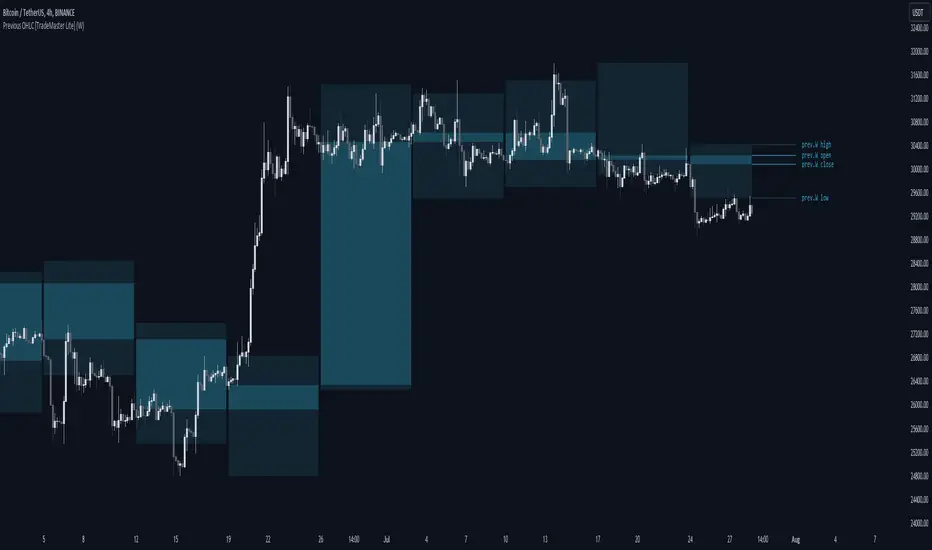
Previous OHLC Levels [TradeMaster Lite]In trading, the “Previous Open/High/Low/Close” (or previous OHLC) refers to the opening, high, low and closing price of the instrument in the previous period. These prices are typically used in technical analysis to identify trends and patterns and to make trading decisions. Some traders may also use the differences between the opening, high, low and closing prices to make trading decisions. For example, the difference between the closing and opening price (the so-called “true body”) and the high and low price (the so-called “upper shadow” and “lower shadow”) can indicate the strength of a trend, whether the bulls or bears are controlling the market, and can also give an idea of market volatility, and are also used as support and resistance levels.
Previous Open: shows the opening price of the previous period. It's the price at which the market first started trading in that period.
Previous High: represents the highest price reached during the previous period. It can act as a resistance level for the current period.
Previous Low: indicates the lowest price hit during the previous period. It can serve as a support level in the current period.
Previous Close: the last price at which the asset traded during the previous period. It's often considered the most accurate reflection of the market sentiment at the end of that period.
These values provide a summary of the previous trading period's price action, giving you a baseline for comparing current price movements. They can help in understanding the market's direction and identifying potential support and resistance levels. It is important to keep in mind that, like any other technical indicator, Previous OHLC does not give a definitive indication of future market direction and should be used in conjunction with other analytical tools, as well as fundamental analysis and market sentiment. It is also important to have appropriate risk management in place.
👉 General advice
Confirming Signals with other indicators:
As with all technical indicators, it is important to confirm potential signals with other analytical tools, such as support and resistance levels, as well as indicators like RSI, MACD, and volume. This helps increase the probability of a successful trade.
Use proper risk management:
When using this or any other indicator, it is crucial to have proper risk management in place. Consider implementing stop-loss levels and thoughtful position sizing.
Combining with other technical indicators:
The indicator can be effectively used alongside other technical indicators to create a comprehensive trading strategy and provide additional confirmation.
Keep in Mind:
Thorough research and backtesting are essential before making any trading decisions. Furthermore, it's crucial to have a solid understanding of the indicator and its behavior. Additionally, incorporating fundamental analysis and considering market sentiment can be vital factors to take into account in your trading approach.
Limitations:
This is a lagging indicator. Please note that the displayed values are delayed by the chosen timeframe on historical bars and show the values from the previous period on the current bar.
The indicators within the TradeMaster Lite package aim for simplicity and efficiency, while retaining their original purpose and value. Some settings, functions or visuals may be simpler than expected.
⭐ Conclusion
We hold the view that the true path to success is the synergy between the trader and the tool, contrary to the common belief that the tool itself is the sole determinant of profitability. The actual scenario is more nuanced than such an oversimplification. Our aim is to offer useful features that meet the needs of the 21st century and that we actually use.
🛑 Risk Notice:
Everything provided by trademasterindicator – from scripts, tools, and articles to educational materials – is intended solely for educational and informational purposes. Past performance does not assure future returns.
Lowest / Highest From WidgetRecent events inspired me to create a small widget that allows you to spot from when current value is lowest / highest.
Just add it to chart and script will compute most recent day when price was higher / lower than current and it will display:
Line coming from that value to the current one
A table with previous low/high information
Thanks to @MUQWISHI to help me coding it.
Disclaimer
Please remember that past performance may not be indicative of future results.
Due to various factors, including changing market conditions, the strategy may no longer perform as well as in historical backtesting.
This post and the script don’t provide any financial advice.